Deal of The Day! Hurry Up, Grab the Special Discount - Save 25% - Ends In 00:00:00 Coupon code: SAVE25

Free Preparation Discussions
 MENU
MENU
Genesys GCX-SCR Exam - Topic 1 Question 40 Discussion
Actual exam question for
Genesys's
GCX-SCR exam
Question #: 40
Topic #: 1
[All GCX-SCR Questions]
Topic #: 1
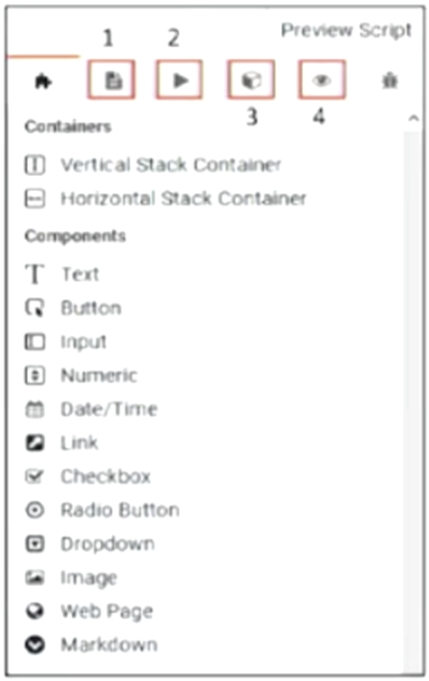
Select the correct tab to add multiple pages to your script.
Suggested Answer:
C
To add multiple pages to your script in Genesys Cloud CX, you would use the tab indicated as number 3 in the provided image. This tab provides access to the components and functionalities needed to manage and navigate between different pages within a script.
This is essential for creating scripts with complex flows that require the user or agent to navigate through multiple stages or sections within a single interaction.
Genesys Cloud CX Scripting Documentation.
Latonia
4 days agoJillian
9 days agoValentin
14 days agoWilbert
20 days agoSarina
25 days agoJules
30 days agoMarva
1 month agoKris
1 month agoStephaine
2 months agoBrinda
2 months agoGlory
2 months agoAngella
2 months ago