
Free Preparation Discussions
 MENU
MENU
Fortinet NSE6_FNC_AD-7.6 Exam Questions
- Fortinet NSE 6 Certifications
- Fortinet NSE 6: Secure Networking Certifications
- Topic 1: Concepts and Initial Configuration: Covers modeling and organizing infrastructure devices, network visibility, grouping, isolation networks, the configuration wizard, and initial administrative setup.
- Topic 2: Deployment and Provisioning: Covers security automation, access control configuration, high availability (hot standby and N+) setup and monitoring, and security policies including firewall tag integration with FortiGate.
- Topic 3: Integration: Covers third-party device integration via syslog/SNMP, FortiNAC-F Manager for distributed deployments, FortiGate VPN session management, and MDM integration.
- Topic 4: Network Visibility and Monitoring: Covers guest and contractor administration, device profiling and host registration, and troubleshooting network devices and device status.
Free Fortinet NSE6_FNC_AD-7.6 Exam Actual Questions
Note: Premium Questions for NSE6_FNC_AD-7.6 were last updated On Sep. 04, 2026 (see below)
Refer to the exhibits.
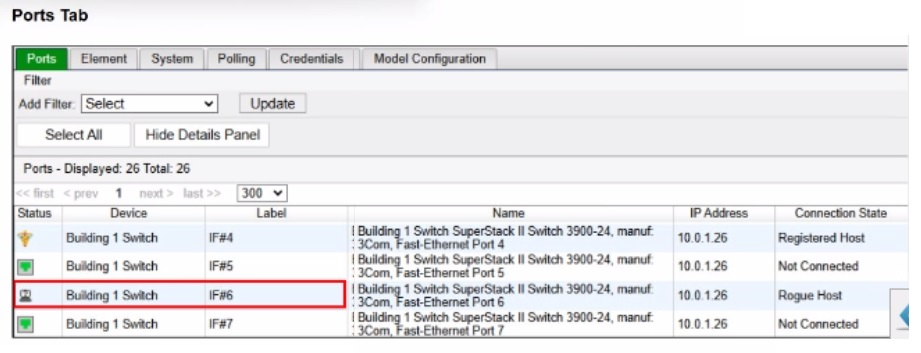
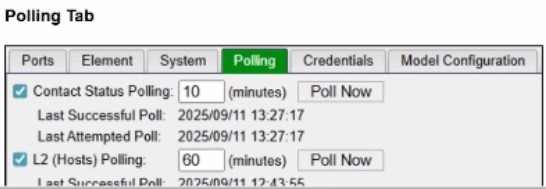
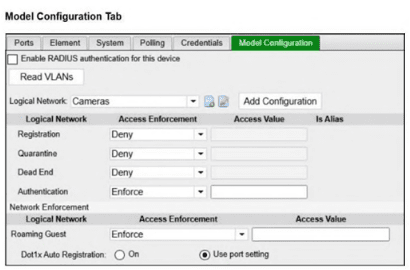
An administrator is troubleshooting visibility issues on a modeled switch The switch is configured to use link traps and to provision hosts based on network access policies. The administrator is seeing hosts on ports with no hosts connected and not seeing hosts on ports where hosts are known to be connected.
What is the most likely cause?
The correct answer is C. In a link-trap-based wired deployment, the switch sends a linkUp or linkDown SNMP trap to FortiNAC-F, but that trap does not contain the endpoint MAC address. After receiving the link trap, FortiNAC-F must contact the switch and perform a Layer 2 poll to read the forwarding table and determine which MAC address was added or removed on the port. The FortiNAC-F study guide states that link traps trigger FortiNAC-F to perform a Layer 2 poll to update its awareness of devices connected to the edge device, and the wired link-trap workflow specifically shows FortiNAC-F performing a Layer 2 poll before locating the host record and provisioning access.
The symptoms in the exhibit are classic stale Layer 2 visibility: FortiNAC-F still shows a rogue host on a port where no host is connected, while also failing to show hosts on ports where endpoints are actually connected. That means FortiNAC-F is not successfully refreshing the switch MAC table information. Since link traps depend on FortiNAC-F being able to poll the switch after the trap, a contact failure with the modeled switch is the most likely cause.
Option A is wrong because logical network settings affect access enforcement, not whether FortiNAC-F can see current MAC-to-port mappings. Option B is wrong because the FortiNAC-F agent is not required for basic switch-port visibility; Layer 2 visibility comes from switch polling, MAC notification traps, or RADIUS. Option D is tempting, but the broader failure shown here is not merely a policy or endpoint-side issue---it is that FortiNAC-F cannot obtain current Layer 2 data from the switch. In practice, you would still verify SNMP/CLI credentials while troubleshooting, but the best answer to the symptom pattern is that FortiNAC-F cannot contact/query the switch successfully.
As part of a FortiNAC-F integration with FortiGate for management of VPN users, what must be configured on FortiGate to keep FortiNAC-F up to date with VPN session information?
The correct answer is D. For FortiGate VPN integration, FortiNAC-F depends on syslog from FortiGate to receive VPN user, IP address, and session information. The FortiNAC-F study guide states that after a remote user successfully authenticates and establishes a VPN connection, FortiGate sends user, IP, and session information to FortiNAC-F using syslog. This keeps FortiNAC-F aware of the VPN session so it can apply the correct access control state and update FortiGate when the device becomes trusted.
Option A is wrong because SNMP traps are commonly used for infrastructure events, link traps, or third-party event inputs, but this VPN workflow uses FortiGate syslog. Option B is wrong because RADIUS accounting can update session information in some NAC workflows, but the FortiGate VPN integration described in the guide uses syslog. Option C is wrong because Security Fabric integration is not the required mechanism for keeping FortiNAC-F updated with VPN session details in this scenario.
An administrator wants FortiNAC-F to return a group of user-defined RADIUS attributes in RADIUS responses.
Which condition must be true to achieve this?
In FortiNAC-F, theRADIUS Attribute Groupsfeature allows administrators to return customized RADIUS attributes (such as specific VLAN IDs, filter IDs, or vendor-specific attributes) in anAccess-Acceptpacket sent back to a network device. This is particularly useful for supporting 'Generic RADIUS' devices that are not natively supported but can be managed using standard AVPairs.
According to theFortiNAC-F Generic RADIUS Wired Cookbookand theRADIUS Attribute Groups sectionof the Administration Guide, there is one critical prerequisite for this feature to function: theinbound RADIUS request must contain the Calling-Station-ID attribute. The Calling-Station-ID typically contains theMAC addressof the connecting endpoint. Because FortiNAC-F is a host-centric system, it uses the MAC address as the unique identifier to look up the host record, evaluate the associated Network Access Policy, and determine which Logical Network (and thus which Attribute Group) should be applied. If the incoming request lacks this attribute, FortiNAC-F cannot reliably identify the host and, as a safety mechanism, willnot include any user-defined RADIUS attributesin the response. This ensures that unauthorized or unidentifiable devices do not receive privileged access through misapplied attributes.
'Configure a set of attributes that must be included in the RADIUS Access-Accept packet returned by FortiNAC...Requirement: Inbound RADIUS request must contain Calling-Station-Id. Otherwise, FortiNAC will not include the RADIUS attributes.This attribute is used to identify the host and its current state within the FortiNAC database.' ---FortiNAC-F 7.6.0 Generic RADIUS Wired Cookbook: Configure RADIUS Attribute Groups.
Refer to the exhibit.
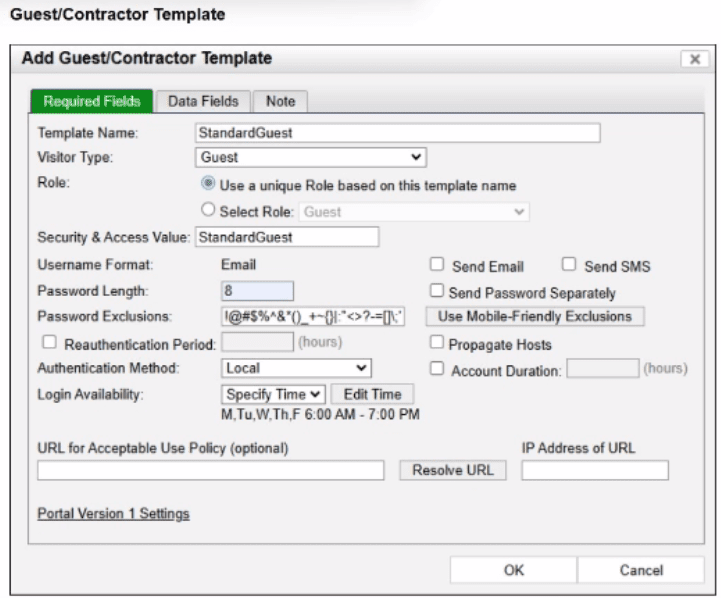
An administrator wants to ensure that guest accounts created from this template are not allowed network access outside of the designated times.
To achieve this, all necessary configurations must be made to force isolation of hosts in which state?
The correct answer is C. The exhibit shows a guest template with Login Availability set to Specify Time, allowing login only Monday through Friday from 6:00 AM to 7:00 PM. The study guide explains that the Account Duration and Login Availability fields define when the account is deleted from the database or what days and times the account is enabled. Therefore, outside the allowed login window, the guest cannot authenticate successfully using that guest account.
To stop network access outside those permitted times, FortiNAC-F must isolate hosts that are in the Not Authenticated state. The guide maps the Authentication captive network to hosts in the Not Authenticated state, and the isolation logic table shows that hosts in the Not Authenticated state are moved to the Authentication network when the point of connection is in the Forced Authentication group.
Option A is wrong because At-risk hosts are isolated to remediation/quarantine due to compliance or security posture problems, not because a guest login is outside allowed hours. Option B is wrong because Disabled hosts are intentionally disabled and sent to the dead-end network; the account here is time-restricted, not necessarily disabled. Option D is wrong because Rogue applies to unregistered or unclassified devices, while this scenario is about a known guest account that is not allowed to authenticate outside its login schedule.
An administrator has configured the DHCP scope for a registration isolation network, but the isolation process isn't working.
What is the problem with the configuration?
In a FortiNAC-F deployment, the configuration of theDHCP scopefor isolation networks (Registration, Remediation, etc.) must perfectly align with the underlying network infrastructure to ensure that isolated hosts can communicate with the FortiNAC appliance. In the provided exhibits, there is a clear discrepancy between theDHCP configurationand theNetwork Topology.
As shown in the 'Network Topology' exhibit, theRegistration Networkresides on a router interface (or sub-interface) with the IP address192.168.180.1. This address represents the default gateway for any host placed into the Registration VLAN. However, the 'DHCP configuration' exhibit shows the scope'REG-ScopeOne'configured with aGateway of 10.0.1.254. This 10.0.1.254 address belongs to the management/service network (port2 of FortiNAC), not the registration subnet. If a host in the Registration VLAN receives this incorrect gateway via DHCP, it will attempt to send all off-link traffic to an unreachable IP, preventing it from loading theCaptive Portalor communicating with the FortiNAC server.
According to theFortiNAC-F Configuration Wizard Reference, when defining a Layer 3 network scope, the 'Gateway' field must contain the IP address of the router interface that acts as the gateway for that specific isolation VLAN. The FortiNAC appliance itself usually sits on a different subnet, and traffic is directed to it via the router's DHCP Relay (IP Helper) and DNS redirection.
'When configuring scopes for a Layer 3 network, theGatewayvalue must be the IP address of the router interface for that subnet. This allows the host to reach its local gateway to route traffic. If the gateway is misconfigured, the host will be unable to reach the FortiNAC eth1/port2 interface for registration... Ensure the Gateway matches the network topology for the isolation VLAN.' ---FortiNAC-F Configuration Wizard Reference Manual: DHCP Scopes.
- Select Question Types you want
- Set your Desired Pass Percentage
- Allocate Time (Hours : Minutes)
- Create Multiple Practice tests with Limited Questions
- Customer Support
Currently there are no comments in this discussion, be the first to comment!