
Free Preparation Discussions
 MENU
MENU
Fortinet NSE6_FMG_AD-7.6 Exam Questions
- Fortinet NSE 6 Certifications
- Fortinet NSE 6: Secure Networking Certifications
- Topic 1: Administration: This domain covers FortiManager's core features and architecture, including ADOMs, API usage, and integration with FortiAnalyzer, along with performing initial setup and configuring administrative domains for multi-tenant or organizational use.
- Topic 2: Device Manager: This domain focuses on registering and organizing FortiGate devices within ADOMs, using scripts to install configuration changes, and diagnosing issues through configuration and revision history.
- Topic 3: Policy and Objects: This domain covers managing policy packages and objects, handling ADOM revisions, working in workspace mode, and performing policy imports and installations across managed devices.
- Topic 4: Advanced Configuration: This domain addresses FortiManager high availability setup, configuring FortiGuard services for managed devices, and using the global database ADOM to share policies and objects across multiple ADOMs.
- Topic 5: Troubleshooting: This domain covers common FortiManager deployment scenarios, resolving import and installation failures, diagnosing device-level and ADOM-level database issues, and troubleshooting system-level problems such as connectivity and resource usage.
Free Fortinet NSE6_FMG_AD-7.6 Exam Actual Questions
Note: Premium Questions for NSE6_FMG_AD-7.6 were last updated On Sep. 04, 2026 (see below)
Refer to the exhibit.
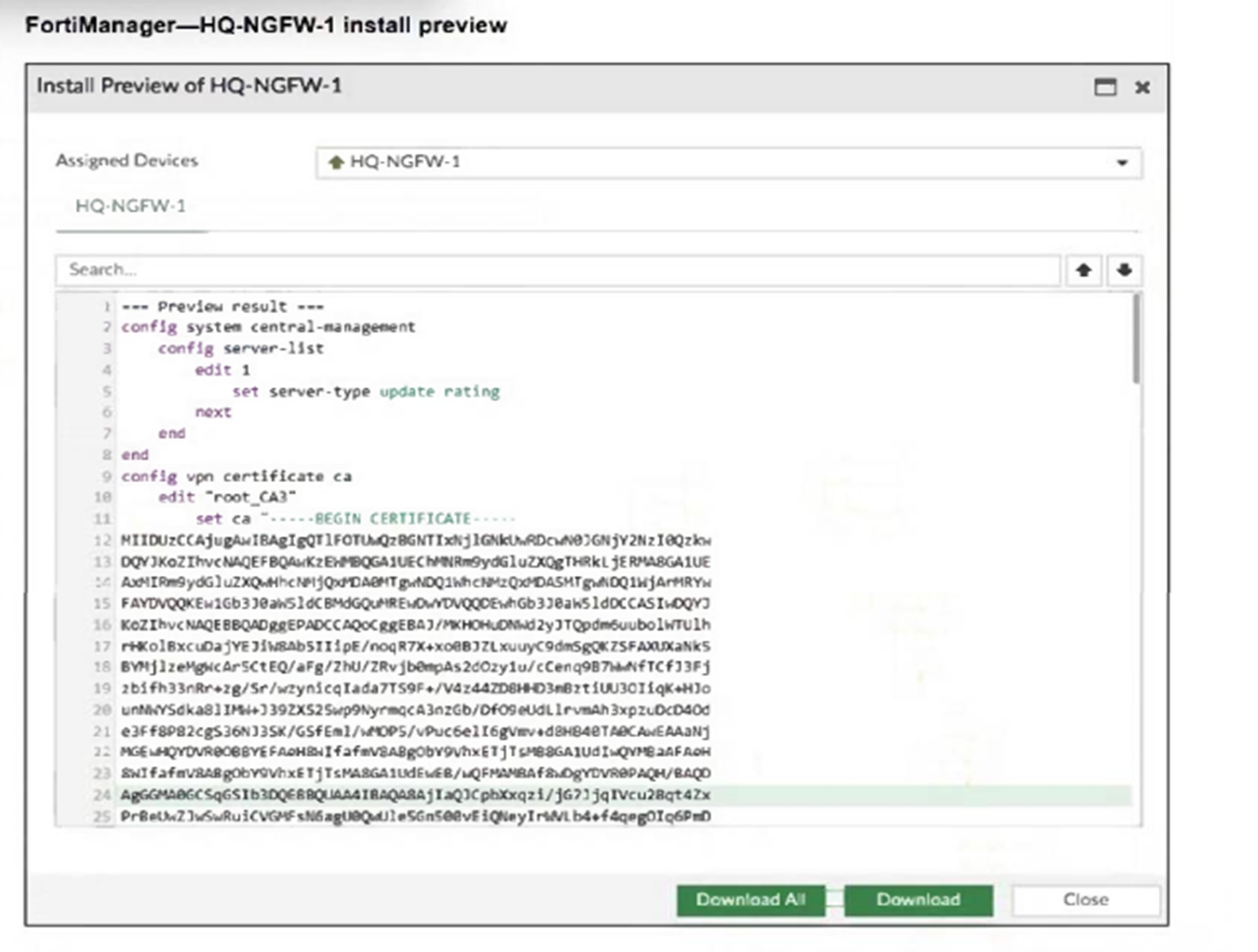
An administrator assigned a new policy package to FortiGate HQ-NGFW-1. In the installation preview, they noticed some settings they did not modify and are unsure about the changes.
Based on the exhibit, which two things will happen if they continue with the installation? (Choose two.)
The configuration includes a server-list with server-type set to 'update rating,' which enables FortiGate HQ-NGFW-1 to contact FortiManager as a FortiGuard Distribution Server (FDS) for FortiGuard updates.
The installation includes a root_CA3 certificate, which FortiManager will install on FortiGate HQ-NGFW-1 to authenticate FGFM tunnel connections between the devices.
An administrator receives the import report after importing policies into the policy package layer.
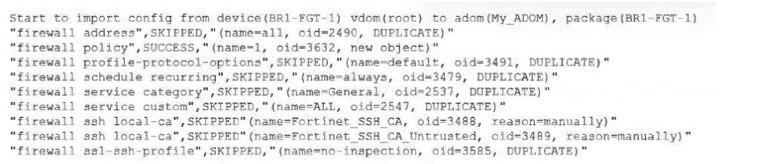
Based on the import report, how did FortiManager handle the profile-protocol-options object named default?
The import report clearly shows: 'firewall profile-protocol-options', SKIPPED, '(name=default, oid=3491, DUPLICATE)'. In FortiManager import reporting, SKIPPED means the object was not imported or updated, and DUPLICATE means an object with that identity already exists in the ADOM database. So FortiManager did not update its database with the imported value for the object default, which makes C correct.
The lab guide reinforces this behavior in the conflict-handling workflow. It explains that during import, FortiManager checks for duplicate names and conflicts, and for conflicting objects the administrator may need to choose whether to keep the value from FortiGate or FortiManager. For the default Firewall Profile-Protocol-Options object, the guide specifically discusses keeping the existing FortiManager value to avoid unnecessary changes.
=========
Refer to the exhibit.
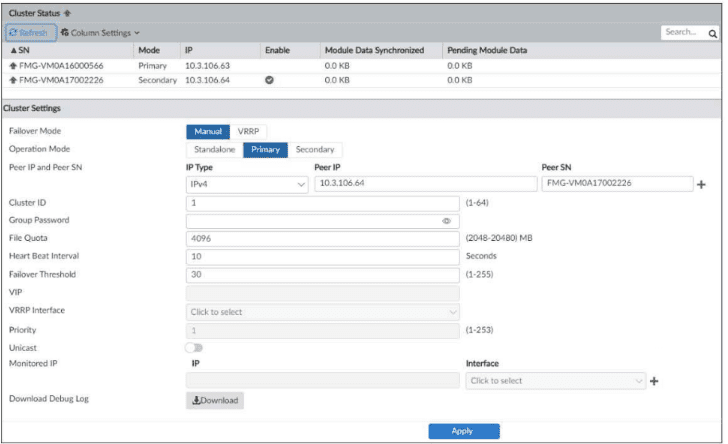
Which statement about the environment shown in the exhibit is true? Choose one answer
The exhibit shows a FortiManager HA cluster with one primary and one secondary member. The FortiManager 7.6 Administrator Study Guide clearly states that if FortiAnalyzer features are enabled, you cannot configure FortiManager HA, so in an HA environment like the one shown, FortiAnalyzer features are not enabled. That makes D the correct answer.
A is incorrect because the study guide explicitly says you do not need to reboot a device when promoting it from secondary to primary.
C is incorrect because the failover mode shown is Manual, not VRRP automatic failover, so failover does not occur automatically based on heartbeat loss.
B is not the best answer here because FortiGuard packages are downloaded separately rather than synchronized as HA data, but the exhibit's key provable conclusion is the HA restriction on FortiAnalyzer features.
=========
What allows FortiManager to run CLI scripts on FortiGate devices without prompting for SSH authentication each time?
The correct answer is B. The FortiManager 7.6 Administrator Study Guide explicitly states: ''CLI scripts use the FGFM tunnel and the FGFM tunnel is authenticated using the FortiManager and FortiGate serial numbers.'' It also states: ''Tcl scripts do not run through the FGFM tunnel like CLI scripts do. Tcl scripts use SSH to tunnel through FGFM and they require SSH authentication to do so.''
This is the exact reason CLI scripts can run without prompting for SSH authentication every time: they use the existing secure FGFM management tunnel, not a separate interactive SSH login. The FGFM section of the study guide also confirms that this is a secure communication tunnel established between FortiManager and managed FortiGate devices.
So the enabler is not legacy login, script location, or the ''Remote FortiGate Directly'' option by itself. It is the FGFM secure management tunnel.
A FortiManager administrator has moved a FortiGate device to a new ADOM, but they cannot see the policy or object configurations for that FortiGate.
What should the administrator do to see the policy or object configurations?
The correct answer is C. The FortiManager 7.6 Administrator Study Guide gives the exact extract: ''If you need to move a device from one ADOM to another, run the Import Configuration wizard to import the policy package into the new ADOM.'' It also states: ''When you move devices from one ADOM to another ADOM, shared policy packages and objects do not move to the new ADOM. You will need to import policy packages from managed devices.''
That is exactly why the administrator cannot see the policy and object configuration after the move: the device itself moved, but its shared policy package and objects did not automatically move with it. The required corrective action is to manually import the policy package into the new ADOM using Import Configuration. Options A, B, and D are not the documented remedy in the uploaded FortiManager sources.
=========
- Select Question Types you want
- Set your Desired Pass Percentage
- Allocate Time (Hours : Minutes)
- Create Multiple Practice tests with Limited Questions
- Customer Support
Currently there are no comments in this discussion, be the first to comment!