
 MENU
MENU
Refer to the exhibit.
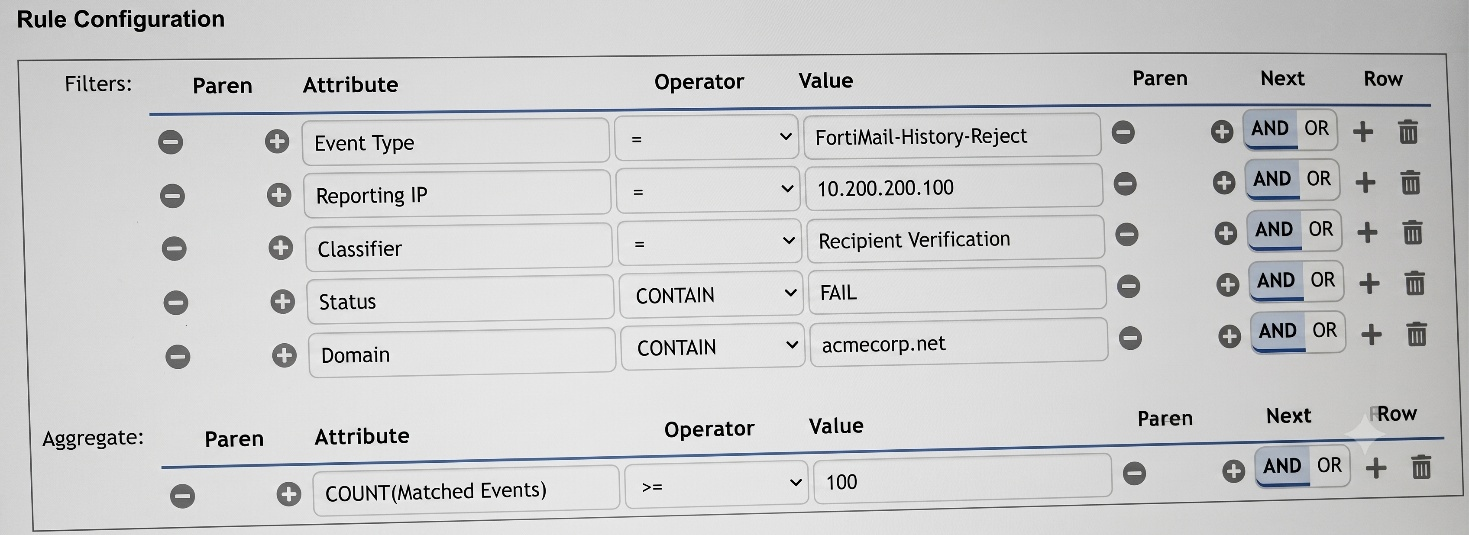
You want to configure a FortiSIEM rule that triggers when a FortiMail device reports at least 100 recipient verification failures for different email accounts in the domain acmecorp.net. What would you add or modify to accomplish this task? Choose one answer.
Exact Extract: ''The subpattern... consists of three components: Filter... Aggregate... Group By... Aggregate: The aggregate function stipulates that five or more events within the 600-second time window must be matched. Group By: If multiple VPN login failure events have the same source IP address, reporting device, reporting IP address, and user, they are grouped together in one row, and the count column tracks the number of events for each row.''
Exact Extract: ''FortiSIEM uses the analytics search filter conditions to create the rule subpattern Filter conditions and the search display conditions to create the rule Group by conditions. When creating rules from analytics searches, FortiSIEM always sets the Aggregate condition to COUNT(Matched Events) >= 1.''
The correct answer is A because the requirement is not simply ''100 failed events''; it is 100 failures for different email accounts. The existing aggregate COUNT(Matched Events) >= 100 only counts total matching FortiMail rejection events. That could trigger even if one recipient address failed 100 times. To detect failures across different recipients, the aggregate must count unique recipient values, so COUNT(Distinct Mail Receiver) >= 100 is the correct modification. Option B is invalid because Mail Receiver is a field containing an email recipient value, not a numeric counter. Option C incorrectly tries to push counting logic into the Status filter; Status should remain a filter such as CONTAIN FAIL. Option D may be useful only if the domain is not already filtered, but the exhibit already includes the domain condition for acmecorp.net, and it still would not solve the ''different email accounts'' requirement.