
Free Preparation Discussions
 MENU
MENU
Fortinet NSE6_FNC_AD-7.6 Exam - Topic 2 Question 5 Discussion
Topic #: 2
Refer to the exhibits.
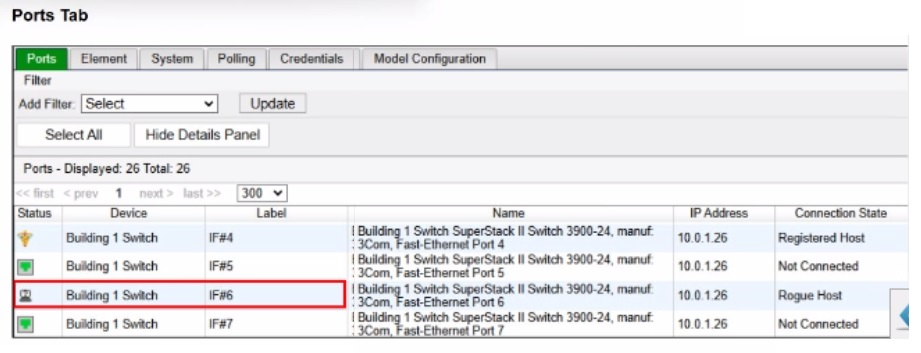
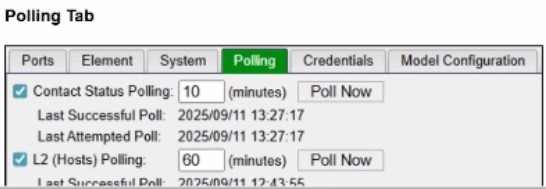
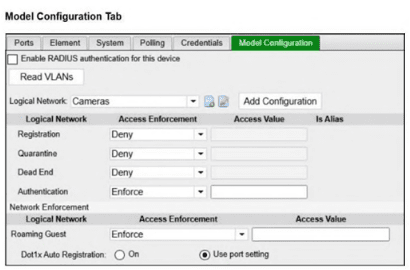
An administrator is troubleshooting visibility issues on a modeled switch The switch is configured to use link traps and to provision hosts based on network access policies. The administrator is seeing hosts on ports with no hosts connected and not seeing hosts on ports where hosts are known to be connected.
What is the most likely cause?
The correct answer is C. In a link-trap-based wired deployment, the switch sends a linkUp or linkDown SNMP trap to FortiNAC-F, but that trap does not contain the endpoint MAC address. After receiving the link trap, FortiNAC-F must contact the switch and perform a Layer 2 poll to read the forwarding table and determine which MAC address was added or removed on the port. The FortiNAC-F study guide states that link traps trigger FortiNAC-F to perform a Layer 2 poll to update its awareness of devices connected to the edge device, and the wired link-trap workflow specifically shows FortiNAC-F performing a Layer 2 poll before locating the host record and provisioning access.
The symptoms in the exhibit are classic stale Layer 2 visibility: FortiNAC-F still shows a rogue host on a port where no host is connected, while also failing to show hosts on ports where endpoints are actually connected. That means FortiNAC-F is not successfully refreshing the switch MAC table information. Since link traps depend on FortiNAC-F being able to poll the switch after the trap, a contact failure with the modeled switch is the most likely cause.
Option A is wrong because logical network settings affect access enforcement, not whether FortiNAC-F can see current MAC-to-port mappings. Option B is wrong because the FortiNAC-F agent is not required for basic switch-port visibility; Layer 2 visibility comes from switch polling, MAC notification traps, or RADIUS. Option D is tempting, but the broader failure shown here is not merely a policy or endpoint-side issue---it is that FortiNAC-F cannot obtain current Layer 2 data from the switch. In practice, you would still verify SNMP/CLI credentials while troubleshooting, but the best answer to the symptom pattern is that FortiNAC-F cannot contact/query the switch successfully.
Currently there are no comments in this discussion, be the first to comment!