
Free Preparation Discussions
 MENU
MENU
Fortinet NSE6_EDR_AD-7.0 Exam - Topic 5 Question 5 Discussion
Topic #: 5
Refer to the exhibit:
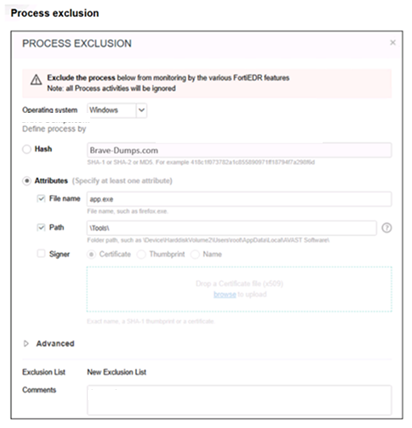
You configured an execution prevention exclusion with both File Name = app.exe and Path = C:\Tools. What will FortiEDR do? (Choose one answer)
The correct answer is B. Exclude only app.exe when it is running from C:Tools.
The FortiEDR 7.0.0 Administration Guide explains that the Exclusion Manager is used to define which processes, files, or domains are excluded from Security Policies monitoring. For Process Exclusions, FortiEDR does not inspect actions performed by specific processes, and those processes are identified by the attributes defined by the administrator.
The guide further explains that process/source attributes can include File Name, Path, Hash, and Signer. It also states that when an exclusion contains multiple conditions, an AND relationship exists between the conditions. If an OR relationship is required, a separate exclusion must be created.
In this exhibit, both conditions are selected:
File Name = app.exe
Path = C:Tools
Because FortiEDR applies an AND relationship between multiple exclusion conditions, the exclusion applies only when both conditions match. Therefore, FortiEDR excludes app.exe only when it is located/running from C:Tools.
Option A is wrong because no Signer condition is selected. Option C is wrong because that would apply if only the file name were used broadly. Option D is wrong because FortiEDR is not excluding every file in C:Tools; it is excluding the process that matches both the file name and path conditions.
Veta
3 days agoBeata
8 days agoZita
13 days agoNiesha
18 days agoTheodora
24 days agoTess
29 days agoRoy
1 month agoBo
1 month agoElli
1 month ago