
Free Preparation Discussions
 MENU
MENU
Fortinet NSE5_SSE_AD-7.6 Exam - Topic 1 Question 8 Discussion
Topic #: 1
Refer to the exhibit.
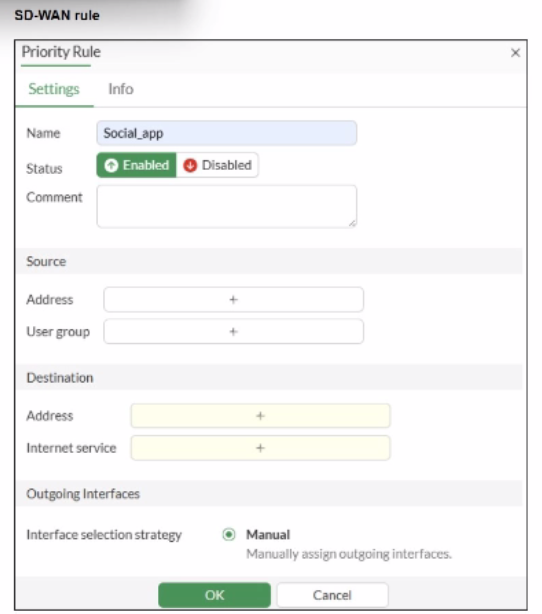
You configure SD-WAN on a standalone FortiGate device. You want to create an SD-WAN rule that steers traffic related to Facebook and LinkedIn through the less costly internet link. What must you do to set Facebook and LinkedIn applications as destinations from the GUI?
According to the SD-WAN 7.6 Core Administrator curriculum and the FortiOS 7.6 Administration Guide, setting common web-based services like Facebook and LinkedIn as destinations in an SD-WAN rule is primarily accomplished through the Internet Service Database (ISDB).
Internet Service vs. Application Control: In FortiOS, there is a distinction between Internet Services (which use a database of known IP addresses and ports to identify traffic at the first packet) and Applications (which require the IPS engine to inspect deeper into the packet flow to identify Layer 7 signatures).
SD-WAN Efficiency: Fortinet recommends using the Internet service field for services like Facebook and LinkedIn in SD-WAN rules because it allows the FortiGate to steer the traffic immediately upon the first packet. If the 'Application' signatures were used instead, the first session might be misrouted because the application is not identified until after the initial handshake.
GUI Configuration: As shown in the exhibit (image_b3a4c2.png), the 'Destination' section of an SD-WAN rule includes an Internet service field by default. To steer Facebook and LinkedIn traffic, the administrator simply clicks the '+' icon in that field and selects the entries for Facebook and LinkedIn from the database.
Feature Visibility (Alternative): While you can enable a specific 'Application' field in System > Feature Visibility (by enabling 'Application Detection Based SD-WAN'), this is typically used for less common applications that do not have dedicated ISDB entries. For the specific 'applications' mentioned (Facebook and LinkedIn), they are natively available in the Internet service field, making Option B the most direct and common implementation.
Why other options are incorrect:
Option A: Licensing for application signatures is part of the standard FortiGuard services and is not a prerequisite specific only to 'applications as destinations' in SD-WAN rules.
Option C: Standalone FortiGate devices fully support application-based and ISDB-based steering in SD-WAN rules.
Option D: While enabling feature visibility would add an additional field for L7 applications, it is not a 'must' for Facebook and LinkedIn, which are already accessible via the Internet Service field provided in the default GUI layout.
Carrol
1 month agoAlpha
1 month agoMelodie
2 months agoCarrol
2 months agoAlpha
2 months agoMelodie
2 months agoStefan
2 months agoGlory
2 months agoGilberto
3 months agoTommy
4 months agoSkye
4 months agoBelen
5 months agoElina
5 months agoLashawnda
5 months agoLemuel
6 months ago