
 MENU
MENU
Refer to the exhibit.
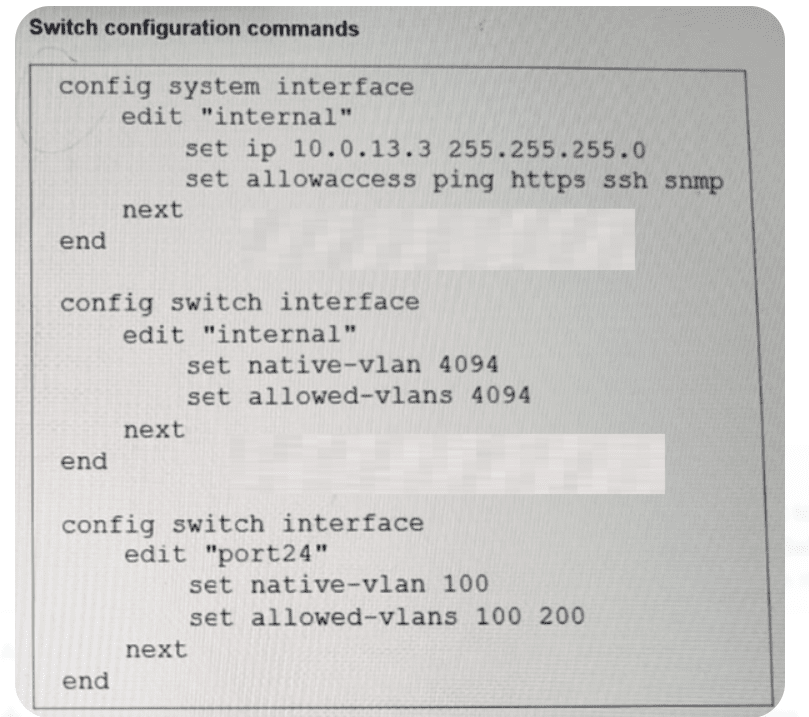
Port24 is the only uplink port connected to the network where you need access to FortiSwitch management services. However, FortiSwitch is not accessible on its management interface with IP address 10.0.13.3. Based on the configuration shown in the exhibit, which two actions should you take to fix the issue and access FortiSwitch? (Choose two answers)
According to theFortiSwitchOS 7.6 Administration Guide (Page 320), management traffic on a FortiSwitch is associated with a specific logical interface, which in this case is the'internal'interface. The exhibit shows that the'internal'interface is configured onVLAN 4094(both as native and allowed). This means that for any management traffic (such as HTTPS, SSH, or SNMP) to reach the switch CPU, it must be able to traverse the physical uplink on VLAN 4094.
However, the configuration forport24(the uplink) is currently restricted. It is set withnative VLAN 100and an allowed-vlans list that only includes100 and 200. Because VLAN 4094 is not included in the allowed list of port24, all frames belonging to the management VLAN (4094) are dropped by the switch's ingress/egress filters on the uplink.
To resolve this and restore management access, the administrator has two valid configuration paths based on the provided options:
Option B:Change thenative VLAN on port24 to VLAN 4094. By making 4094 the native VLAN, untagged management traffic can traverse the port, effectively allowing the 'internal' interface to communicate with the network.
Option D:Add VLAN 4094 to the allowed VLANs on port24. This ensures that VLAN 4094 is no longer filtered out, allowing management frames to pass through the uplink while maintaining the current native VLAN for other traffic.
Option C is irrelevant as removing a working VLAN (200) does not help the management traffic. While Option A describes an alternate architectural approach (moving management into an already-allowed VLAN), Options B and D represent the direct fixes for the mismatch described in the 7.6 administration documentation.