
Free Preparation Discussions
 MENU
MENU
Fortinet NSE4_FGT_AD-7.6 Exam - Topic 5 Question 10 Discussion
Topic #: 5
Refer to the exhibit.
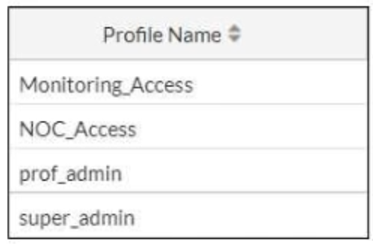
The NOC team connects to the FortiGate GUI with the NOC_Access admin profile. They request that their GUI sessions do not disconnect too early during inactivity. What must the administrator configure to answer this specific request from the NOC team? (Choose one answer)
According to the FortiOS 7.6 Administrator Study Guide, while there is a global administrative idle timeout setting that applies to all users by default (typically 5 minutes), FortiOS allows for granular control through Administrator Profiles. The Override Idle Timeout feature is specifically designed to allow different timeout values for different access profiles, which is ide1al for environments like a Network Operations Center (NOC) where persistent monitoring is required.23
To implement this, the administrator must modify the s4pecific access profile settings. By using the command config system accprofile 5and editing the NOC_Access profile, the administrator can enable the admintimeout-override and then increase the admintimeout value (Statement D). This configuration ensures that only the users assigned to that specific profile benefit from the extended session duration, maintaining a higher security posture for other administrative accounts that still follow the global timeout. Other options, such as changing the profile order (A) or assigning the super_admin role (C), do not address the specific requirement for inactivity timeout management. Option B is incorrect as 'offline value' is not a standard parameter for this feature.
Elroy
17 hours agoFletcher
6 days agoAlpha
11 days agoScarlet
16 days agoDaryl
21 days agoChun
27 days agoJonell
1 month agoScarlet
1 month agoDaryl
1 month agoAlpha
2 months agoAlease
2 months agoOmer
2 months agoBlondell
2 months agoGabriele
2 months agoCallie
2 months agoAlonso
3 months agoLashon
4 months agoPhung
4 months agoNida
5 months ago