
Free Preparation Discussions
 MENU
MENU
Fortinet FCP_FCT_AD-7.4 Exam - Topic 3 Question 12 Discussion
Topic #: 3
Refer to the exhibits.
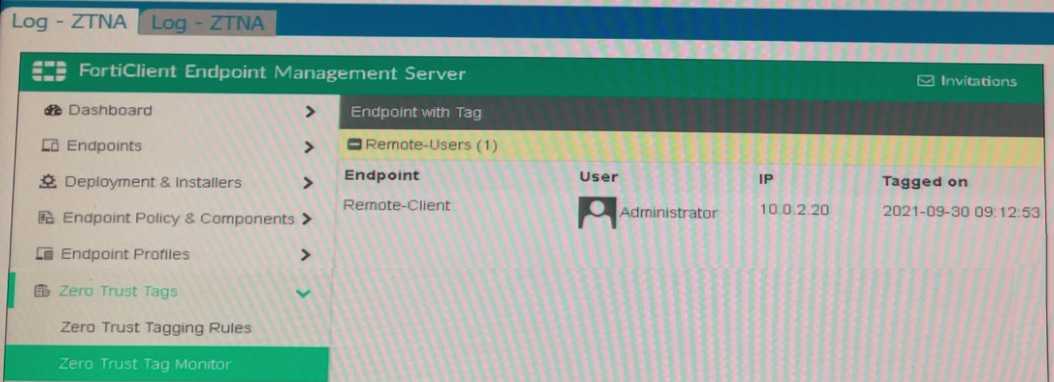
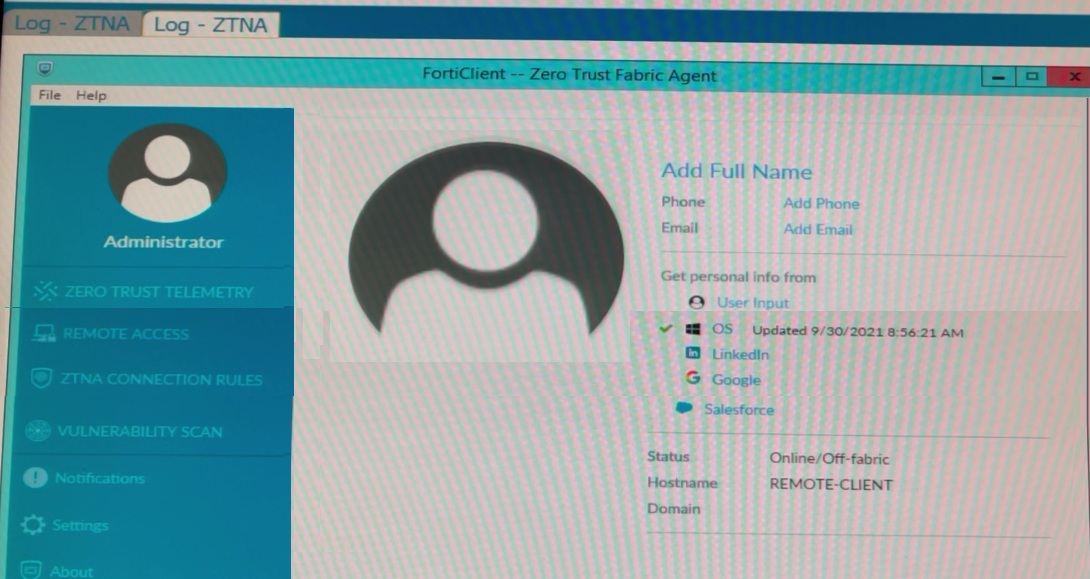
Which show the Zero Trust Tag Monitor and the FortiClient GUI status.
Remote-Client is tagged as Remote-Users on the FortiClient EMS Zero Trust Tag Monitor.
What must an administrator do to show the tag on the FortiClient GUI?
Based on the exhibits provided:
The 'Remote-Client' is tagged as 'Remote-Users' in the FortiClient EMS Zero Trust Tag Monitor.
To ensure that the tag 'Remote-Users' is visible in the FortiClient GUI, the system settings within FortiClient need to be updated to enable tag visibility.
The tag visibility feature is controlled by FortiClient system settings which manage how tags are displayed in the GUI.
Therefore, the administrator needs to change the FortiClient system settings to enable tag visibility.
Reference
FortiClient EMS 7.2 Study Guide, Zero Trust Tagging Section
FortiClient Documentation on Tag Management and Visibility Settings
Noble
21 days agoDion
27 days agoAnglea
1 month agoLaurel
1 month agoCathrine
1 month agoAngella
2 months agoNathan
2 months agoJolene
2 months agoMarylin
2 months agoCasie
2 months agoYuette
2 months agoWei
3 months ago