Deal of The Day! Hurry Up, Grab the Special Discount - Save 25% - Ends In 00:00:00 Coupon code: SAVE25
Welcome to Pass4Success

- Free Preparation Discussions

F5 Networks F5CAB5 Exam - Topic 5 Question 12 Discussion

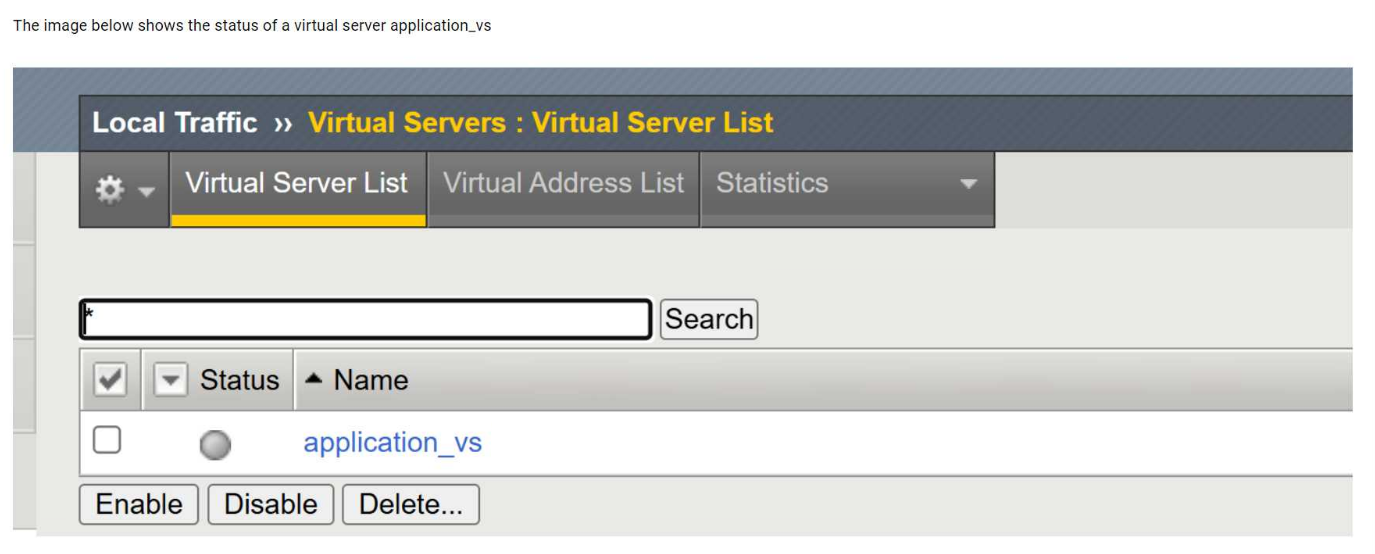
Refer to the exhibit.The image shows the status of a virtual server namedapplication_vsin the BIG-IP Configuration Utility.What is the cause of the status shown? (Choose two answers)
A) Pool member(s) administratively disabled and C) Node(s) administratively disabled
B) Pool member(s) forced offline
D) Virtual Server administratively disabled

F5 Networks F5CAB5 Exam - Topic 5 Question 12 Discussion

Actual exam question for F5 Networks's F5CAB5 exam
Question #: 12
Topic #: 5
[All F5CAB5 Questions]

Refer to the exhibit.

The image shows the status of a virtual server namedapplication_vsin the BIG-IP Configuration Utility.

What is the cause of the status shown? (Choose two answers)

Show Suggested Answer Hide Answer
Suggested Answer: A, C

The exhibit shows the virtual serverapplication_vswith a status indicating it isoffline but enabled. In BIG-IP terminology, this status means the virtual server itself is administratively enabled, but it is unable to pass traffic becauseno usable pool members are available.

Two common and documented causes for this condition are:

Pool member(s) administratively disabled (Option A):When all pool members are administratively disabled, BIG-IP removes them from load-balancing decisions. Even though the virtual server remains enabled, it has no available pool members to send traffic to, resulting in an offline status.

Node(s) administratively disabled (Option C):Pool members inherit the status of their parent nodes. If a node is administratively disabled, all associated pool members are also marked unavailable. This condition causes the virtual server to show as offline, even though the virtual server configuration itself is correct.

The other options are incorrect:

Forced offline pool members (Option B)result in a different operational intent and are explicitly set for maintenance scenarios.

Virtual server administratively disabled (Option D)would show the virtual server as disabled, not enabled/offline.

This behavior is consistent with BIG-IP traffic management logic and is commonly verified by reviewingpool and node availability stateswhen diagnosing virtual server availability issues.


Contribute your Thoughts:

0/2000 characters
Lyda
4 hours ago
But B is less likely. D is more direct.
upvoted 0 times
...
Fannie
5 days ago
I lean towards B as well. Forced offline is a possibility.
upvoted 0 times
...
Maybelle
11 days ago
A and D seem right. Both could cause this status.
upvoted 0 times
...
In
16 days ago
What about A? Could be pool members disabled too.
upvoted 0 times
...
Kina
21 days ago
Agreed, D makes sense. It's disabled.
upvoted 0 times
...
Santos
26 days ago
I think it's D. The virtual server is down.
upvoted 0 times
...
Honey
1 month ago
Nah, I don't think that's it. Could be something else entirely.
upvoted 0 times
...
Stevie
1 month ago
Surprised it's not just a simple misconfiguration!
upvoted 0 times
...
Gilberto
1 month ago
I think it could also be pool members forced offline.
upvoted 0 times
...
Salena
2 months ago
Definitely agree, it's probably option D.
upvoted 0 times
...
Raylene
2 months ago
Looks like the virtual server is administratively disabled.
upvoted 0 times
...
Aileen
2 months ago
I’m confused about the difference between administratively disabled and forced offline. I guess I need to think more about that before choosing.
upvoted 0 times
...
Jesus
2 months ago
I'm not entirely sure, but I feel like forced offline could be a reason as well. So maybe B?
upvoted 0 times
...
German
2 months ago
I think I saw a similar question where the virtual server was disabled, so D might be a good choice too.
upvoted 0 times
...
Elouise
2 months ago
I remember something about pool members being disabled, so maybe A or C could be right.
upvoted 0 times
...

Save Cancel