
Free Preparation Discussions
 MENU
MENU
F5 Networks F5CAB5 Exam Questions
- Topic 1: Determine resource utilization: This domain covers analyzing system resources including control plane versus data plane usage, CPU statistics per virtual server, interface statistics, and disk and memory utilization.
- Topic 2: Identify network level performance issues: This section focuses on diagnosing network problems including packet capture needs, interface availability, packet drops, speed and duplex settings, and TCP profile optimization.,
- Topic 3: Identify the reason load balancing is not working as expected: This domain addresses troubleshooting load balancing by analyzing persistence, priority groups, rate limits, health monitor configurations, and availability status.
- Topic 4: Identify the reason a virtual server is not working as expected: This section covers diagnosing virtual server issues including availability status, profile conflicts and misconfigurations, and incorrect IP addresses or ports.
- Topic 5: Identify the reason a pool is not working as expected: This domain focuses on troubleshooting pools including health monitor failures, priority group membership, and configured versus availability status of pools and members.
- Topic 6: Given a scenario, review basic stats to confirm functionality: This section involves interpreting traffic object statistics and network configuration statistics to validate system functionality.
- Topic 7: Given a scenario, interpret traffic flow: This domain covers understanding traffic patterns through client-server communication analysis and interpreting traffic graphs and SNMP results.
Free F5 Networks F5CAB5 Exam Actual Questions
Note: Premium Questions for F5CAB5 were last updated On Sep. 08, 2026 (see below)
What information is required for a BIG-IP Administrator to open an F5 Support ticket?
To ensure a support case is processed and routed efficiently, F5 specifies a mandatory set of baseline information.
Serial Number: Required to verify the support contract and entitlement level for the hardware or virtual edition.
QKView: This is described as the 'first and most important thing to have when opening a case'. It provides the F5 Support Engineer with the necessary diagnostic data to understand the system's current state and resource utilization.
Problem Description: A precise description of the issue, including symptoms, when the problem started, and the business impact, is critical for routing the case to the correct technical team.
Contact Info: Accurate contact information for the individual who will be working on the ticket with F5.
Comparison: While packet captures (Option A) or UCS files (Option B) are often useful, they are not strictly required for the initial opening of all support tickets; however, a QKView is considered a primary prerequisite for technical analysis.
A BIG-IP Administrator needs to collect HTTP status code and HTTP method for traffic flowing through a virtual server. Which default profile provides this information?
To gather granular Layer 7 data such as specific HTTP methods (GET, POST, etc.) and HTTP status codes (200, 404, 500), the BIG-IP system utilizes the Analytics (AVR) profile.
Analytics Profile (Application Visibility and Reporting): While a standard HTTP profile tracks basic byte counts and requests, the Analytics profile is designed specifically to capture, analyze, and display detailed application performance metrics.
Metrics Captured: When attached to a virtual server, it records URL-level statistics, response codes, page load times, and client-side metrics.
Why not others? * HTTP Profile (Option A): This profile handles the parsing of HTTP traffic but does not provide a built-in reporting dashboard for status code distribution.
Statistics Profile (Option C): This is a legacy profile used for custom user-defined counters and does not automatically categorize HTTP methods or status codes.
Request Adapt (Option D): This is used for integrating with ICAP servers (like virus scanners) and does not perform traffic reporting.
Refer to Exhibit:
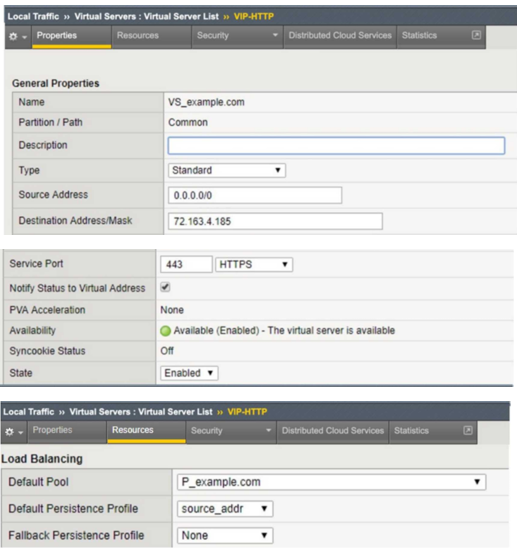
An organization is reporting slow performance accessing their Intranet website, hosted in a public cloud. All employees use a single Proxy Server with the public IP of 104.219.110.168 to connect to the Internet. What should the BIG-IP Administrator of the Intranet website do to fix this issue?
This scenario describes a classic network performance issue known as the 'Mega-Proxy' problem. When an organization routes all employee traffic through a single proxy server, the BIG-IP sees thousands of unique users as having the exact same source IP address. If the administrator has configured 'Source Address Affinity' persistence, the BIG-IP will correctly follow the rule but incorrectly route all users to the same single backend pool member. This creates a severe load imbalance where one server is overwhelmed while others remain idle, leading to poor application response times. To resolve this, the administrator must change the persistence profile to 'HTTP Cookie'. Cookie-based persistence allows the BIG-IP to place a unique identifier in each user's browser, allowing the system to distinguish between individual sessions even if they share the same source IP. This fix ensures that traffic is distributed evenly across the pool members, restoring4 the expect5ed load balancing functionality and resolving the slow performance reported by users behind the corporate proxy.
Exhibit:
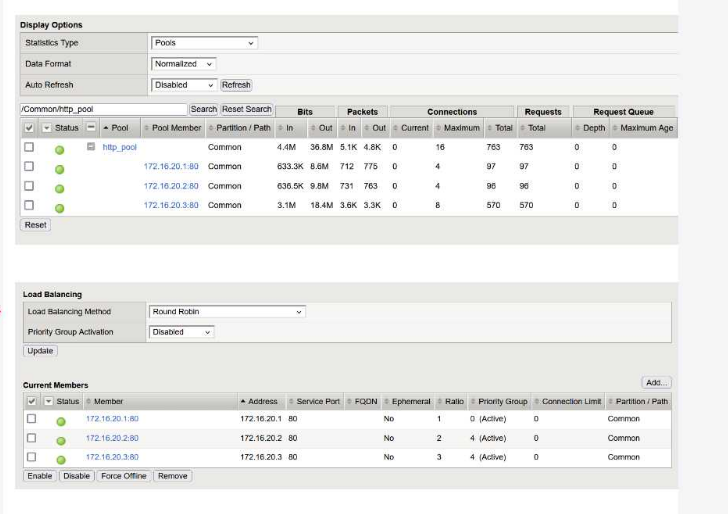
A BIG-IP Administrator configured a virtual server with a pool of 3 members and selected the Round Robin load balancing method to evenly distribute traffic across the pool members. During initial testing, traffic was not evenly distributed and the pool member 172.16.20.3 received more traffic than the other pool members.
Refer to the exhibit and the virtual server configuration provided below:
Plaintext
ltm virtual http.vs {
destination 10.10.1.100:http
ip-protocol tcp
mask 255.255.255.255
persist {
source_addr { default yes }
}
pool http.pool
profiles {
tcp{}
}
serverssl-use-sni disabled
source 0.0.0.0/0
source-address-translation {
type automap
}
translate-address enabled
}
What is the most likely cause of this behavior?
The primary reason for the uneven traffic distribution is the presence of a Persistence Profile in the virtual server configuration.
Load Balancing vs. Persistence: While the Round Robin method is designed to distribute new connections sequentially among pool members, Persistence overrides this logic for existing clients.
Source Address Persistence: The configuration shows source_addr persistence is enabled. This ensures that once a client (identified by their source IP) is mapped to a pool member, all subsequent connections from that same IP will be sent to the same member for the duration of the persistence record.
Uneven Distribution Logic: If one source IP address generates significantly more connections or longer-lived sessions than others---or if many clients appear behind a single NAT/Proxy IP---that specific pool member (in this case, 172.16.20.3) will receive a disproportionate amount of traffic compared to the others.
Evaluating Other Options:
Automap (Option A): SNAT Automap changes the source IP between the BIG-IP and the pool member. It does not impact the BIG-IP's ability to load balance incoming client requests.
Ratio Settings (Option B): In the provided exhibit, the pool members have a Ratio of 1, 2, and 3 respectively. While a higher ratio does direct more traffic to a member, the question asks for the 'most likely cause' in the context of the provided ltm virtual configuration, which explicitly highlights the persistence override.
HTTP Profile (Option C): Round Robin is a Layer 4 load balancing algorithm and does not require a Layer 7 HTTP profile to function.
Refer to the exhibit.
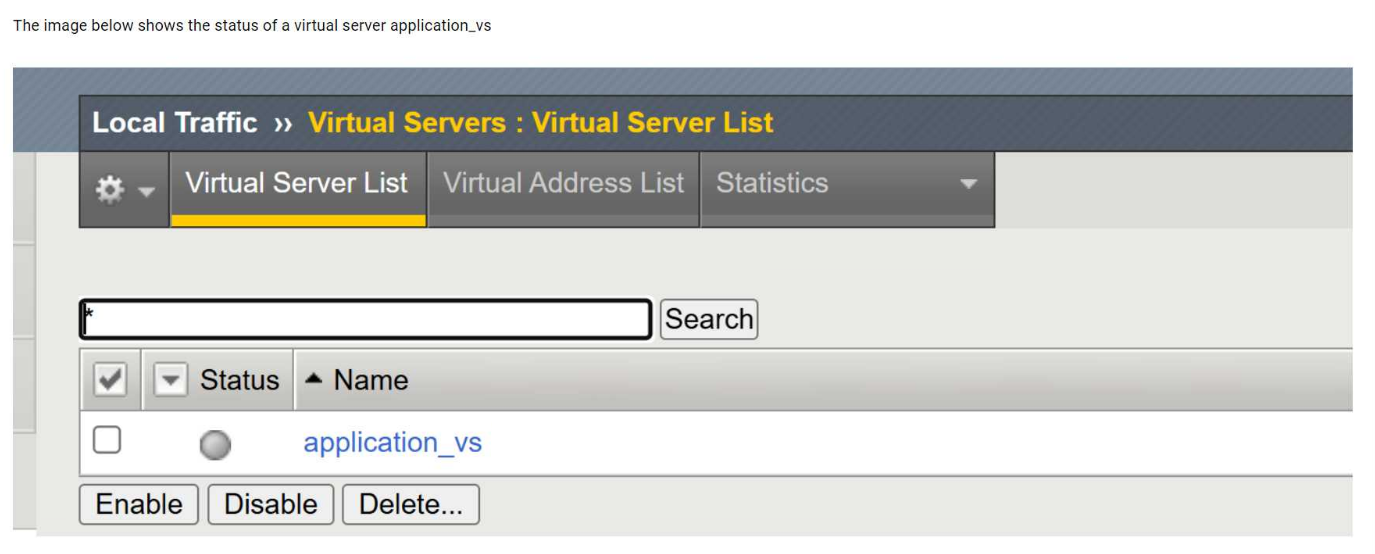
The image shows the status of a virtual server namedapplication_vsin the BIG-IP Configuration Utility.
What is the cause of the status shown? (Choose two answers)
The exhibit shows the virtual serverapplication_vswith a status indicating it isoffline but enabled. In BIG-IP terminology, this status means the virtual server itself is administratively enabled, but it is unable to pass traffic becauseno usable pool members are available.
Two common and documented causes for this condition are:
Pool member(s) administratively disabled (Option A):When all pool members are administratively disabled, BIG-IP removes them from load-balancing decisions. Even though the virtual server remains enabled, it has no available pool members to send traffic to, resulting in an offline status.
Node(s) administratively disabled (Option C):Pool members inherit the status of their parent nodes. If a node is administratively disabled, all associated pool members are also marked unavailable. This condition causes the virtual server to show as offline, even though the virtual server configuration itself is correct.
The other options are incorrect:
Forced offline pool members (Option B)result in a different operational intent and are explicitly set for maintenance scenarios.
Virtual server administratively disabled (Option D)would show the virtual server as disabled, not enabled/offline.
This behavior is consistent with BIG-IP traffic management logic and is commonly verified by reviewingpool and node availability stateswhen diagnosing virtual server availability issues.
- Select Question Types you want
- Set your Desired Pass Percentage
- Allocate Time (Hours : Minutes)
- Create Multiple Practice tests with Limited Questions
- Customer Support
Rebecca Nelson
4 days agoDonald Sanchez
12 days agoSandra Gonzalez
1 month agoEdward Martinez
1 month agoAshley Clark
2 months agoGeorge Collins
2 months agoJoseph Robinson
3 months agoCharles Wright
4 months agoKaren Robinson
4 months agoCynthia Rogers
5 months agoAshley Thompson
4 months agoJoshua Moore
4 months agoLinda Peterson
4 months agoEmma Thomas
4 months agoSandra Mitchell
4 months agoEdison
5 months agoMichael
5 months agoChauncey
6 months agoMarti
6 months agoKristal
6 months agoLavonna
6 months agoBrandon
7 months agoTamar
7 months agoEun
7 months agoShalon
7 months agoJulian
8 months agoJeanice
8 months agoCarmela
8 months agoHillary
8 months agoTeddy
9 months ago