Deal of The Day! Hurry Up, Grab the Special Discount - Save 25% - Ends In 00:00:00 Coupon code: SAVE25
Welcome to Pass4Success

- Free Preparation Discussions

Dell D-PSC-MN-01 Exam - Topic 4 Question 32 Discussion

Posted by Shelia on Jun 27, 2026 at 08:28 PM

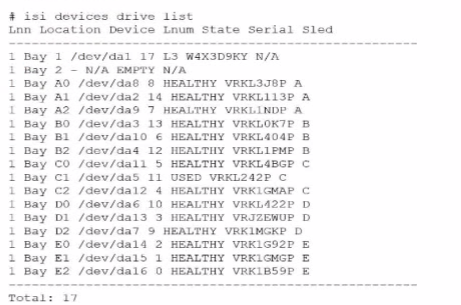
Refer to the exhibit.

An engineer replaced the drive in C1. They run the isi devices drive list command and obtain the output that is shown.

What action must the engineer take?

Suggested Answer: B

In the output of the isi devices drive list command shown in the exhibit, the drive in location C1 is marked as 'USED,' with the serial number VRKL242P. This indicates that the drive has been replaced but has not yet been initialized or formatted for use within the PowerScale cluster.

To make the drive usable, it must be formatted. The correct procedure to follow is to use the isi devices drive format command, specifying the drive location (C1 in this case). This will prepare the drive for use in the cluster, ensuring that it is recognized and available for OneFS to start writing data to it.

Steps to format the drive:

Log in to the OneFS cluster using an SSH session with an account that has the necessary privileges.

Run the following command to format the new drive:

bash

Copy code

isi devices drive format C1

This command will format the drive located at C1, making it available for use in the cluster.

After the format is complete, verify that the drive is now in a HEALTHY state by running:

isi devices drive list

This should display the new status of the drive as HEALTHY, indicating that it has been successfully formatted and is ready for data operations.

This process is outlined in Dell's PowerScale Administration Guide and ensures the correct initialization of new or replaced drives.


Get Premium D-PSC-MN-01 Questions as Interactive Web-Based Practice Test or PDF Real Exam Format Detailed Explanations Instant Access Get Your Practice Test
21 comments · newest first
GE
Gerald 2 days ago
Definitely B. The drive needs to be ready for use.
GE
Geraldo 7 days ago
I feel like option A is too early. We need to format first.
TU
Tula 13 days ago
I agree, but what about option D? Firmware updates can be crucial too.
TR
Trevor 18 days ago
I think option B is the best choice. Formatting is essential after replacing a drive.
SA
Salome 23 days ago
Let’s not forget about A. Adding the drive is the first step.
DE
Demetra 28 days ago
I still lean towards B. Formatting is a standard procedure.
RO
Ronnie 1 month ago
Right, but if the firmware is outdated, it might cause issues later.
PE
Pete 1 month ago
True, but formatting ensures the drive is ready for use.
SA
Salome 1 month ago
D could be important too. Firmware updates are often overlooked.
DE
Demetra 2 months ago
C seems too extreme. Dell support for this?
RO
Ronnie 2 months ago
I agree, but what about A? Adding the drive first could be necessary.
PE
Pete 2 months ago
I think the answer is B. Formatting is essential after replacing a drive.
MA
Mariko 2 months ago
C1 should be good to go after formatting!
JU
Julian 2 months ago
Wait, can you really just format it right away?
PE
Pete 2 months ago
I thought updating firmware was necessary first?
AL
Alease 3 months ago
Definitely B, no doubt about it!
MA
Maryanne 3 months ago
Looks like they need to format the new drive.
FR
Frederica 3 months ago
I’m leaning towards contacting support, but I think that’s more of a last resort. I hope it’s not option C!
YU
Yuette 3 months ago
I feel like updating the firmware is important, but I wonder if it’s the first step or if we need to format the drive first.
TR
Trinidad 3 months ago
I remember a practice question where we had to add a drive, but I can't recall if it was similar to this one. Could it be option A?
CA
Catarina 4 months ago
I think the right action might be to format the new drive, so maybe option B? But I'm not entirely sure if that's always necessary.
0/2000 characters

Save Cancel