
Free Preparation Discussions
 MENU
MENU
Dell D-PSC-MN-01 Exam Questions
- Topic 1: PowerScale Hardware Concepts: This part of the exam assesses the expertise of IT infrastructure architects, and emphasizes the ability to differentiate between the architectural elements of PowerScale platforms, understand their specific use cases, and compare design specifications across PowerScale hardware models.
- Topic 2: PowerScale Hardware Maintenance: Targeted at system administrators, this section focuses on key tasks involved in maintaining PowerScale hardware. It examines candidates' proficiency in completing initial maintenance steps, preparing nodes for operation, and processing Field Replaceable Unit (FRU) and Customer Replaceable Unit (CRU) requests.
- Topic 3: PowerScale Hardware Installation: This section evaluates the installation capabilities of hardware engineers to test candidates on their ability to plan and execute the installation of PowerScale hardware, prepare the maintenance site, and adhere to best practices when installing racks, nodes, and related components.
- Topic 4: PowerScale Implementation: Geared towards cluster administrators, this section covers the practical aspects of implementing PowerScale systems. It focuses on creating new clusters, integrating nodes into existing clusters, and applying alternative configurations or accessories to improve performance.
Free Dell D-PSC-MN-01 Exam Actual Questions
Note: Premium Questions for D-PSC-MN-01 were last updated On Oct. 04, 2026 (see below)
Which cluster interface provides the most detailed network traffic statistics and enables file and directory operations on the cluster?
The Command Line Interface (CLI) provides the most comprehensive and detailed interaction with a Dell PowerScale cluster. Through the CLI, administrators have access to a wide range of commands that offer detailed network traffic statistics, system performance metrics, and the ability to perform granular file and directory operations.
While the Web console offers a user-friendly graphical interface for cluster management, it may not provide the same level of detail or the full set of functionalities available in the CLI. The Serial console is primarily used for initial setup or troubleshooting when network access is unavailable. The Platform API allows for programmatic access but requires additional development effort to utilize.
The CLI is accessible via SSH and provides tools like isi statistics for detailed performance metrics and isi commands for file system operations. This makes it the most powerful interface for administrators needing in-depth information and control over the cluster.
Dell PowerScale OneFS Command-Line Administration Guide
Dell PowerScale OneFS CLI Reference Guide
A platform engineer must install several Dell PowerScale clusters.
Which rack should they use for the A3000 nodes?
For installing Dell PowerScale A3000 nodes, the appropriate rack to use is the Titan-HD (High Density) rack. The Titan-HD rack is specifically designed to accommodate high-density nodes like the A3000, which are part of Dell's archive storage solutions.
Understanding the A3000 Node:
Role in PowerScale Family:
The A3000 is an archive node designed for high-capacity, cost-effective storage.
Physical Characteristics:
It has a high-density form factor to maximize storage capacity within a minimal rack space.
Titan Rack Options:
Titan-HD (High Density):
Designed for high-density nodes with deep chassis.
Supports higher weight loads due to the dense storage components.
Provides enhanced cooling and power distribution suitable for A3000 nodes.
Titan-D and Titan-P:
Titan-D is typically used for general-purpose nodes.
Titan-P may cater to performance-oriented nodes but is not specifically designed for high-density archive nodes like the A3000.
Reasons for Choosing Titan-HD:
Structural Support:
Can handle the weight and depth of A3000 nodes.
Cooling Capabilities:
Optimized airflow to cool densely packed components.
Power Management:
Equipped with power distribution units (PDUs) suitable for high-capacity nodes.
Installation Considerations:
Rack Compatibility:
Using the recommended rack ensures that mounting rails and hardware align properly.
Warranty and Support:
Compliance with Dell's installation guidelines maintains warranty and support agreements.
Dell PowerScale Reference:
Dell EMC PowerScale A3000 Installation Guide:
Specifies the recommended rack types for installing A3000 nodes.
Dell EMC PowerScale Site Preparation Guide:
Provides details on rack specifications, including dimensions and weight capacities.
Hardware Specifications Documentation:
Lists compatibility information for various PowerScale nodes and rack options.
Which resource provides up-to-date instructions to service a Dell EMC PowerScale system?
Dell SolVe Online (and SolVe Desktop) is the primary resource for obtaining up-to-date, detailed service procedures for Dell EMC PowerScale systems.
Key Points:
Purpose of Dell SolVe Online:
Provides the latest service procedures, including installation, replacement, and troubleshooting guides.
Ensures that technicians have access to current and accurate information.
Features:
Interactive procedures with step-by-step instructions.
Customizable checklists and workflows.
Regularly updated content reflecting the latest product updates and best practices.
Accessibility:
Available online and as a downloadable application (SolVe Desktop).
Requires authentication to ensure that only authorized personnel access sensitive service information.
Dell PowerScale Reference:
Dell EMC Support Resources:
Directs service personnel to use SolVe Online for official procedures.
Emphasizes the importance of using approved resources to maintain product integrity and support agreements.
Incorrect Options:
Option A (Dell Quick Reference Guide) provides summary information but not detailed service procedures.
Option B (Dell Enterprise Configuration Services) is a professional service offering, not a resource for procedures.
Option D (Dell iDRAC Service Module) is a management tool for servers, not for accessing service instructions for PowerScale systems.
The SSD has failed in a Dell EMC PowerScale H400 node that has one SSD installed. A technician is asked to replace it.
Where should the new drive be installed?
In a Dell EMC PowerScale H400 node that has one SSD installed and requires replacement, the new SSD should be installed in the correct slot to ensure proper operation.
Key Points:
SSD Slot Location:
The H400 node uses sleds for drive placement.
SSDs are installed in specific positions to support metadata acceleration and caching functions.
Position 0 and sled E is designated for the SSD in an H400 node.
Drive Replacement Procedure:
Identify the correct sled and position for the SSD.
Power down the node if necessary, following safety procedures.
Remove the faulty SSD and install the new SSD in the correct slot.
Importance of Correct Placement:
Installing the SSD in the wrong slot can lead to the node not recognizing the drive.
May affect the performance and data protection features of the cluster.
Dell PowerScale Reference:
Dell EMC PowerScale Hardware Replacement Guide:
Section on SSD Replacement for H400 Nodes:
Specifies that the SSD should be installed in Position 0 of sled E.
Provides diagrams and step-by-step instructions.
Node Documentation:
Illustrates the drive bay numbering and sled identification.
Emphasizes the importance of installing drives in the correct positions.
Incorrect Options:
Option A (Left slot at the back of the node) and Option D (Right slot at the back of the node) do not correspond to the correct SSD slot.
Option B (Position 0 and sled A) is not the designated slot for the SSD in an H400 node.
Refer to the exhibit.
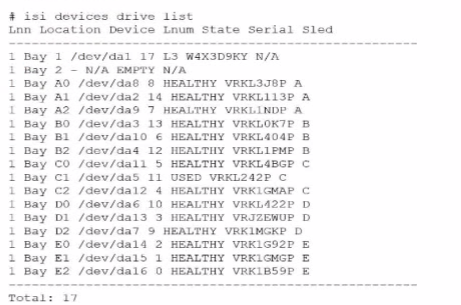
An engineer replaced the drive in C1. They run the isi devices drive list command and obtain the output that is shown.
What action must the engineer take?
In the output of the isi devices drive list command shown in the exhibit, the drive in location C1 is marked as 'USED,' with the serial number VRKL242P. This indicates that the drive has been replaced but has not yet been initialized or formatted for use within the PowerScale cluster.
To make the drive usable, it must be formatted. The correct procedure to follow is to use the isi devices drive format command, specifying the drive location (C1 in this case). This will prepare the drive for use in the cluster, ensuring that it is recognized and available for OneFS to start writing data to it.
Steps to format the drive:
Log in to the OneFS cluster using an SSH session with an account that has the necessary privileges.
Run the following command to format the new drive:
bash
Copy code
isi devices drive format C1
This command will format the drive located at C1, making it available for use in the cluster.
After the format is complete, verify that the drive is now in a HEALTHY state by running:
isi devices drive list
This should display the new status of the drive as HEALTHY, indicating that it has been successfully formatted and is ready for data operations.
This process is outlined in Dell's PowerScale Administration Guide and ensures the correct initialization of new or replaced drives.
- Select Question Types you want
- Set your Desired Pass Percentage
- Allocate Time (Hours : Minutes)
- Create Multiple Practice tests with Limited Questions
- Customer Support
Patricia Jackson
20 days agoElizabeth Morris
1 month agoTimothy Taylor
2 months agoJustin Smith
2 months agoBarbara King
3 months agoDavid Cooper
3 months agoMonica Roberts
4 months agoAdam Williams
4 months agoAdam Ramirez
5 months agoBrian Walker
5 months agoHeather Jackson
6 months agoTiffany Mitchell
5 months agoMelissa Garcia
5 months agoJoseph Clark
5 months agoBrian Brown
6 months agoJennifer Collins
5 months agoSalley
6 months agoWilford
7 months agoDylan
7 months agoBenton
7 months agoThaddeus
7 months agoOctavio
8 months agoMarg
8 months agoJoye
8 months agoChantay
8 months agoRebbecca
9 months agoRebbecca
9 months agoNadine
9 months agoShizue
9 months agoGlendora
10 months agoAltha
10 months agoLenna
10 months agoBrynn
10 months agoAleta
11 months agoMarguerita
11 months agoEura
11 months agoArdella
11 months agoLang
12 months agoLore
12 months agoChau
1 year agoDerick
1 year agoTwana
1 year agoIola
1 year agoMalcolm
1 year agoTijuana
1 year agoStephaine
1 year agoRaul
1 year agoLeontine
1 year agoJaime
1 year agoDalene
1 year agoLourdes
1 year agoAlecia
1 year agoAlyce
1 year agoRicarda
1 year agoLeonor
1 year agoGlory
1 year agoLizbeth
2 years agoClare
2 years agoNoe
2 years agoTequila
2 years agoLashawnda
2 years agoJose
2 years agoHildegarde
2 years agoWilbert
2 years agoJerrod
2 years agoVal
2 years agoHoney
2 years agoCherry
2 years agoSkye
2 years agoBenton
2 years agoOna
2 years agoWillard
2 years agoHester
2 years agoFranchesca
2 years agoBelen
2 years agoMalinda
2 years agoVincent
2 years agoMozell
2 years agoAbraham
2 years agoZita
2 years agoHollis
2 years ago