
Deal of The Day! Hurry Up, Grab the Special Discount - Save 25% - Ends In 00:00:00 Coupon code: SAVE25
Welcome to Pass4Success

- Free Preparation Discussions

CompTIA 220-1201 Exam - Topic 1 Question 19 Discussion

Posted by Lina on May 12, 2026 at 11:21 PM

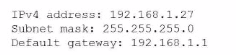
Some users are unable to access their workstations. An administrator runs ipconfig on one of the workstations and sees the following:
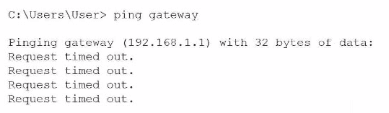
The administrator runs the following command and receives this output:
Which of the following is the source of issue?

Suggested Answer: B

The workstation's IP configuration (192.168.1.27/24 with gateway 192.168.1.1) shows that it has a correct IP address, correct subnet mask, and expected default gateway for a typical small office network. Because the IP is in the correct private range and not an APIPA address (169.254.x.x), this also confirms that DHCP is functioning properly. Therefore, option D (DHCP) cannot be the cause.

The user then pings the default gateway at 192.168.1.1, which should be the router---the device providing routing between local devices and outside networks. The repeated 'Request timed out' responses indicate the workstation cannot reach the router at all. This type of failure points directly to a router outage, a powered-off router, a failed router interface, or a physical disconnection of the router from the switch.

If DNS (C) were the issue, the user would still be able to ping the IP address of the gateway because DNS is not required for IP-to-IP connectivity. A web server (A) has no relation to local gateway communication and does not affect workstation access.

Since the workstation has a valid IP but cannot reach its default gateway, the failure point is the router.


Get Premium 220-1201 Questions as Interactive Web-Based Practice Test or PDF Real Exam Format Detailed Explanations Instant Access Get Your Practice Test
22 comments · newest first
AR
Arthur 2 days ago
Definitely DHCP. Clients need an IP to connect.
YV
Yvonne 8 days ago
I think it's DHCP. No IP address assigned.
DO
Donte 13 days ago
If no IP, it's almost always DHCP.
LA
Lawana 18 days ago
I agree, DHCP is crucial for connectivity.
WI
Willow 23 days ago
Router seems fine. DHCP is the main suspect.
CA
Carman 28 days ago
Could be DNS, but looks like a DHCP issue.
JO
Johnathon 1 month ago
Definitely DHCP. Clients need an IP.
YO
Yolando 1 month ago
I think it's DHCP. No IP address assigned.
PO
Portia 1 month ago
Is it possible the router is causing this? Just a thought.
SH
Sherell 2 months ago
I agree, DHCP is usually the culprit in these cases.
HE
Henriette 2 months ago
Wait, how can it be DNS? That doesn’t make sense!
AL
Albina 2 months ago
Definitely a DNS problem, I’ve seen this before.
AU
Audra 2 months ago
Looks like a DHCP issue to me.
CO
Coral 2 months ago
This seems off, I thought web servers don’t affect workstations like this.
DE
Devorah 2 months ago
Wait, how can it be DHCP if the IP is showing?
CO
Colette 3 months ago
I’m not so sure, could it be the router?
MA
Matthew 3 months ago
Definitely a DNS problem, I’ve seen this before.
AR
Ardella 3 months ago
Looks like a DHCP issue to me.
SH
Shawnda 3 months ago
I have a hunch it might be the DNS, but I need to double-check how to interpret the output from ipconfig.
JA
Jamal 3 months ago
This reminds me of a practice question where the router was the problem. But I feel like DHCP is more likely here since they can't access their workstations.
CL
Clare 4 months ago
I'm not entirely sure, but I think DNS could be the issue if users can't resolve hostnames.
WI
Willis 5 months ago
I remember studying DHCP issues, and I think if the IP address is not in the correct range, it could be a DHCP problem.
0/2000 characters

Save Cancel