
 MENU
MENU
Refer to the exhibit.
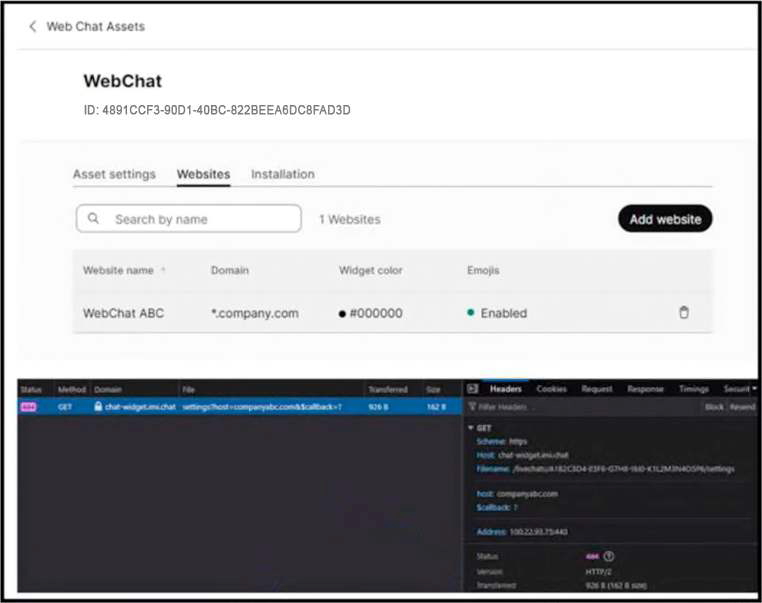
A Webex Contact Center engineer is deploying a chat digital channel widget for Company ABC. After the chat digital channel widget code is implemented in the company website, the chat digital channel widget does not load. While investigating Webex Contact Center, engineer sees this output in the web browser.
What is causing this issue?
A Web Chat widget that is visible in configuration but does not load on the company website commonly points to an asset-domain mismatch. Cisco Webex Connect live chat assets require the website domain to be configured for the asset so the platform can validate where the widget is embedded. The exhibit shows the browser-side failure after widget code is implemented, which is consistent with the site domain not matching the domain configured for the Web Chat Asset. Missing Webex Connect flow configuration usually causes chat handling or routing failures after a chat is initiated, not the widget failing to load. A firewall block to a widget domain is possible in the real world, but the question says the engineer sees output in the browser while investigating Webex Contact Center, and the Cisco configuration control involved is the website domain on the asset. Content Security Policy allow-listing in Webex Contact Center is for desktop/embedded content behavior, not the primary asset-domain validation for web chat loading. Reference: Webex Connect Help, Livechat; Cisco Help, Set up digital channels in Webex Contact Center.