
Free Preparation Discussions
 MENU
MENU
Cisco 300-830 Exam Questions
- Cisco Certified Network Professional CCNP Certifications
- Cisco Certified Network Professional Collaboration CCNP Collaboration Certifications
- Topic 1: Telephony and Call Routing: Covers the architecture, configuration, and troubleshooting of voice channels in Webex Contact Center, including PSTN integration options, agent telephony setup, and call routing components like queues, teams, and flows.
- Topic 2: Tenant Configuration and Reporting: Covers the setup of network requirements, user management, desktop experience, call recording, and building real-time, historical, and customized reporting dashboards for the Webex Contact Center environment.
- Topic 3: Digital Channels: Covers the configuration and troubleshooting of non-voice contact routing and digital communication channels including chat, email, SMS, and social media within Webex Contact Center.
- Topic 4: Advanced Features and AI: Covers advanced flow design for voice and digital channels, connector and API integration types, and AI-powered capabilities including the Webex AI agent, summarization, topic analytics, and agent wellness features.
Free Cisco 300-830 Exam Actual Questions
Note: Premium Questions for 300-830 were last updated On Oct. 10, 2026 (see below)
To elevate their customer experience, Redwood Solutions wants to proactively identify and resolve customer dissatisfaction before it escalates.
Which Cisco AI Assistant feature provides the required functionality?
The requirement is to detect customer dissatisfaction before it escalates. Cisco's AI Assistant reporting and quality features include automatic CSAT scoring, which estimates customer satisfaction from interaction signals and gives the contact center a proactive way to identify poor experiences without waiting for a manual survey response. Topic analytics identifies common contact drivers and trending issues, which is valuable for operational improvement but does not directly score whether a specific customer is dissatisfied. AI-generated summaries reduce after-call work and improve handoff context, but they do not by themselves predict dissatisfaction. Real-time transcripts provide the text foundation for analysis and assistance, but the feature that turns interaction data into a customer-satisfaction signal is automatic CSAT scoring. For a customer-experience program focused on early dissatisfaction detection and proactive resolution, automatic CSAT provides the required risk signal. Reference: Cisco Help, AI Assistant reports in Analyzer; Cisco AI Assistant for Webex Contact Center documentation.
A Webex Contact Center engineer is configuring a new Webex Contact Center tenant and wants to implement digital channels.
Which two actions must be taken before setting up digital channels? (Choose two.)
Before configuring Webex Contact Center digital channels, the integration nodes in Webex Connect must be authorized. Cisco's digital-channel setup documentation explicitly requires completing node authorization in Webex Connect and setting both Webex CC Task and Webex CC Engage nodes to Authorized state. The Task integration lets Webex Connect communicate with Webex Contact Center for task creation, queueing, routing notifications, and task resolution. The Engage integration lets Webex Connect work with conversation objects in Webex Engage, such as creating, appending, resolving, and updating conversations. The wording in the incorrect options places authorization in Webex Engage, but Cisco's procedure puts the pre-built integration authorization under Webex Connect assets and integrations. Digital channel setup depends on those authorizations because the flow cannot queue or resolve a conversation through WxCC without valid access tokens. Therefore, Webex CC Engage and Webex CC Task integration authorization in Webex Connect are the prerequisites. Reference: Cisco Help, Set up digital channels in Webex Contact Center; Webex Connect Help, Webex CC Task Integration Nodes and Node Authorizations.
Refer to the exhibit.
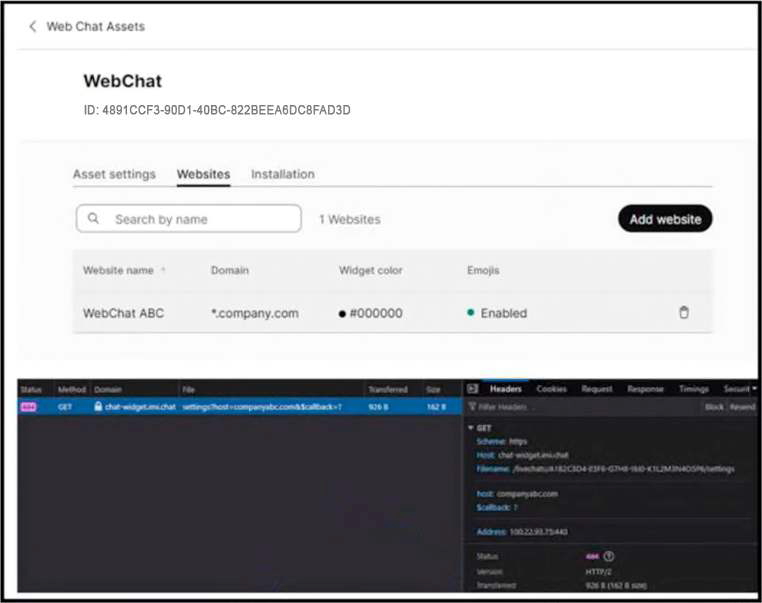
A Webex Contact Center engineer is deploying a chat digital channel widget for Company ABC. After the chat digital channel widget code is implemented in the company website, the chat digital channel widget does not load. While investigating Webex Contact Center, engineer sees this output in the web browser.
What is causing this issue?
A Web Chat widget that is visible in configuration but does not load on the company website commonly points to an asset-domain mismatch. Cisco Webex Connect live chat assets require the website domain to be configured for the asset so the platform can validate where the widget is embedded. The exhibit shows the browser-side failure after widget code is implemented, which is consistent with the site domain not matching the domain configured for the Web Chat Asset. Missing Webex Connect flow configuration usually causes chat handling or routing failures after a chat is initiated, not the widget failing to load. A firewall block to a widget domain is possible in the real world, but the question says the engineer sees output in the browser while investigating Webex Contact Center, and the Cisco configuration control involved is the website domain on the asset. Content Security Policy allow-listing in Webex Contact Center is for desktop/embedded content behavior, not the primary asset-domain validation for web chat loading. Reference: Webex Connect Help, Livechat; Cisco Help, Set up digital channels in Webex Contact Center.
An engineer must generate a report that details the number of times an agent went on a break.
Which Cisco Webex Contact Center Analyzer repository must be queried?
Agent break behavior is an agent-state activity, so the correct Analyzer repository is Agent Activity Record. Cisco's Analyzer documentation explains that Analyzer repositories separate session-level and activity-level data for customers and agents. A break is not a customer contact segment and not a call session metric; it is a state transition or activity performed by the agent. Agent Activity Record is the repository that captures detailed agent activity state events, idle codes, availability changes, and similar state-driven information. Customer Session Record summarizes the end-to-end customer session. Customer Activity Record captures customer/contact activities such as call segments and handling details. Agent Session Record summarizes an agent's signed-in session, but it does not provide the granular count of times an agent entered a break state. For counting how many times an agent went on a break, the report needs the activity-level state records, not the session summary. Reference: Cisco Help, Cisco Webex Contact Center Analyzer User Guide; Webex Contact Center Analyzer Stock Reports.
An engineer is configuring outdial telephony for a new Cisco Webex Contact Center deployment.
Which two configurations are required? (Choose two.)
Outdial calling in Webex Contact Center needs both a tenant or system caller-ID source and a desktop permission path that lets the agent place outbound calls. Cisco's Control Hub voice settings document the Default Outdial ANI field, which determines the default caller ID used for outdial behavior when a dial number is not otherwise mapped. Cisco's desktop profile documentation then controls whether an agent can actually use outdial from Agent Desktop. When Outdial is enabled on the desktop profile, the administrator selects the outdial entry point and, where applicable, the Outdial ANI list. Adding an agent to an outbound team is campaign-related and not a prerequisite for ordinary outdial. ANI in Flow Designer can influence call presentation in flows, but it is not the required administrative setup for agent outdial. A wrap-up reason for an outdial queue is useful for classification after a contact, not the base telephony enablement. Reference: Cisco Help, Set up voice settings for Webex Contact Center; Manage desktop profiles.
- Select Question Types you want
- Set your Desired Pass Percentage
- Allocate Time (Hours : Minutes)
- Create Multiple Practice tests with Limited Questions
- Customer Support
Richard Hill
15 days agoAna Simon
28 days agoRitu Yadav
2 months agoAarav Joshi
2 months agoNoor Malik
3 months agoFrancesco Berg
3 months agoBushra Choudhury
4 months agoMohit Joshi
4 months agoAnya Pedersen
5 months ago