
 MENU
MENU
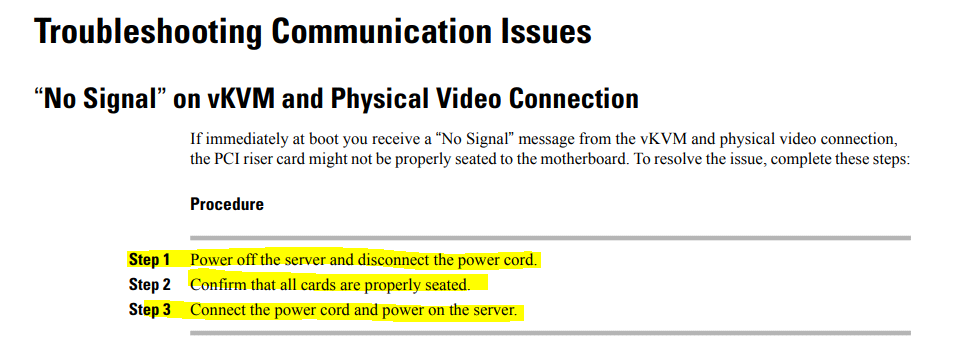
During a boot process of a Cisco UCS C-Series Rack Server, an engineer receives a "No Signal" message from the vKVM and physical connection. Which set of steps resolves the issue?
Suggested Answer: B
Get Premium 300-615 Questions
as Interactive Web-Based Practice Test or PDF
Real Exam Format
Detailed Explanations
Instant Access
Get Your Practice Test
27 comments · newest first
HY
Hyun
5 months ago
I like D too, but it skips the power-off step. Feels risky.
VA
Vanna
6 months ago
Option A seems simpler, but I prefer B for safety.
LA
Laticia
6 months ago
I agree, B makes sense. You need to disconnect safely.
ME
Merilyn
6 months ago
I think option B is the best. Powering off first is crucial.
FL
Flo
6 months ago
Just disconnecting the power cord won't fix it, right?
NG
Ngoc
6 months ago
I thought D was correct, but B makes sense too.
MI
Michal
6 months ago
Wait, are we sure about the "properly seated" part?
AN
Antione
7 months ago
I agree, B is the way to go!
AS
Ashleigh
7 months ago
Definitely B, you need to power off first.
MI
Micaela
7 months ago
Option D is the way to go. Disconnect, check, reconnect. Easy peasy lemon squeezy.
AL
Alyce
7 months ago
Haha, "properly seated" - that's what she said! But seriously, option B is the way to go.
RO
Rolland
7 months ago
Option A seems like a good choice. Disconnect, check the cards, then reconnect and power on. Can't go wrong with the classic troubleshooting steps.
AN
Annette
8 months ago
Option C is the way to go. Confirming the cards are "available" is key here. Gotta make sure they're not just seated, but actually working.
FA
Fatima
8 months ago
I'd go with option D. Disconnect the power, check the cards, then reconnect and power on. Simple and straightforward.
LI
Lili
8 months ago
Option B looks good to me. Gotta make sure those cards are seated properly!
LU
Lucy
8 months ago
I feel like I should choose option A since it has the right sequence, but I’m not completely confident about the power cord step.
CO
Cory
9 months ago
I practiced a question like this, but I can't recall if "available" or "seated" is the right term to use for the cards.
EL
Elena
9 months ago
I think option B sounds familiar because it mentions powering off the server first, which seems like a safe step.
ST
Stephanie
9 months ago
I remember something about ensuring all components are properly seated, but I'm not sure if it was before or after disconnecting the power.
LI
Lisandra
9 months ago
Okay, I think I've got a good strategy here. I'll start by disconnecting the power, then check the card seating, and finally reconnect the power. That systematic approach should help me nail this question.
LE
Lemuel
9 months ago
Ugh, I hate these hardware troubleshooting questions. They always feel so specific and nitpicky. I'm just going to take my best guess and hope for the partial credit.
PA
Paola
10 months ago
Alright, I've got this. The key here is to confirm that all the cards are properly seated. That's the critical step to resolving the "No Signal" issue. I'd go with option B.
DE
Delisa
10 months ago
Okay, let me think this through. I'm a bit confused about the difference between options B and C - they seem pretty similar to me. I'll need to read through them carefully to figure out the right approach.
SE
Serina
10 months ago
Hmm, this seems like a pretty straightforward troubleshooting question. I'd probably start by checking the power connections and making sure all the cards are properly seated.
JA
Janae
3 months ago
I think option B covers all the bases. Power off first, then check everything.
MY
Myra
4 months ago
Definitely! Properly seated cards can make a huge difference.
ZO
Zoila
4 months ago
I agree, checking the power connections is key.