
 MENU
MENU
Refer to the exhibit.
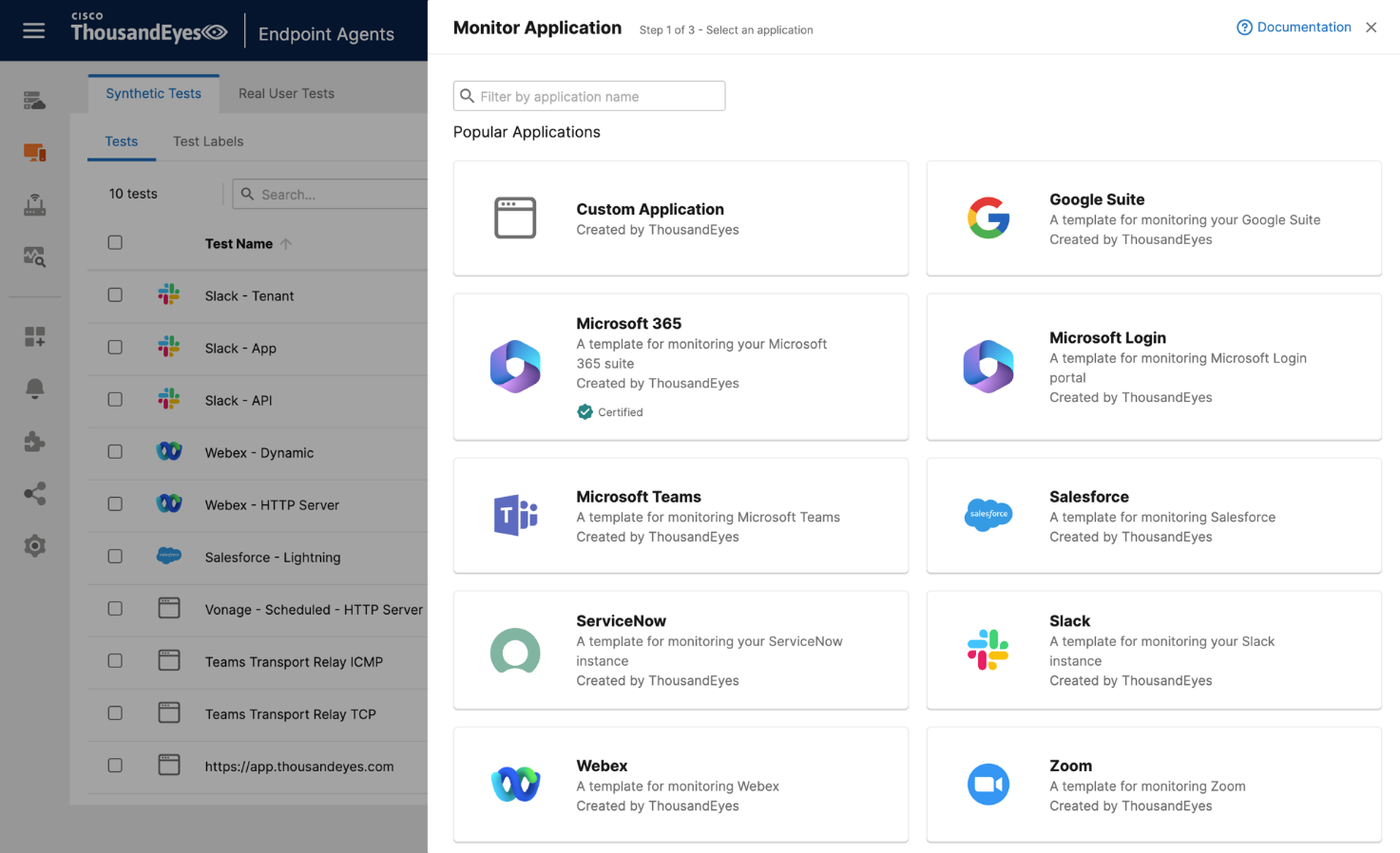
An engineer is tasked with configuring a new test to monitor a web application from the employee's point of view. What two actions should be taken to fulfill the requirement?
In the Designing and Implementing Enterprise Network Assurance (300-445 ENNA) curriculum, monitoring the digital experience of internal employees requires leveraging ThousandEyes Endpoint Agents to simulate or record traffic from the user's specific vantage point. When an engineer needs to monitor a specific, potentially internal or non-standard web application, they must utilize the Custom Application workflow within the Endpoint Experience settings.
According to the ENNA implementation standards, the first necessary action is to Create a new custom application monitor (Option A). In the ThousandEyes portal under Endpoint Experience > Test Settings > Synthetic Tests, the 'Monitor Application' button provides access to pre-defined templates for popular services like Microsoft 365 or Webex. However, for a unique enterprise application, the engineer must select 'Custom Application' to define the application's identity, including its name and the relevant domain or URL.
The second required action is to Add a new scheduled test to the monitor (Option C). Endpoint Agents perform Scheduled Tests at regular, predefined intervals---such as every 5 or 10 minutes---to proactively check the application's availability, response time, and network path health without requiring user interaction. By adding a scheduled HTTP Server or Network test to the custom monitor, the engineer ensures a consistent baseline of the application's performance as seen from the employee's machine.
Reviewing the incorrect options:
Google Suite monitor (Option B): This is a specific template for Google Workspace and is not suitable for a custom application.
Dynamic Tests (Option D): These are specifically designed for collaboration tools like Zoom or Microsoft Teams to capture ad-hoc sessions; they are generally not used for baselining a standard custom web application.
Test Template (Option E): While all monitors are based on templates, 'adding a new template' is not a configuration action but rather a result of the monitoring setup.