
 MENU
MENU
Refer to the exhibit.
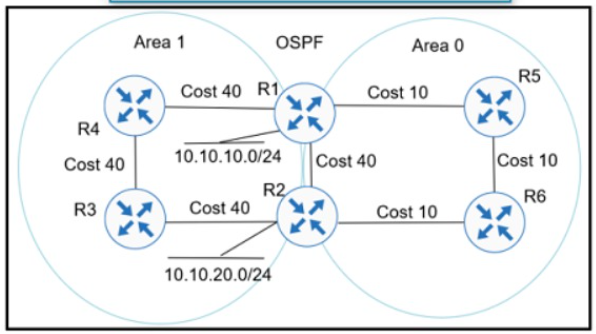
Refer to the exhibit Which action ensures that 10 10 10 0/24 reaches 10 10 20 0/24 through the direct link between R1 and R2?
Suggested Answer: B
Get Premium 300-410 Questions
as Interactive Web-Based Practice Test or PDF
Real Exam Format
Detailed Explanations
Instant Access
Get Your Practice Test
35 comments · newest first
LA
Lacresha
10 months ago
Surprised that people are overlooking D, it could work!
IL
Iluminada
10 months ago
C makes sense too, but I lean towards A.
RE
Renea
10 months ago
Definitely agree with A, nonpassive links are key!
TI
Tijuana
11 months ago
Wait, are we sure about that? What if B is better?
TI
Tiara
11 months ago
I think option A is the way to go.
RE
Refugia
11 months ago
I'm a bit confused about the link costs; I thought lower costs were better, but I'm not sure if setting it to 1 or 3 makes a difference in this scenario.
MO
Mose
11 months ago
I practiced a question similar to this, and I feel like adjusting the OSPF link cost could be the key to making sure the routes are reachable.
EL
Elli
11 months ago
I remember something about OSPF areas, but I'm not sure if just putting them under area 1 is enough for the routes to reach each other.
LA
Lang
12 months ago
I think we might need to configure the links as nonpassive to allow OSPF to send updates between R1 and R2.
ST
Stephania
12 months ago
Hmm, the OSPF link cost and path cost options are interesting, but I think configuring the links as non-passive is the key to making the route reach the destination.
AL
Aleisha
12 months ago
Based on my understanding of OSPF, configuring the links as non-passive seems like the most likely solution to ensure the route is advertised and propagated correctly.
AA
Aaron
1 year ago
I'm a bit confused by the wording of the question. Let me re-read it carefully and think through the OSPF configuration settings that could impact the route.
CA
Cathern
1 year ago
Okay, the question is asking about how to ensure a specific route reaches the destination through the direct link between R1 and R2. I'll need to consider the OSPF options provided.
WI
Willard
1 year ago
Hmm, this looks like an OSPF configuration question. I'll need to think through the OSPF concepts to determine the right action.
BR
Brinda
1 year ago
This question is a real head-scratcher! Maybe I should try configuring my router with a unicorn as the next-hop. That would be a real shortcut!
ME
Merri
1 year ago
User3: I'm leaning towards C) Configure OSPF link cost to 1 between R1 and R2.
CO
Colette
1 year ago
User2: No, I believe the correct answer is B) Configure R1 and R2 links under area 1.
LE
Lenna
1 year ago
User1: I think the answer is A) Configure R1 and R2 LAN links as nonpassive.
JI
Jina
1 year ago
Hmm, I'm not sure. I was thinking D, but now I'm reconsidering. Decisions, decisions...
AL
Alaine
1 year ago
User 3: Let's review the exhibit again to make sure.
RE
Regenia
1 year ago
User 2: Maybe we should consider all the options before deciding.
GI
Gilberto
1 year ago
User 1: I think the answer is D.
DO
Dorethea
1 year ago
I think D) Configure OSPF path cost to 3 between R1 and R2 is the best option for this scenario.
RE
Reita
1 year ago
Option C seems like the way to go. Setting the OSPF link cost to 1 will make the direct link between R1 and R2 the preferred path.
CI
Ciara
1 year ago
That makes sense, it will ensure the direct link between R1 and R2 is the preferred path.
KE
Kenneth
1 year ago
I agree, setting the OSPF link cost to 1 is the best option.
AR
Arlene
1 year ago
But wouldn't configuring the OSPF link cost to 1 between R1 and R2 also work?
BE
Beckie
1 year ago
I disagree, I believe the answer is B) Configure R1 and R2 links under area 1.
AR
Arlene
1 year ago
I think the answer is A) Configure R1 and R2 LAN links as nonpassive.
AL
Aliza
1 year ago
I think the answer is B. Configuring the links under area 1 will ensure that the route is properly propagated through the OSPF domain.
JA
Janessa
1 year ago
C) Configure OSPF link cost to 1 between R1 and R2
AL
Alva
1 year ago
B) Configure R1 and R2 links under area 1
RO
Rosamond
1 year ago
A) Configure R1 and R2 LAN links as nonpassive.
AM
Amie
1 year ago
User 2: I agree, configuring the links under area 1 is the right choice.
NA
Nakita
1 year ago
User 1: I think the answer is B.