
 MENU
MENU
Refer to the exhibit.
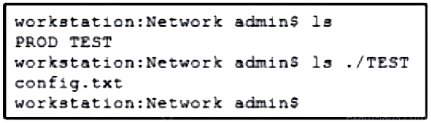
A network engineer must copy the ''config.txt'' file from directory TEST to directory PROD. The copied file must also be renamed into ''current.txt''. Which command must be used to accomplish these tasks?
Suggested Answer: D
Get Premium 200-901 Questions
as Interactive Web-Based Practice Test or PDF
Real Exam Format
Detailed Explanations
Instant Access
Get Your Practice Test
To copy a file from one directory to another and rename it in the process, the cp (copy) command in Linux can be used with the appropriate source and destination paths:
Command Breakdown:
cp: The copy command.
./TEST/config.txt: The source file path.
./PROD/current.txt: The destination file path with the new name.
Thus, the correct command to achieve this task is: cp ./TEST/config.txt ./PROD/current.txt
Linux cp Command Manual
Cisco DevNet Associate Certification Guide
23 comments · newest first
LU
Lucy
10 months ago
Why do we need to rename it? Seems unnecessary to me.
TE
Tequila
10 months ago
Wait, isn't there a typo in option B? It says TESTi instead of TEST.
CY
Cyril
10 months ago
The correct command is D. It copies and renames the file.
CA
Candida
11 months ago
Totally agree, option D is the way to go!
LE
Letha
11 months ago
I thought it was option C at first, but D makes more sense.
VI
Vincenza
11 months ago
I feel like the answer is D because it matches the requirement to copy and rename the file, but I need to double-check the command structure.
SH
Shay
11 months ago
I’m a bit confused about the directory paths. Shouldn't we be using the correct source and destination in the command?
SH
Sheridan
11 months ago
I remember practicing a similar question where we had to copy and rename files, and I think option D looks familiar for that.
ST
Stephaine
12 months ago
I think the command should copy the file from TEST to PROD, but I'm not sure about the syntax for renaming it.
LA
Laurel
12 months ago
Alright, I'm pretty confident I know the right answer here. I'll double-check the details one more time, but I think option D is the way to go.
WE
Wenona
12 months ago
I'm a bit confused. The wording of the question and the options is tripping me up. Let me re-read this a few times to make sure I understand what I'm supposed to do.
EM
Emerson
1 year ago
I've got this! Option D is the correct answer - "cp ./TEST/config.txt ./PROD/current.txt". That copies the file from the right source to the right destination with the correct renaming.
AU
Audry
1 year ago
Okay, the key details are that I need to copy the "config.txt" file from the TEST directory to the PROD directory, and rename it to "current.txt". Let me think through the options...
LU
Luisa
1 year ago
Hmm, this looks straightforward. I'll carefully read through the question and options to make sure I understand exactly what needs to be done.
AN
Antonio
1 year ago
D is the correct answer. I mean, it's not rocket science, just basic file management. Though, I have to admit, option B with the 'TESTi' directory gave me a good chuckle.
DA
Daniel
1 year ago
Because we need to copy from TEST to PROD and rename the file, so it makes sense to use option A.
TE
Tegan
1 year ago
Why do you think it's A?
DA
Daniel
1 year ago
I disagree, I believe the answer is A.
NI
Nikita
1 year ago
Haha, option B says 'TESTi', is that a new directory they invented? I'm going with D, it's the only one that makes sense.
TE
Tegan
1 year ago
I think the answer is D.
AL
Allene
1 year ago
Definitely D. You can't copy a file from PROD to TEST, that makes no sense. The question clearly states to copy from TEST to PROD and rename it.
LE
Leatha
1 year ago
User2: Yeah, it makes sense to copy from TEST to PROD.
GA
Gary
1 year ago
User1: I think the answer is D.