Deal of The Day! Hurry Up, Grab the Special Discount - Save 25% - Ends In 00:00:00 Coupon code: SAVE25

Free Preparation Discussions
 MENU
MENU
Cisco 200-301 Exam - Topic 20 Question 59 Discussion
Actual exam question for
Cisco's
200-301 exam
Question #: 59
Topic #: 20
[All 200-301 Questions]
Topic #: 20
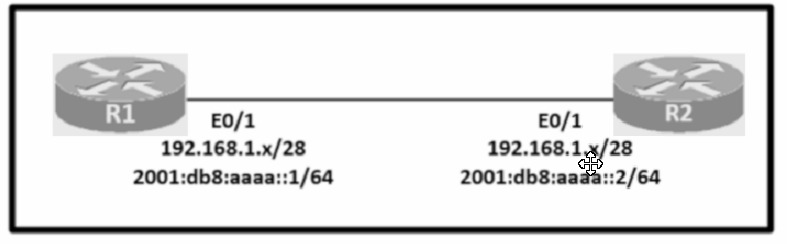
Configure IPv4 and IPv6 connectivity between two routers. For IPv4, use a /28 network from the 192.168.1.0/24 private range. For IPv6, use the first /64 subnet from the 2001:0db8:aaaa::/48 subnet.
1. Using Ethernet0/1 on routers R1 and R2, configure the next usable/28 from the 192.168.1.0/24 range. The network 192.168.1.0/28 is unavailable.
2. For the IPv4 /28 subnet, router R1 must be configured with the first usable host address.
3. For the IPv4 /28 subnet, router R2 must be configured with the last usable host address.
4. For the IPv6 /64 subnet, configure the routers with the IP addressing provided from the topology.
5. A ping must work between the routers on the IPv4 and IPv6 address ranges.
Suggested Answer:
A
Lachelle
10 months agoXuan
10 months agoLucille
10 months agoBarney
11 months agoShayne
11 months agoTiffiny
11 months agoMalcolm
11 months agoRozella
11 months agoLavonna
11 months agoMelodie
11 months agoMa
11 months agoLasandra
11 months ago