
 MENU
MENU
A user reports that a company website is not available. The help desk technician issues a tracert command to determine if the server hosting the website is reachable over the network. The output of the command is shown as follows:
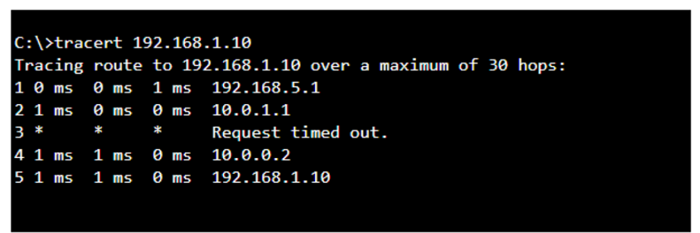
What can you tell from the command output?
The tracert command output shows the path taken to reach the destination IP address, 192.168.1.10. The command output indicates:
* Hops 1 and 2 are successfully reached.
* Hop 3 times out, meaning the router at hop 3 did not respond to the tracert request. However, this does not necessarily indicate a problem with forwarding packets, as some routers may be configured to block or not respond to ICMP requests.
* Hops 4 and 5 are successfully reached, with hop 5 being the destination IP 192.168.1.10, indicating that the server is reachable.
Thus, the correct answer is C. The server with the address 192.168.1.10 is reachable over the network.
* Cisco Traceroute Command
* Understanding Traceroute
The tracert command output indicates that the server with the address 192.168.1.10 is reachable over the network. The asterisk (*) at hop 3 suggests that the probe sent to that hop did not return a response, which could be due to a variety of reasons such as a firewall blocking ICMP packets or the router at that hop being configured not to respond to ICMP requests. However, since the subsequent hops (4 and 5) are showing response times, it means that the packets are indeed getting through and the server is reachable12.
* How to Use Traceroute Command to Read Its Results
* How to Use the Tracert Command in Windows