
 MENU
MENU
Refer to exhibit.
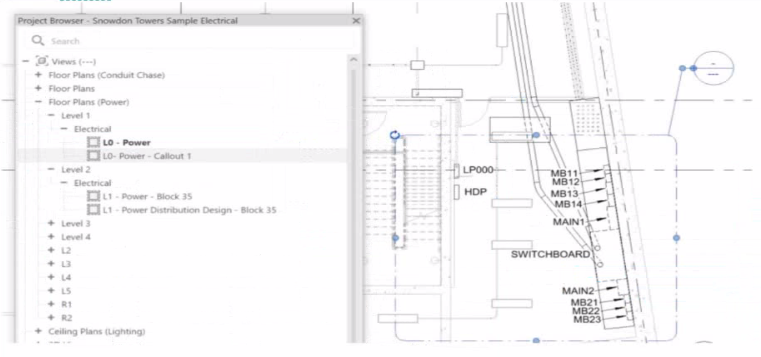
In Autodesk Revit, when an electrical designer creates a callout view, the software automatically generates a new dependent or independent view based on the selected callout type. However, if a callout is accidentally linked to the wrong or redundant view, the designer can easily reassign it to another existing view without recreating the callout. This can be done using the Reference Other View property in the Properties palette.
According to the Revit MEP User's Guide (Chapter 47 ''Views and Callouts''):
''To link a callout to an existing view rather than creating a new one, select the callout, and under the properties for that element, use Reference Other View to specify the desired target view.''
This means that when the designer selects the callout (in this case, shown as ''L0 - Power - Callout 1'' in the Project Browser), they can modify the Reference Other View setting from the Properties palette to point to a different, pre-existing detail view or callout view---for example, one showing an enlarged power distribution layout or switchboard detail.
This is the most efficient workflow because:
It avoids recreating or redrawing the callout (unlike Option C).
It preserves all annotation and sheet referencing data.
It ensures alignment and consistency across sheet references.
The Smithsonian Facilities Revit Template User's Guide reinforces this standard Revit practice:
''When a view reference or callout is incorrectly associated, use the Reference Other View property to redirect the annotation to an existing detail or dependent view.''
Why the Other Options Are Incorrect:
B . Change its type from the Type Selector: Callout types control annotation style (not the referenced view).
C . Delete and recreate: This is unnecessary and inefficient.
D . Open the callout view and change its type: Callout type cannot be changed directly once created; it's controlled by view properties.
Therefore, the correct and Revit-recommended approach is Option A: Select the callout and choose a detail view under Reference Other View.
References:
Autodesk Revit MEP User's Guide -- Chapter 47 ''Views and Callouts,'' pp. 1092--1097
Smithsonian Facilities Revit Template User's Guide -- Section 2.8.1 ''View Types and Templates,'' pp. 29--31
Autodesk Revit Electrical Design Essentials -- ''Callouts, Detail Views, and Referencing Workflows''