
 MENU
MENU
Refer to exhibit.
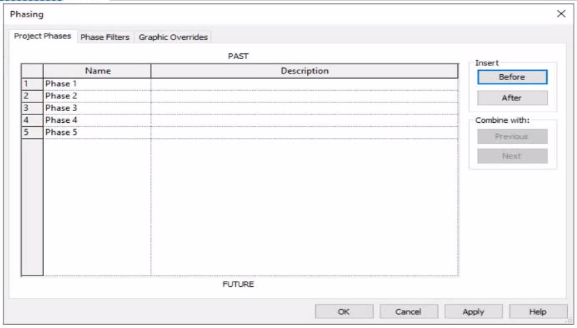
An electrical designer is working m a view set for Phase 3.
Which elements within this view will be overridden according to the "Temporary" graphic override settings?
In Autodesk Revit, phasing is used to represent different stages of a project --- for example, existing conditions, demolition, and new construction --- all within a single model. Each view is assigned to a specific phase, and elements in that view are displayed according to their phase status (created, existing, demolished, or temporary).
According to the Autodesk Revit User's Guide (Phasing and Phase Filters section):
''Each element in a project has 2 key phase-related parameters:
Phase Created -- the phase in which the element was created.
Phase Demolished -- the phase in which the element is demolished. These parameters control how elements display in different views depending on the view's assigned phase and phase filter.'' --- Revit User's Guide, Chapter: Phasing and Phase Filters
Revit automatically applies Graphic Overrides to display phase statuses. These are defined under Manage tab Phases Graphic Overrides. The categories include:
Existing
Demolished
New
Temporary
''Elements that are both created and demolished in the same phase are considered Temporary and display using the Temporary graphic override settings.'' --- Revit MEP User's Guide, Managing Phases and Graphic Overrides
Applying This to the Exhibit:
In the exhibit, the project includes multiple phases (Phase 1 through Phase 5). The designer is currently working in Phase 3.
Elements created and demolished in the same phase (Phase 3) are displayed as Temporary.
Elements created in earlier phases (e.g., Phase 1) and demolished in the current phase (Phase 3) are displayed as Demolished.
Elements created in later phases (e.g., Phase 4) do not yet exist and are not shown.
Therefore:
A . Elements that will be demolished in Phase 4 not applicable; those elements are still active in Phase 3.
B . Elements created in Phase 1 and demolished in Phase 3 will appear as Demolished, not Temporary.
C . Elements created and demolished in Phase 3 correctly displayed using Temporary graphic overrides.
D . Elements created and demolished in Phase 2 would not appear in Phase 3 (they were already removed).
Verified References from Revit Electrical Design Documentation:
Autodesk Revit MEP User's Guide (2011), ''Working with Phases'':
''Elements created and demolished in the same phase are shown using the Temporary phase graphic override settings.''
Autodesk Revit Architecture and MEP Official Study Guide, ''Phasing and Phase Filters'':
''Temporary elements exist only during the phase in which they are created and demolished; they are displayed using the temporary override graphics.''
Currently there are no comments in this discussion, be the first to comment!