
Free Preparation Discussions
 MENU
MENU
AutoDesk RVT_ELEC_01101 Exam - Topic 2 Question 19 Discussion
Topic #: 2
Exhibit.
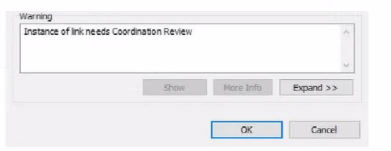
An electrical designer is working within a workshared electrical model The designer reloads the linked architectural model and receives the message as shown in the exhibit What does this message indicate?
The warning message shown --- ''Instance of link needs Coordination Review'' --- appears when Revit detects a modification in a monitored element within a linked model, typically during a coordination workflow between architectural and MEP (electrical, mechanical, plumbing) disciplines.
According to the Revit MEP User's Guide (Chapter 46 ''Copy/Monitor and Coordination Review''):
''When a monitored element changes in the linked model, Revit displays a warning message indicating that the instance of the link needs Coordination Review. You can use the Coordination Review tool to accept, reject, or postpone the change.''
This mechanism ensures synchronization between linked models. For example, if the architectural ceiling or wall that hosts electrical elements (such as lighting fixtures or devices) is modified, moved, or deleted, Revit triggers this alert in the workshared MEP model.
The Smithsonian Facilities Template Guide further emphasizes:
''Coordination Review identifies monitored elements whose hosts or geometry have changed in a linked model. The designer must review these to maintain design consistency.''
Hence, the warning does not indicate a clash or interference (Option A), nor a coordination message created manually in the architectural model (Option B), but specifically a change in a monitored element in the linked architectural model (Option D).
References:
Autodesk Revit MEP User's Guide -- Chapter 46 ''Copy/Monitor and Coordination Review,'' pp. 1084--1088
Smithsonian Facilities Revit Template User's Guide -- Section 3.4 ''Coordination Views,'' p. 86
Autodesk Revit Electrical Design Essentials -- Coordination Workflows and Monitoring Elements
Currently there are no comments in this discussion, be the first to comment!