
 MENU
MENU
Refer to exhibit.
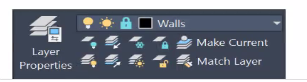
(Note Exhibit shown is the AutoCAD interlace in Windows White the AutoCAD tor Mac version differs in appearance, the correct answers correlate in the options]
Tim Walls layer is locked in the drawing (see exhibit) and is the current drafting layer
A CAD designer wants to make sure the Walls layer is not visible in the drawing while drafting
Which layer property should the designer set?
To ensure that the 'Walls' layer is not visible while drafting, the appropriate property to set is 'Layer Off.' This will make the entire layer invisible in the drawing.
Layer Off:
Effect: Turns off the visibility of the layer in the drawing, making it not visible.
Usage: This is useful when you want to hide certain elements temporarily without affecting the actual data or properties of the elements on that layer.
Layer Freeze:
Effect: Similar to 'Layer Off,' but additionally, it removes the layer from memory, which can improve performance in large drawings. However, 'Layer Freeze' is not the primary choice when only visibility control is needed.
Layer Lock:
Effect: Prevents editing of the layer's content but does not hide it from view.
Usage: Useful when you want to protect the layer's content from accidental modifications.
Layer Unlock:
Effect: Opposite of 'Layer Lock,' allows editing of the layer's content.