Deal of The Day! Hurry Up, Grab the Special Discount - Save 25% - Ends In 00:00:00 Coupon code: SAVE25
Welcome to Pass4Success

- Free Preparation Discussions

AutoDesk ACP-01101 Exam - Topic 4 Question 13 Discussion

Posted by Candra on May 14, 2026 at 02:08 PM

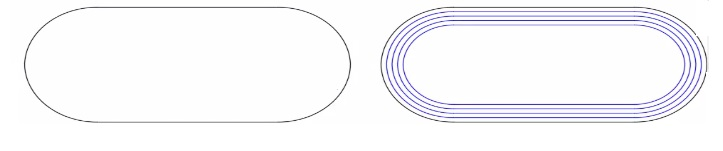
Refer to exhibit.

A CAN designer is creating a tour-lane running track the outside lane is a polyline on the Track layer. The inside are to be placed on the current layer LANES.

Wlik.li options should the designer use with the OFFSET command at an offset distance of 10 to create the ruining track?

Suggested Answer: C

To create multiple parallel lines (lanes) for a running track using the OFFSET command in AutoCAD, and to ensure they are placed on the current layer (LANES), follow these steps:

Initiate the OFFSET command:

Type OFFSET in the command line and press Enter.

Set the offset distance:

When prompted for the offset distance, type 10 and press Enter.

Use the Layer option:

To place the offset lines on the current layer, type L for Layer and press Enter.

Select Current to ensure the new offset lines are created on the current layer (LANES).

Select the Multiple option:

To create multiple offsets at the same distance, type M for Multiple and press Enter.

Create the offsets:

Select the polyline (outside lane) as the object to offset.

Click to the side where the offsets are to be created (inside of the original polyline).

Repeat the clicks to create the necessary number of lanes.

This method ensures that each new lane is created at a consistent distance of 10 units from the previous one and that all new lanes are placed on the current layer.


AutoCAD OFFSET Command: Creating Multiple Offsets - Autodesk Knowledge Network

Get Premium ACP-01101 Questions as Interactive Web-Based Practice Test or PDF Real Exam Format Detailed Explanations Instant Access Get Your Practice Test
22 comments · newest first
RA
Rana 2 days ago
I think B is the best choice. Layer option with distance makes sense.
MA
Maybelle 7 days ago
This question is tricky! I feel unsure about the options.
RE
Reta 12 days ago
I like option B. It’s clear and precise for the task.
BE
Bette 17 days ago
I’m not sure about A. I think D is more straightforward.
CA
Carri 23 days ago
I agree with Deeanna. Current layer is key for accuracy.
SU
Susana 28 days ago
I’m leaning towards option A. Through option seems useful.
DE
Deeanna 1 month ago
I feel like option C could work too. Current layer is important.
FA
Fannie 1 month ago
This question is tricky! I think option B makes sense.
FL
Florinda 1 month ago
D sounds off, why would you use Through for this?
SI
Simona 2 months ago
C could work too, but I lean towards B.
FE
Felicitas 2 months ago
Wait, is it really that simple? I'm not so sure.
CL
Claribel 2 months ago
I agree, B seems right for that setup!
DA
Dalene 2 months ago
I think the answer is B, Layer option/Source.
RO
Rosalia 2 months ago
I didn't realize there were so many options for OFFSET!
DE
Desmond 2 months ago
I’m leaning towards C, Current makes more sense for the inside lane.
EM
Emeline 3 months ago
Wait, why would you use Source instead of Current?
BE
Berry 3 months ago
Totally agree, B seems right!
LI
Ligia 3 months ago
I think the answer is B, Layer option/Source with distance 10.
NE
Nell 3 months ago
I believe the answer is B, but I’m not entirely confident. I remember we discussed using Multiple for creating several lines at once.
BE
Bernadine 3 months ago
I’m a bit confused about the difference between Source and Current layers in this context. I think I need to review that part again.
AV
Avery 4 months ago
This question seems similar to one we practiced where we had to create parallel lines. I feel like the Layer option might be the right choice.
LE
Leota 5 months ago
I think I remember the OFFSET command, but I'm not sure if I should use the Layer option or Through option for this question.
0/2000 characters

Save Cancel