
 MENU
MENU
Refer to exhibit.
Exhibit 1:
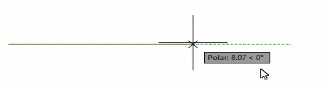
Exhibit 2:
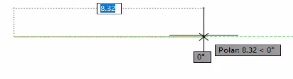
in Exhibit 1, a CAD designer is drawing a line, but the dimension input box to specify its length is missing Which function should be enabled to display the dimension input box shown in Exhibit 2?
The function that needs to be enabled to display the dimension input box while drawing a line is 'Dynamic Input.' This feature provides a command interface near the cursor, allowing you to input dimensions and commands directly where you are drawing.
Dynamic Input:
Effect: Displays input boxes for dimensions and commands near the cursor.
Usage: Facilitates real-time input of lengths, angles, and other parameters directly while drawing.
How to Enable:
Command: DYNMODE
Toggle: You can toggle Dynamic Input on or off using the F12 key or by typing DYNMODE and setting it to 1.