
Free Preparation Discussions
 MENU
MENU
AutoDesk ACP-01101 Exam - Topic 5 Question 16 Discussion
Topic #: 5
Exhibit.
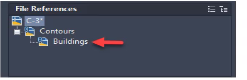
A CAD designer attaches a contour drawing as an external reference and notices an additional drawing reference is also attached.
How should the Buildings drawing be removed from the C-3 drawing? Note Mac commands shown m parentheses
Understanding External Reference:
External references (Xrefs) allow you to attach drawing files within your current drawing, enabling collaborative work and data sharing.
Xrefs can be attached as Overlay or Attachment. Overlays do not include nested Xrefs, while Attachments do.
Identifying the Problem:
The exhibit shows that the Buildings drawing is nested within the Contours Xref.
To remove the Buildings drawing from the C-3 drawing, it must be detached from the Xref hierarchy.
Steps to Detach Xref:
Right-click (Control-click) the Buildings reference in the Xref Manager.
Select the Detach option. This will remove the Buildings reference from the drawing.
Conclusion:
To remove the Buildings drawing from the C-3 drawing, detach the Buildings reference directly from the Xref Manager.
AutoCAD User Guide on Managing Xrefs.
AutoCAD Help Documentation on Detaching Xrefs.
Ashleigh
2 hours agoHershel
5 days agoVerlene
10 days agoCarma
16 days ago