
 MENU
MENU
Exhibit.
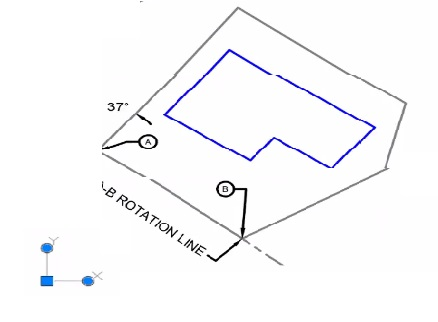
A building needs to be drawn parallel with the A-B ROTATION LINE as show.
Which of those workflows should the CAU designer use lo align the UCS icon before drawing the sbuilding?
Suggested Answer: A
Get Premium ACP-01101 Questions
as Interactive Web-Based Practice Test or PDF
Real Exam Format
Detailed Explanations
Instant Access
Get Your Practice Test
Set DVIEW Twist Angle:
Type DVIEW in the command line and press Enter.
Select the object (or type TW for Twist).
Enter 37 for the twist angle.
Set SNAPANG Value:
Type SNAPANG in the command line and press Enter.
Enter 37 for the snap angle.
Verify UCS Alignment:
Ensure the UCS icon is aligned parallel to the A-B rotation line.
Draw the building relative to the aligned UCS.
AutoCAD Documentation on DVIEW and SNAPANG
Autodesk Knowledge Network: Setting Up the UCS in AutoCAD
12 comments · newest first
ST
Stanford
3 months ago
I’m leaning towards D. Moving the grips feels more intuitive for me.
SH
Sherly
3 months ago
I agree, B seems straightforward. Aligning with point B makes sense.
EL
Eliseo
3 months ago
I think option B is the best choice. It directly uses point B for rotation.
VE
Vernell
3 months ago
I’ve always used D for this kind of alignment!
LA
Latia
3 months ago
A is definitely not the right choice here.
LE
Leah
4 months ago
Wait, can you really set the UCS like that?
JA
Jannette
5 months ago
I disagree, D seems more straightforward.
WE
Wenona
5 months ago
I think option B is the way to go.
JA
James
6 months ago
I have a vague memory of using the UCS command, but I can't decide between options B and C. They both seem plausible.
DI
Diane
6 months ago
I feel like option D might be the right choice, but I can't recall if moving the grips is the best method for this situation.
AS
Ashlyn
6 months ago
I'm not entirely sure, but I remember something about setting angles in DVIEW. Could that be option A?
GE
Gearldine
6 months ago
I think option B sounds familiar since we practiced using the UCS command with points for rotation angles.