
Free Preparation Discussions
 MENU
MENU
Atlassian ACP-520 Exam Questions
- Topic 1: Atlassian Organizations: This section of the exam measures skills of an Atlassian Organization Administrator and covers creating and managing Atlassian organizations, handling multiple sites and products, managing product access, handling access requests, and managing subscriptions and billing processes for cloud environments.
- Topic 2: Users and Groups: This section of the exam measures the skills of a Cloud Identity Manager and covers managing users and distinguishing between managed and unmanaged accounts. It includes creating managed accounts, administering groups, updating user access, and troubleshooting user and group changes across Jira and Confluence.
- Topic 3: Admin Roles: This section of the exam measures skills of an Atlassian Organization Administrator and covers distinguishing and assigning administrative roles. It focuses on understanding the responsibilities of org admins, product admins, project admins, and space admins, and the tasks associated with these roles.
- Topic 4: Advanced Features: This section of the exam measures skills of a Cloud Identity Manager and covers configuring advanced features like custom email addresses, release tracks, sandboxes, IP allowlisting, admin APIs, application tunnels, data residency, and understanding Atlassian Access integration for secure identity management and user provisioning.
Free Atlassian ACP-520 Exam Actual Questions
Note: Premium Questions for ACP-520 were last updated On Oct. 10, 2026 (see below)
Your Cloud organization has multiple products on multiple sites.
Currently, Edmund is a brand new user with no product access.
You selected Edmund from Directory > Users, clicked "Add products", and set the User product role from the Product roles dropdown for a single product on
a single site. For all other products, the Product roles dropdown was None.
Which is NOT a possible outcome for Edmund?
The only outcome that is not possible for Edmund is that he is granted org admin privileges. This is because org admin privileges are not related to product access or product roles, but to organization settings and management. To grant Edmund org admin privileges, you would need to go to Settings > Organization admins and add him there. The other outcomes are possible depending on the product access settings and the groups that Edmund belongs to.
Reference= [Give users access to products] and [Manage organization admins]
A secure pathway needs to be configured between a self-managed Jira Software instance and several Atlassian Cloud products.
Identify one configuration step that must be done in a self-managed instance.
Adding an upstream port is one of the configuration steps that must be done in a self-managed instance to enable a secure pathway between a self-managed Jira Software instance and several Atlassian Cloud products. An upstream port is the port on your self-managed instance that receives traffic from the application tunnel. You need to configure the upstream port for each product that you want to connect to the tunnel.
Reference=Configure required connections and upstream portsandCreate an application tunnel to your self-managed instance
Your company has a single Atlassian Cloud organization.
Atlassian Access discovered "shadow IT".
Which statement explains how this occurred?
Shadow IT refers to the product creation and usage administered outside of an organization's IT department, which can lead to unexpected costs, security and compliance concerns, and operational complexity1.Atlassian Access is a service that provides enhanced security and governance features for Atlassian Cloud products, such as SAML SSO, user provisioning, enforced two-step verification, and audit logs2.Atlassian Access also offers a feature called automatic product discovery, which helps admins discover and manage the shadow IT products created by their managed users1.
A managed user is a user whose account is on a domain that is verified by an organization3.A verified domain is a domain that an organization has proven ownership of by adding a DNS or HTTPS record4. For example, if an organization verifies the domain acme.com, then any user with an email address ending with @acme.com is a managed user of that organization.
A product is an instance of an Atlassian Cloud product, such as Jira Software, Confluence, Bitbucket, or Trello5.A product belongs to a site, which is a collection of products that share a URL and administration settings6.A site belongs to an organization, which is a way to group and manage multiple sites and products under one central admin console7.
A managed user can create a product in another Cloud organization by using their work email address to sign up for a new site or join an existing site that is not owned by their organization1. This creates a shadow IT product that is not visible or controlled by their organization's admins.Atlassian Access can discover these shadow IT products by scanning the domains of all Atlassian Cloud products and matching them with the domains of the organizations that have Atlassian Access enabled1. Atlassian will proactively send an email to the organization admins with the number of shadow IT products created by their managed users and what the exact shadow IT product is.Within admin.atlassian.com, organization admins can also view additional information, such as the owner of these products, how many users are in that product, and the date it was created1.
Therefore, the statement that explains how Atlassian Access discovered shadow IT is that one of your managed accounts created a product in another Cloud organization.
Automatic product discovery in Atlassian Access
Atlassian Access: Enhanced Cloud Data Security & Governance
What is a managed account?
Verify a domain to manage accounts
What is a product?
Understand Atlassian sites and organizations
What is an Atlassian organization?
You are an org admin. Your organization contains the two users shown below.
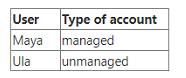
Which statement is true?
As an organization admin, you can delete both managed and unmanaged accounts. Managed accounts are those that belong to your organization and are verified by a domain or an allowlist. Unmanaged accounts are those that do not belong to your organization and are not verified by a domain or an allowlist. Deleting an account removes the user's access to all Atlassian products and services, and deletes their personal data.
You went to the "site-admins" group page.
For the Confluence product on the ACME site, you unselected the User product role.
What does this mean?
By unselecting the User product role for Confluence, you are removing the site-admins group from the default groups that manage roles for that product1.This means that ACME site admins will lose their Confluence admin permissions, such as managing Confluence settings, space permissions, etc2. They will still be able to see Confluence users, but not edit their roles or access.
- Select Question Types you want
- Set your Desired Pass Percentage
- Allocate Time (Hours : Minutes)
- Create Multiple Practice tests with Limited Questions
- Customer Support
Joseph Martinez
26 days agoDavid Edwards
1 month agoCynthia Scott
2 months agoBarbara Sanchez
2 months agoElizabeth Lee
3 months agoJennifer Jones
3 months agoPatricia Howard
4 months agoMatthew Hernandez
4 months agoEric Phillips
5 months agoThomas Thomas
5 months agoLinda Martinez
6 months agoHeather Smith
6 months agoStephen Taylor
5 months agoEric Rogers
5 months agoMelissa Brown
5 months agoLisa Brown
6 months agoKeneth
6 months agoQueen
7 months agoIsadora
7 months agoShaunna
7 months agoTrevor
7 months agoMoon
8 months agoRosio
8 months agoYuki
8 months agoEugene
8 months agoElin
9 months agoAngelo
9 months agoAngelo
9 months agoJacqueline
9 months agoDelsie
10 months agoCorinne
10 months agoDemetra
10 months agoHoa
10 months agoParis
11 months agoLeslie
11 months agoBeata
11 months agoShannan
11 months agoIra
12 months agoNorah
12 months agoLizbeth
1 year agoLorrie
1 year agoRaina
1 year agoCheryl
1 year agoSerita
1 year agoMelvin
1 year agoAdria
1 year agoPura
1 year agoCheryl
1 year agoVilma
1 year agoHobert
1 year agoLaticia
1 year agoXenia
1 year agoLavonda
1 year agoBasilia
1 year agoColette
1 year agoJudy
2 years agoChandra
2 years ago