
Free Preparation Discussions
 MENU
MENU
Free Android AFD-200 Exam Dumps September 2026
Here you can find all the free questions related with Android Flutter Certified Application Developer (AFD-200) exam. You can also find on this page links to recently updated premium files with which you can practice for actual Android Flutter Certified Application Developer Exam. These premium versions are provided as AFD-200 exam practice tests, both as desktop software and browser based application, you can use whatever suits your style. Feel free to try the Flutter Certified Application Developer Exam premium files for free, Good luck with your Android Flutter Certified Application Developer Exam.MultipleChoice
After you create a Flutter app, you need to configure an app icon for your app.
The question is:
If you configure an app icon to your Android code of this Flutter app, the icon of your iOS code for the same Flutter app will be added automatically.
OptionsMultipleChoice
The image in this question includes a part of Android Studio tools bar.
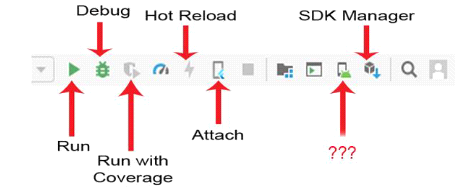
Which option best choices is correct about the missing icon name (represented by question marks)?
OptionsMultipleChoice
Flutter widgets are the basic building blocks of a Flutter user interface. Almost everything in Flutter app is a widget such as images, icons, texts, menus, buttons, row, column etc.
OptionsMultipleChoice
This Flutter widget is used to toggle the on/off state of a single setting. Which of the following choices represents this definition?
OptionsMultipleChoice
Assume that you designed a Flutter app as illustrated in the image of this question. When you tapped the "Bottom Sheet" button, you got a bottom sheet including the text "Welcome to Android ATC".
But, you were not able to tap the "Test Button" button in this app interface when this bottom sheet was
active.
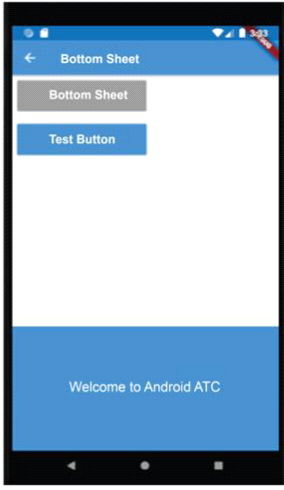
Which option best choices about the type of this Bottom Sheet Widget is correct?
OptionsMultipleChoice
You may add a lot of properties to your Container widget such as background color, size, padding, margins, borders or the shape of text, and other properties.
OptionsMultipleChoice
A floating action button in Flutter development is by default a circular icon button, and you should add the Icon widget as a child widget of FloatingActionButton widget.
Which of the following choices is correct to add a phone icon to the FloatingActionButton widget in a Flutter app ?
OptionsMultipleChoice
In Flutter, AlertDialog Widget is similar to a small interface which appears for a few seconds at the bottom of the app user interface when the app user takes a specific action such as clicking a button.
Options
