
Free Preparation Discussions
 MENU
MENU
UiPath-ASAPv1 Exam Questions
- Topic 1: UiPath Studio Fundamentals: In this section, the focus is on Robotic Process Automation (RPA) concepts, UiPath Studio and its components (StudioX, Robot, Orchestrator), and working with the UiPath user interface.
- Topic 2: Design and Development: In this section, the focus is on designing workflows using sequences, flowcharts, and state machines.
- Topic 3: UiPath Activities: This section covers working with various UiPath activities for UI interaction, data manipulation, control flow, and more.
- Topic 4: Debugging and Testing: In this section of the exam, the focus is given to using logging and debugging tools and adopting unit testing and test automation strategies.
- Topic 5: Deployment and Management: This section of the exam focuses on robot deployment and execution options (focusing on ASAP execution if relevant) and security considerations for RPA deployments.
Free UiPath UiPath-ASAPv1 Exam Actual Questions
Note: Premium Questions for UiPath-ASAPv1 were last updated On Oct. 12, 2026 (see below)
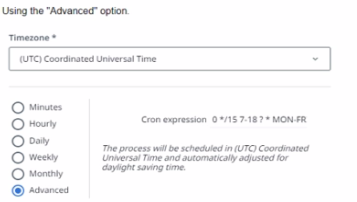
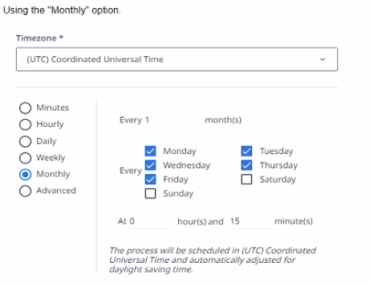
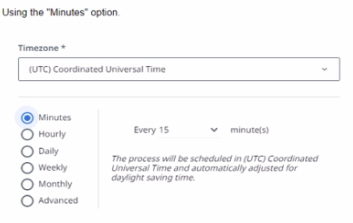
How can a process be scheduled to start every 15 minutes between 07:00 AM and 06:59 PM from Monday To Friday?
A)
B)
C)
D)
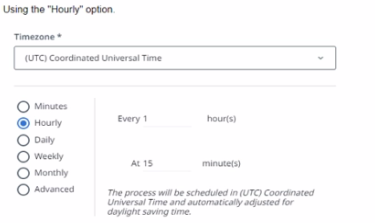
Option D is the correct answer because it shows the scheduling option using the ''Advanced'' option. This option allows the user to specify a cron expression that defines the exact time and frequency of the process execution. The cron expression for this scenario is0 0/15 7-18 ? * MON-FRI *, which means the process will run every 15 minutes starting at 0 minutes past the hour, from 7 AM to 6 PM, on every weekday. The other options are incorrect because they do not match the required schedule. Option A uses the ''Hourly'' option, which will run the process every hour at 15 minutes past the hour, not every 15 minutes. Option B uses the ''Daily'' option, which will run the process once a day at 15 minutes past 7 AM, not every 15 minutes.Option C uses the ''Weekly'' option, which will run the process once a week on Monday at 15 minutes past 7 AM, not every 15 minutes.Reference: UiPath Automation Solution Architect Learning Plan, Module 5: Operationalization1; UiPath Automation Suite - Scheduling Processes2; UiPath Academy - Roles of a Solution Architect in Automation, RPA Setting3.
What is the UiPath Document Understanding (DU) Process template purpose role?
The UiPath Document Understanding Process template is a fully functional UiPath Studio project template based on a document processing flowchart. Its aim is to offer a Document Understanding tool at hand that is easy to use and easy to execute for any developer who wants to start working either on a simple demo or on large-scale implementation. The process provides logging, exception handling, retry mechanisms, and all the methods that should be used in a Document Understanding workflow, out of the box. The process is preconfigured with a series of basic document types in a taxonomy, a classifier configured to distinguish between these classes, and extractors to showcase how to use the Data Extraction capabilities of the framework. It is meant to be used as a best practice example that can be adapted to your needs while displaying how to configure each of its components. The workflow has an architecture decoupled from other connected automations: it does not matter where the files to be processed are coming from or what triggers the execution, this is the responsibility of an upstream process; it does not matter where the extracted information should be used, this is the responsibility of a downstream process. The architecture is common for both attended robots and unattended robots running Document Understanding and having human-in-the-loop validation via Action Center. Items are not processed in bulk. Instead, there is one job for each input file. Indeed, a dispatcher is required every time but this flexible approach makes it simpler to get started, to develop, debug, and scale Document Understanding processes. The process supports Visual Basic flavored projects. The default dependencies in a Document Understanding Process are: UiPath.DocumentUnderstanding.ML.Activities, UiPath.Excel.Activities, UiPath.IntelligentOCR.Activities, UiPath.PDF.Activities, UiPath.System.Activities, and UiPath.UIAutomation.Activities. (123)
1: Document Understanding Process: Studio Template - UiPath
2: Document Understanding Process: Studio Template
3: Activities - About Document Understanding Process: Studio Template - UiPath
Consider the following business scenario which has to be automated:
Invoices arrive in various mailboxes and their information must be extracted and entered into SAP
Which architectural approach is best for this?
This architectural approach is best for this scenario because it leverages the UiPath Platform capabilities to automate the end-to-end process of invoice processing. It uses the UiPath Email activities to connect to various mailboxes and retrieve the invoices as attachments. It then uses the UiPath Document Understanding framework to classify, extract, and validate the relevant information from the invoices, such as invoice number, date, amount, vendor, etc. It also uses the UiPath SAP activities to connect to the SAP system and input the extracted data into the appropriate fields and transactions.This approach is scalable, reliable, and efficient, as it does not require any manual intervention or third-party service.Reference: UiPath Automation Solution Architect Learning Plan, Module 4: High-Level Solution Design1; UiPath Automation Suite - Invoice Processing2; UiPath Academy - Roles of a Solution Architect in Automation, RPA Setting3.
What are the two primary stages m checking license utilization in UiPath projects?
According to the UiPath Automation Solution Architect course, the two primary stages in checking license utilization in UiPath projects are:
Licensing Allocation: This stage involves planning and allocating the required licenses for the project, such as Studio, Robot, Orchestrator, and Data Service licenses. This stage also involves estimating the cost and return on investment (ROI) of the project based on the license usage.
Development Testing: This stage involves testing the project in different environments, such as development, testing, and production, and monitoring the license consumption and performance of the project. This stage also involves optimizing the license utilization and resolving any issues or errors related to licensing.
UiPath Automation Solution Architect course, Module 4: Project Delivery2
Data Service - Checking the License Usage - UiPath Documentation Portal1
What is the role of 'E3L''?
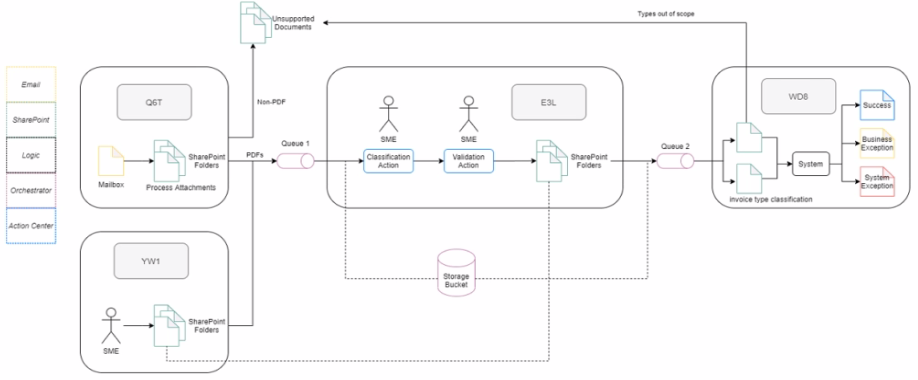
According to the image, 'E3L' is a component that connects the Storage Bucket and the SME Validation Action. This implies that 'E3L' is responsible for retrieving the documents from the storage and sending them to the SMEs for validation. This is an example of a Human in the Loop (HITL) scenario, where human intervention is required to complete the automation process.Therefore, 'E3L' can be considered as a Human in the Loop Performer, which is a role that enables human interaction with the automation solution1.
- Select Question Types you want
- Set your Desired Pass Percentage
- Allocate Time (Hours : Minutes)
- Create Multiple Practice tests with Limited Questions
- Customer Support
Dennis Torres
26 days agoKevin Nguyen
2 months agoCrystal Rivera
2 months agoRebecca White
3 months agoKenneth Thompson
3 months agoBarbara Mitchell
4 months agoBrenda Rogers
4 months agoRonald Martin
5 months agoAmanda Reed
5 months agoMargaret Carter
5 months agoAnthony Hernandez
6 months agoWilliam Mitchell
6 months agoPaul Morgan
6 months agoDennis Harris
6 months agoWilliam Bell
6 months agoDonald Baker
6 months agoDerick
6 months agoNathan
7 months agoLouvenia
7 months agoIola
7 months agoAdaline
7 months agoAlbert
8 months agoWilliam
8 months agoAnnamaria
8 months agoHarris
9 months agoPearlene
9 months agoArlette
9 months agoOretha
9 months agoJosephine
10 months agoLatanya
10 months agoBrendan
10 months agoIra
10 months agoDaryl
11 months agoAlex
11 months agoChantell
11 months agoStephen
11 months agoSkye
12 months agoMelda
12 months agoKathrine
1 year agoLevi
1 year agoTequila
1 year agoAron
1 year agoBrice
1 year agoLashonda
1 year agoJaclyn
1 year agoOnita
1 year agoDahlia
1 year agoGregg
2 years agoDierdre
2 years agoCheryl
2 years agoThersa
2 years agoMarla
2 years agoOren
2 years agoJanine
2 years agoCarri
2 years agoKrystal
2 years agoEleonora
2 years agoPhyliss
2 years agoOdette
2 years agoHaydee
2 years agoCaitlin
2 years agoMargurite
2 years agoSheron
2 years agoBuddy
2 years agoLeota
2 years agoPeggie
2 years agoRuthann
2 years agoAngella
2 years agoIndia
2 years agoIsaiah
2 years agoTrevor
2 years ago