
Deal of The Day! Hurry Up, Grab the Special Discount - Save 25% - Ends In 00:00:00 Coupon code: SAVE25
Welcome to Pass4Success

- Free Preparation Discussions

UiPath-ADPv1 Exam - Topic 4 Question 59 Discussion

A developer configured the properties for a Click activity on an element inside a web page as shown in the following exhibit.An animation on the web page never completely loads but the element indicated in the Click activity does load within the specified timeout duration. What occurs when this Click activity executes?
A) Element is clicked once the element is fully loaded.
B) Timeout error occurs without clicking on the element.
C) Continues to the next activity after 30 seconds without clicking on the element.
D) Waits 10 seconds before clicking on the element.

UiPath-ADPv1 Exam - Topic 4 Question 59 Discussion

Actual exam question for UiPath's UiPath-ADPv1 exam
Question #: 59
Topic #: 4
[All UiPath-ADPv1 Questions]

A developer configured the properties for a Click activity on an element inside a web page as shown in the following exhibit.
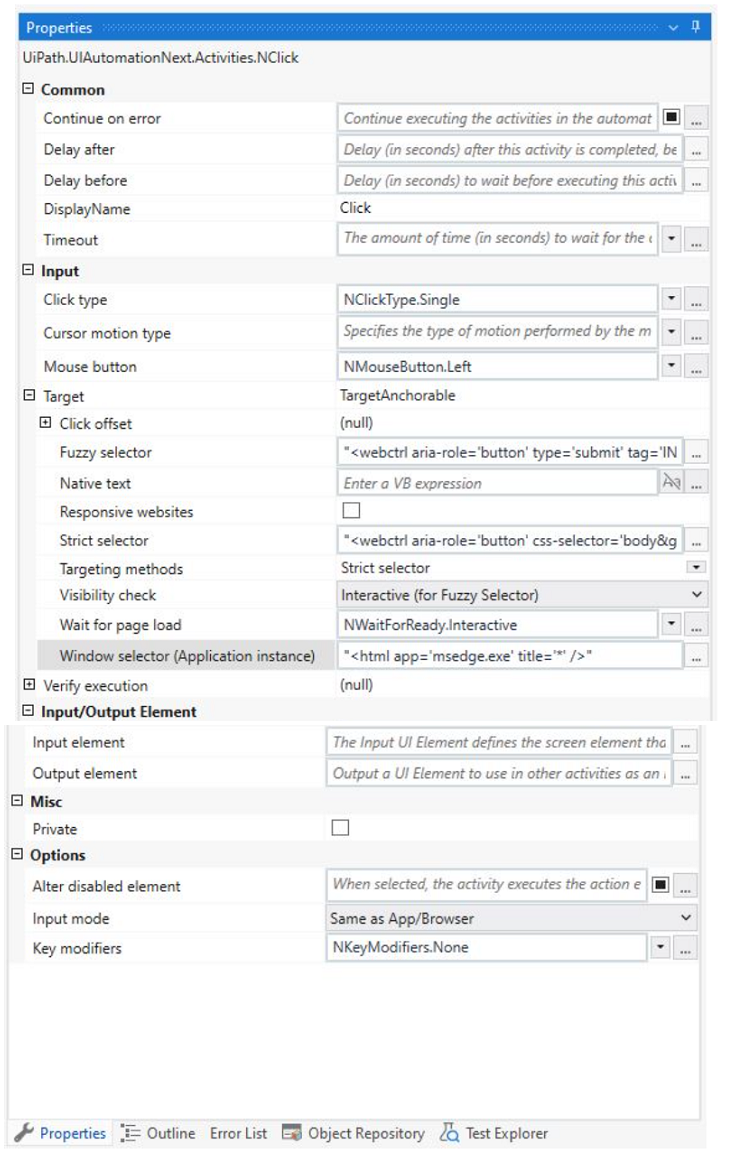
An animation on the web page never completely loads but the element indicated in the Click activity does load within the specified timeout duration. What occurs when this Click activity executes?

Show Suggested Answer Hide Answer
Suggested Answer: A

Click activity has the following properties:

*ClickType: Single

*MouseButton: Left

*Target.Timeout: 30000 ms (30 seconds)

*Target.WaitForReady: Interactive

The Target.Timeout property specifies the amount of time (in milliseconds) to wait for the activity to run before the SelectorNotFoundException error is thrown1. The default value is 30000 milliseconds (30 seconds)2.

The Target.WaitForReady property determines how long the activity should wait for the target UI element to be ready before performing the action1. The following options are available:

*None: Does not wait for anything except the target UI element to exist before executing the action1.

*Interactive: Waits until only a part of the app is loaded1.

*Complete: Waits for the entire app to be loaded1.

The default value is Interactive2, which means that the activity will wait until the UI element is visible and can be interacted with3.

Therefore, based on these properties, the Click activity will wait for the element indicated by the selector to be loaded and clickable within 30 seconds. If the element is loaded before the timeout, the activity will click it and continue to the next activity. If the element is not loaded within the timeout, the activity will throw an error and stop the execution. The animation on the web page does not affect the Click activity, as long as the target element is loaded and visible. Hence, the correct answer is A. Element is clicked once the element is fully loaded.


Contribute your Thoughts:

0/2000 characters
Susana
1 day ago
D) is definitely not right, it shouldn't wait that long!
upvoted 0 times
...
Gerry
6 days ago
Wait, how can it click if the animation isn't done? Sounds off.
upvoted 0 times
...
Lizette
11 days ago
C) makes sense, it should just move on after the timeout.
upvoted 0 times
...
Thea
17 days ago
I think B) is more likely, timeout errors happen often.
upvoted 0 times
...
Ardella
22 days ago
A) Element is clicked once the element is fully loaded.
upvoted 0 times
...
Jonell
27 days ago
I feel like the answer might be B, but I remember something about it proceeding if the element is found before the timeout.
upvoted 0 times
...
Patti
1 month ago
I’m a bit confused. Does the Click activity ignore the animation if the element is present? I feel like I’ve seen that before.
upvoted 0 times
...
Pa
1 month ago
I think I practiced a similar question where the timeout was crucial. If the element loads within the timeout, it should click, right?
upvoted 0 times
...
Casie
1 month ago
I remember something about how Click activities work with loading elements, but I'm not sure if it waits for the animation to finish.
upvoted 0 times
...

Save Cancel