
Free Preparation Discussions
 MENU
MENU
SAP C_THR81_2505 Exam Questions
- SAP Certified Associate Certifications
- SAP SuccessFactors Employee Central Core Certifications
- Topic 1: Employee Central Core: This section of the exam measures the skills of HRIS Analysts and covers the essential components of the SAP SuccessFactors Employee Central Core module. It assesses the ability to configure foundational system features, including data models, business rules, event reasons, and workflows. Emphasis is placed on navigating the core employee data lifecycle, managing personal and employment information, and maintaining organizational structure within Employee Central.
- Topic 2: Position Management: This section of the exam evaluates the knowledge of SAP Consultants in configuring and managing Position Management functionality. It focuses on understanding position hierarchy, relationship assignments, and synchronization with job information. Candidates are assessed on how effectively they support organizational planning through accurate position data setup and integration with other SAP modules.
- Topic 3: Scenario 1: HR Transaction Rules: This section of the exam tests the proficiency of HRIS Analysts in applying HR transaction rules within the system. It focuses on the creation and use of business rules for automating actions, enforcing data accuracy, and streamlining HR processes. Candidates demonstrate the ability to define rule contexts and apply logic relevant to specific HR transactions.
- Topic 4: Scenario 2: Approvals for Self-Service: This section of the exam assesses the competency of SAP Consultants in configuring self-service approval workflows. It covers the setup of dynamic approval chains and ensures policy compliance for employee-initiated actions. The focus is on enabling seamless and scalable workflow automation tailored to organizational structures and user roles.
Free SAP C_THR81_2505 Exam Actual Questions
Note: Premium Questions for C_THR81_2505 were last updated On Oct. 17, 2026 (see below)
This is a global customer and HR admins will be assigned based on legal entity. The HR admins should be getting approval workflows from their target population.
How can you define this in one workflow?
For a global customer where HR admins are assigned based on legal entities and need to receive approval workflows for their target population, you can configure the workflow as follows:
Create a Dynamic Role using the Legal Entity filter.
Assign the Resolver Type as a Dynamic Group to ensure the workflow automatically routes to the correct HR admin based on the legal entity.
This configuration avoids creating multiple static workflows and simplifies management by dynamically resolving approvers based on the legal entity.
Scenario 2: Approvals for Self-Service
Where do you enable the Incumbent of Parent Position option to filter positions in Hire, MSS Job Information and History?
The Incumbent of Parent Position option, used to filter positions in Hire, MSS Job Information, and History, is enabled in Position Management Settings > UI Customizing. This configuration allows users to define filtering options for selecting positions, improving usability and ensuring data relevance during employee management processes.
Your customer would like to autogenerate the Position Code to avoid manual entry. Which of the following are prerequisites to achieve this requirement?
Note: There are 3 correct answers to this question.
To autogenerate the Position Code in Position Management, the following prerequisites must be fulfilled:
B . Set a Business Rule using the Trigger Rules to Generate Assignment ID External with the event type onSave and assign it in Position > Save Rules:
This rule ensures that the Position Code is automatically generated when a position is saved, based on the predefined logic in the business rule.
C . Set Position External Code Generation by On Save rule to Yes in Position Management Settings > General tab:
Enabling this setting ensures that the system allows automatic code generation based on the onSave rules defined in the Position Management module.
E . Set the Position Code field as read-only in the Position Object Definition:
Making the Position Code field read-only prevents manual entry, ensuring that the code is exclusively autogenerated by the system.
These settings align with best practices in automating Position Code generation and reducing manual input errors.
Which rule supports the Default_JobClass requirement?
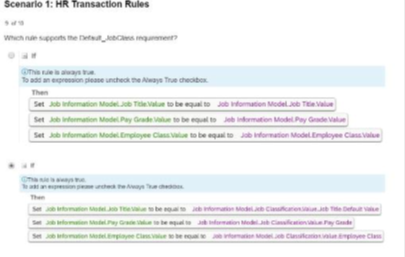
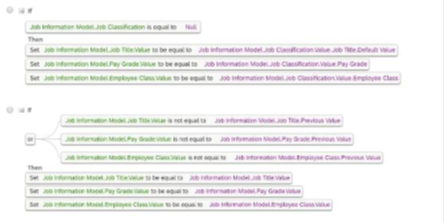
The rule in Option B supports the Default_JobClass requirement by setting default values for fields such as Job Title, Pay Grade, and Employee Class when the Job Classification field is NULL. This ensures that appropriate default data is applied to job information records when certain fields are not explicitly filled.
Scenario 1: HR Transaction Rules
Which steps are required to set up the Auto Delegation feature for a workflow in Employee Central? Note: There are 2 correct answers to this question.
To set up the Auto Delegation feature in Employee Central workflows, the following steps are required:
Enable Auto-Delegate Permission: Users must have the auto-delegate permission enabled, which allows them to define their delegates for workflows.
Enable Auto-Delegation in the Corporate Data Model: This configuration ensures that the system recognizes and supports the auto-delegation functionality at the framework level.
Correct Answers:
B: Enable the auto-delegate permission for users.
D: Enable the field in the Corporate Data Model.
- Select Question Types you want
- Set your Desired Pass Percentage
- Allocate Time (Hours : Minutes)
- Create Multiple Practice tests with Limited Questions
- Customer Support
Sharon Wright
1 month agoRyan Morris
1 month agoSandra Anderson
2 months agoHarold Walker
2 months agoMark Davis
3 months agoCrystal Morris
3 months agoPaul Hill
4 months agoKimberly Cooper
5 months agoElizabeth Morgan
5 months agoMichelle Carter
5 months agoPatricia Phillips
6 months agoEmily Scott
6 months agoDorothy Nguyen
6 months agoJoseph Lopez
6 months agoCharles Carter
6 months agoJennifer Collins
6 months agoZana
9 months agoRikki
10 months agoHyun
10 months agoAdelle
10 months agoCarry
10 months agoHayley
11 months agoKanisha
11 months agoEsteban
11 months agoViola
11 months agoErnestine
12 months agoGoldie
12 months agoChaya
1 year agoAlease
1 year agoCathrine
1 year agoTherese
1 year agoYvonne
1 year agoAliza
1 year agoTheodora
1 year agoWayne
1 year agoLaurel
1 year agoRebecka
1 year agoTrina
1 year agoBrittni
1 year ago