
Free Preparation Discussions
 MENU
MENU
SAP C_C4H56_2411 Exam Questions
- SAP Certified Associate Certifications
- SAP Implementation Consultant - SAP Service Cloud Version 2 Certifications
- Topic 1: Basic Setup This section of the exam measures the skills of a System Administrator and covers the initial configuration steps required to set up the SAP Service Cloud Version 2 system for the first time. It assesses the ability to perform foundational setup tasks to ensure the system is ready for use.
- Topic 2: Master Data: This part evaluates the knowledge of a Data Management Specialist and focuses on setting up master data within the system. It includes configuring essential entities such as Account, Contact, Product, Organization, and employees to support business operations.
- Topic 3: User Management: This domain tests the abilities of an Access Control Manager and involves managing the creation of users and business roles, including assigning the appropriate authorizations. It ensures the secure and efficient administration of user access within the platform. Service Objects: This section targets the proficiency of a Service Operations Specialist and covers the setup of service objects like Registered Products, Installed Base, and Warranty. It looks at how these elements are configured to support service management processes.
- Topic 4: Service Elements: This part of the exam is designed for a Service Process Designer and covers the configuration of Service Level Agreements (SLAs), categories, and case routing. It assesses the ability to define and manage service elements that impact customer support workflows.
- Topic 5: Cases: This domain measures the skills of a Business Process Analyst and focuses on the configuration of document types, party roles, status schemas, and business flows. It evaluates the understanding of case management and process structuring within the system.
- Topic 6: Communication Channels: This section is intended for a Communication Solutions Specialist and covers the configuration of the Agent Desktop for Computer Telephony Integration (CTI) and Interaction Center processes. It also includes setting up the email communication channel for inbound and outbound scenarios.
- Topic 7: Personalization and Extensibility: This part assesses the expertise of a Solution Customization Expert and involves managing personalization, extension fields, validations, and determinations. It looks at how users can tailor and extend the system to meet specific business needs.
- Topic 8: Integration: This domain targets the skills of an Integration Architect and covers the various integration scenarios supported by SAP Service Cloud Version 2. It assesses the ability to connect the system with other applications and services.
- Topic 9: Scenario Based Questions: This section evaluates the problem-solving abilities of a Solution Consultant and presents questions based on fictional scenarios to test comprehensive knowledge of SAP Service Cloud Version 2 in real-world contexts.
- Topic 10: Managing Clean Core: This part of the exam is designed for a Platform Optimization Lead and focuses on evaluating and applying clean core principles to customer experience solutions. It measures the ability to maximize business process agility, reduce adaptation efforts, and accelerate innovation.
Free SAP C_C4H56_2411 Exam Actual Questions
Note: Premium Questions for C_C4H56_2411 were last updated On Sep. 25, 2026 (see below)
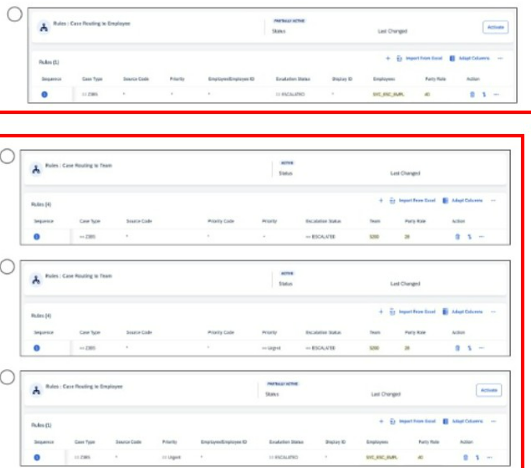
Which of the following options is correct in the configuration, if you want to assign an escalated case with priority urgent to a team? Note: Scroll down to view all possible answer options.
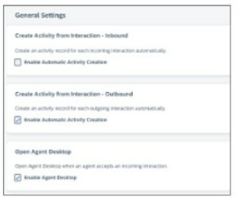
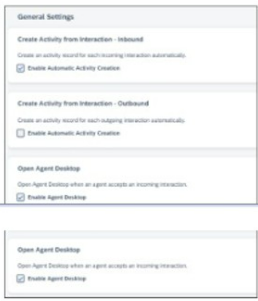
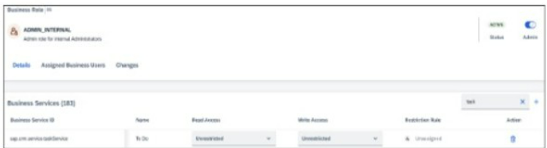
Which screenshots show the correct configuration activities to meet the requirements for incoming service issues? Note: There are 2 correct answers to this question, scroll down to view all possible answer options.
A)
B)
C)
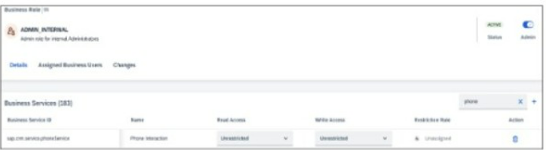
D)
Which of the following are the correct types of usage of an installed base? Note: There are 2 correct answers to this question.
In SAP Service Cloud Version 2, an installed base is used to manage customer equipment and assets. Tracking installed assets is a primary function, as it allows organizations to maintain a record of customer-owned products or equipment, including details like serial numbers and locations. Assigning to a case is another key usage, enabling service agents to link a case to a specific installed base for accurate service delivery and tracking. According to SAP documentation, 'An installed base represents a grouping of products installed at a customer location and can be associated with cases for service requests.'
Tracking measuring points (A) is related to equipment monitoring in SAP S/4HANA, not a direct function of installed bases in Service Cloud V2. Assigning warranties (C) is managed through registered products, not installed bases.
SAP Help Portal: Installed Base Management in SAP Service Cloud V2
SAP Learning: Asset and Installed Base Configuration
You want to assign a value to a specific field based on another field value calculation. Which of the following can you create to enable the field calculation?
To assign a value to a field based on another field's value calculation in SAP Service Cloud V2, a determination is used. Determinations are rules that automatically calculate and set field values based on predefined conditions or calculations. According to SAP documentation, 'Determinations are used to calculate and assign field values dynamically based on other field values or conditions.'
A workflow (A) manages process flows, not field calculations. A field attribute (B) defines field properties, not calculations. An autoflow (D) automates actions but is not used for field value calculations.
SAP Help Portal: Determination Rules in SAP Service Cloud V2
SAP Community: Field Value Calculations
What can you do with Agent Desktop in SAP Service Cloud Version 2? Note: There are 3 correct answers to this question.
- Select Question Types you want
- Set your Desired Pass Percentage
- Allocate Time (Hours : Minutes)
- Create Multiple Practice tests with Limited Questions
- Customer Support
Crystal Hill
17 days agoTiffany Scott
1 month agoAngela Lee
2 months agoJason Wright
2 months agoSandra Roberts
3 months agoHarold Roberts
3 months agoEmma Thompson
4 months agoBarbara Ramirez
4 months agoRebecca Lopez
5 months agoAdam Nguyen
5 months agoEric Turner
5 months agoRyan Green
5 months agoJames Collins
5 months agoJeffrey Roberts
5 months agoSusan Gonzalez
5 months agoBulah
8 months agoAnnabelle
8 months agoMaurine
9 months agoOrville
9 months agoMaybelle
9 months agoDino
9 months agoStanford
10 months agoMarshall
10 months agoDenise
10 months agoPrecious
10 months agoVesta
10 months agoShasta
11 months agoArt
11 months agoFranklyn
11 months agoShenika
11 months agoLouvenia
12 months agoJutta
12 months agoPatria
1 year agoJustine
1 year agoArlyne
1 year agoBarrett
1 year agoQuentin
1 year agoGail
1 year agoNichelle
1 year agoKimberely
1 year ago