
Free Preparation Discussions
 MENU
MENU
SAP C_S4CPB Exam - Topic 1 Question 3 Discussion
Topic #: 1
SIMULATION
Migrate Bank Data
Business Scenario
You are responsible for migrating bank data into the SAP S/4HANA Cloud Public Edition system. You have determined the best method is Migrate Data Using Staging Tables, as you only have a couple banks to migrate.
Prerequisites:
Note:
In the task below, always replace ###### with the last 6 digits of your group number.
Note:
Make sure to use the EXACT names/values/spaces as they are listed in the task. Even forgetting a space or a number will cause the validation of the task to fail and be marked as incorrect.
Task:
Check the documentation for the Bank migration object and assign the additional business role required to ensure you can migrate bank data into the system.
Objective
The purpose of this task is to check the Bank migration object documentation and assign the additional business role needed so you can successfully migrate bank data into SAP S/4HANA Cloud Public Edition.
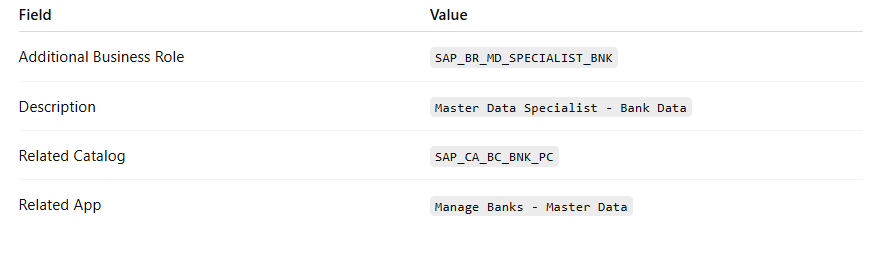
The additional business role required is:
Business Role Template: SAP_BR_MD_SPECIALIST_BNK
Business Role Description: Master Data Specialist - Bank Data
SAP documents that the app Manage Banks - Master Data is assigned to the business role Master Data Specialist - Bank Data (SAP_BR_MD_SPECIALIST_BNK) in business catalog Bank - Maintenance (SAP_CA_BC_BNK_PC). That is the role needed for bank master data maintenance and is the missing authorization when the migration cockpit can load data but cannot create banks in the target system.
Business Scenario Explanation
In the previous migration steps, you already assigned the role:
Configuration Expert - Data Migration
BR_CONFIG_EXPERT_DATA_MIG
That role gives access to the migration cockpit itself, meaning you can:
create migration projects,
select migration objects,
upload CSV files,
validate data,
transfer data to staging tables,
and execute migration runs.
However, for the Bank migration object, SAP also requires the authorization to create bank master data in the target system. If that authorization is missing, the migration can still reach the execution stage, but then fail with an authorization message such as:
You are not authorized to create bank data for country/region US
That is why the additional role Master Data Specialist - Bank Data (SAP_BR_MD_SPECIALIST_BNK) must be assigned.
Important Notes
Always replace ###### with the last 6 digits of your group number in later migration steps.
The role to add here is in addition to the migration cockpit role.
Save the user after assigning the role.
Refresh the session after assignment so the new authorization is loaded.
Required Additional Role
Step 1: Review the migration object documentation
Open the Bank migration object in the migration project and review the documentation or role requirement note.
Explanation
The task explicitly asks you to check the documentation for the Bank migration object and assign the additional role required for migration. SAP's official documentation for bank maintenance shows that bank master maintenance is tied to the role Master Data Specialist - Bank Data (SAP_BR_MD_SPECIALIST_BNK).
Step 2: Open the app ''Maintain Business Users''
From the SAP S/4HANA Cloud launchpad:
Log in to SAP S/4HANA Cloud.
Search for:
Maintain Business Users
Open the app.
Explanation
This app is used to assign business roles to your user.
Step 3: Search for your own user
In Maintain Business Users:
Enter your own user ID in the search field.
Click Go.
Explanation
You must assign the additional role to your own user because you are the one executing the migration.
Step 4: Open your user record
From the search results:
Click your user entry.
Open the business user detail page.
Explanation
This opens the maintenance screen where assigned business roles can be changed.
Step 5: Switch to Edit mode
On the user detail page:
Click Edit
Explanation
Edit mode is required before the assigned business roles list can be updated.
Step 6: Open the ''Assigned Business Roles'' tab
Inside the business user record:
Click:
Assigned Business Roles
Explanation
This is where you assign the additional bank master data role.
Step 7: Click Add
In the assigned business roles section:
Click Add
This opens the popup:
Add Business Roles
Explanation
This popup is used to search for standard SAP business roles.
Step 8: Search for the additional bank role
In the Add Business Roles popup, search for either:
SAP_BR_MD_SPECIALIST_BNK
or
Master Data Specialist - Bank Data
Then select the matching role.
Explanation
SAP documents that the app Manage Banks - Master Data belongs to the role Master Data Specialist - Bank Data (SAP_BR_MD_SPECIALIST_BNK). That is the role needed for bank creation/maintenance authorization.
Step 9: Add the role
After selecting the role:
Click OK or Apply
Explanation
This adds the role to your user in draft mode.
Step 10: Save the business user
Back on the business user page:
Click Save
Explanation
This finalizes the new role assignment.
Step 11: Confirm both migration-related roles are assigned
After saving, verify that your user now has both:
BR_CONFIG_EXPERT_DATA_MIG
SAP_BR_MD_SPECIALIST_BNK
Explanation
These two roles cover different parts of the scenario:
BR_CONFIG_EXPERT_DATA_MIG migration cockpit access
SAP_BR_MD_SPECIALIST_BNK bank master data creation/maintenance authorization
Step 12: Refresh your session
After saving:
Refresh the browser completely, or
Sign out and sign in again
Explanation
SAP role assignments may not become active in the current session immediately. A refresh or new login ensures the authorization is reloaded.
Step 13: Return to the migration project
Go back to:
Migrate Your Data
open your project:
Bank Data ######
open migration object:
Bank
Explanation
Now that the additional bank role is assigned, the system should allow you to migrate bank master data successfully.
Expected Result
After this task is completed successfully:
your user still has the migration role BR_CONFIG_EXPERT_DATA_MIG,
your user also has the additional bank role SAP_BR_MD_SPECIALIST_BNK,
the authorization error for creating bank data should no longer occur,
the Bank migration can proceed successfully.
Screenshots for This Task
Screenshot 1: Assigned Business Roles list including the migration role
Use the screenshot from your run where the business user already shows:
Configuration Expert - Data Migration
This screenshot can be used to explain the starting point before the additional role is assigned.
What this screenshot proves
It shows that the migration role alone was not enough for the bank creation authorization.
Screenshot 2: Migration error message
Use the screenshot from your run that shows the message:
You are not authorized to create bank data for country/region US
This is the key evidence that an additional bank master data role was required.
What this screenshot proves
It proves the migration cockpit role was present, but bank maintenance authorization was still missing.
Official SAP Documentation Basis
SAP's official documentation states that the Manage Banks - Master Data app is assigned to:
Master Data Specialist - Bank Data
SAP_BR_MD_SPECIALIST_BNK
within catalog:
Bank - Maintenance
SAP_CA_BC_BNK_PC
This is the basis for the additional role assignment required in this task.
Currently there are no comments in this discussion, be the first to comment!