
Free Preparation Discussions
 MENU
MENU
Salesforce Plat-101 Exam Questions
- Topic 1: Salesforce Ecosystem: This section of the exam measures skills of Marketing Cloud Administrators and covers the overall Salesforce ecosystem. It focuses on understanding the different resources available for learning and skill development, recognizing how Salesforce Customer 360 products can be applied in real business use cases, and explaining how organizations make use of Salesforce in daily operations. It also highlights awareness of job roles and career opportunities within the Salesforce ecosystem.
- Topic 2: Navigation: This section of the exam measures the skills of Marketing Specialists and covers how users navigate Salesforce. It tests the ability to locate and access necessary information in given scenarios and to identify where different types of Salesforce customizations take place. The emphasis is on practical system navigation that supports marketing operations.
- Topic 3: Data Model: This section of the exam measures skills of Marketing Cloud Administrators and covers Salesforce’s data model. It involves understanding the relationship between core standard objects such as Accounts, Contacts, Leads, Opportunities, and Cases. The section also evaluates knowledge of ensuring data visibility through features and maintaining data integrity using the right tools in different business scenarios.
- Topic 4: Reports & Dashboards: This section of the exam measures skills of Marketing Specialists and covers reporting and visualization in Salesforce. It includes describing how reports are built, how dashboards present insights, and how these tools help organizations monitor performance and make informed marketing decisions.
Free Salesforce Plat-101 Exam Actual Questions
Note: Premium Questions for Plat-101 were last updated On Oct. 08, 2026 (see below)
Get Cloud Consulting (GCC) has started to use Salesforce for its sales and service divisions. GCC would like to automate a process and understands this can be done through declarative and programmatic solutions.
Which approach should GCC explore first?
The approach that GCC should explore first to automate a process is a declarative approach, as it allows for quicker and simpler problem resolution. A declarative approach means that GCC can use point-and-click tools and drag-and-drop interfaces to create and modify applications, workflows, rules, and logic, without writing any code. This makes it easier and faster for GCC to build and customize solutions that meet its business needs, without requiring any programming skills or resources.
Refer to the image below:
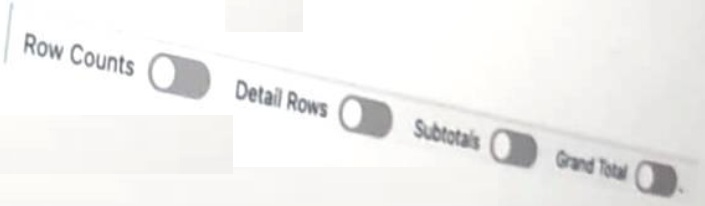
A Salesforce associate reviews a report that shows more information than they need. The associated see individual records but only wants to see the Record Count.
Which switches should the associated toggle to only show the Record Count?
The switches that the associate should toggle to only show the Record Count are Row Counts and Grand Total. Row Counts is a switch that shows the number of rows in the report, which is the same as the number of records. Grand Total is a switch that shows the sum, average, minimum, maximum, or other aggregate functions of a numeric field in the report. By toggling these two switches on and the other two switches off, the associate can see the Record Count and the Grand Total of the report, without seeing the individual records or the subtotals. Subtotals and Detail Rows are switches that show the breakdown and the details of the records in the report, which are not needed for the Record Count.
What is one aspect of multi-tenant architecture?
Salesforce operates on a multi-tenant architecture, where a single instance of the platform serves multiple customers (tenants). Each tenant's data is securely isolated, but they share common resources, such as server space, database instances, and updates. This approach ensures cost efficiency and scalability.
A . Costs more than single-tenant architecture: Multi-tenancy reduces costs due to shared resources.
B . Reserves resources per tenant: Resources are shared rather than reserved individually.
Reference from Salesforce Documentation:
Salesforce Multi-Tenant Architecture Overview
Multi-Tenant vs. Single-Tenant
A manager can see all of the records owned by their team, but not records owned by other teams.
How is access to the records being controlled?
The role hierarchy is a way of controlling access to records based on the user's position in the organization. A user can see all of the records owned by themselves and the users below them in the hierarchy, but not records owned by users above them or in a different branch.
The Health Department wants to gain more insight into its patient data than what Salesforce Dashboards can provide.
Which Salesforce product should the department use?
CRM Analytics is the Salesforce product that the Health Department should use to gain more insight into its patient data than what Salesforce Dashboards can provide. CRM Analytics is a cloud-based analytics platform that allows users to explore data, discover insights, and make data-driven decisions.CRM Analytics can connect to various data sources, including Salesforce and external systems, and provide interactive visualizations, AI-powered insights, and predictive modeling
- Select Question Types you want
- Set your Desired Pass Percentage
- Allocate Time (Hours : Minutes)
- Create Multiple Practice tests with Limited Questions
- Customer Support
Gerald Lewis
23 days agoAshley Green
2 months agoMichelle Ramirez
3 months agoAdam Morgan
4 months agoData Model Perez
5 months agoReports Johnson
3 months agoPaul Peterson
5 months agoSalesforce Ecosystem Thomas
6 months agoNavigation Moore
5 months agoData Model Taylor
4 months agoRebecca Smith
6 months agoHeather Wilson
6 months agoEdward Parker
5 months agoStephen Rivera
6 months agoLinda Scott
5 months agoSandra Cooper
5 months agoMerissa
7 months agoCarin
7 months agoMerissa
7 months agoVeronika
7 months agoAdell
8 months agoSantos
8 months agoWayne
8 months agoKirk
8 months agoMaybelle
9 months agoFreeman
9 months agoBilly
9 months agoAltha
9 months agoPercy
10 months agoHelga
10 months agoNikita
10 months agoHassie
10 months agoElmer
11 months agoMonroe
11 months agoFlo
11 months agoDaniel
11 months agoHerman
11 months agoShelia
12 months agoMadelyn
12 months agoValentin
1 year agoVal
1 year agoEdwin
1 year agoJosphine
1 year agoJacqueline
1 year agoFlo
1 year ago