
Free Preparation Discussions
 MENU
MENU
Salesforce ANC-201 Exam Questions
- Salesforce Consultant Certifications
- Salesforce CRM Analytics and Einstein Discovery Consultant Certifications
- Topic 1: Overview of building and managing apps/ Create a dashboard template
- Topic 2: Creating/Updating Mobile Dashboard Layouts/ Building an app
- Topic 3: Translating Desktop Dashboards to a Mobile Device/ Designing a Dashboard
- Topic 4: Managing Apps, Lenses, Dashboards, and Datasets/ Modify a Dashboard for Mobile
- Topic 5: Adding Charts, Tables, and KPIs to a Dashboard/ Dashboard Building Overview
- Topic 6: Adding Filters to a Dashboard/ Manage apps, lenses, dashboards, and datasets
- Topic 7: Designing a Dashboard and Creating a Template/ Building a Dashboard
Free Salesforce ANC-201 Exam Actual Questions
Note: Premium Questions for ANC-201 were last updated On Jul. 15, 2026 (see below)
consultant is reviewing a model that is set to maximize the daily sales quantity of consumer products in stores, and they see this recommendation.
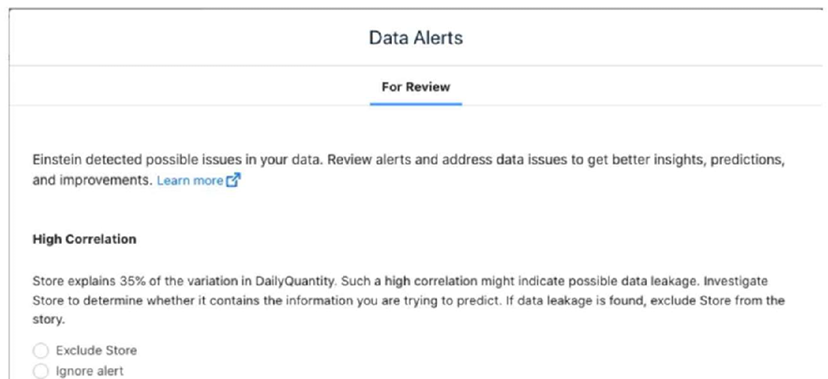
Which action should the consultant take?
Upon reviewing the data model and noticing the high correlation alert between 'Store' and daily sales quantity, the appropriate action is to verify with the client their expectations regarding the influence of the Store field on daily sales. Here's the rationale:
Understanding the Role of 'Store' in the Model: Before making any changes to the model, it's crucial to understand whether the 'Store' field is expected to be a strong predictor based on the business context. If the client expects that different stores inherently have different sales volumes due to factors like location, size, or customer base, this correlation may be both meaningful and desired.
Potential Data Leakage: High correlation warnings can sometimes indicate data leakage, where a predictor (like 'Store') might inadvertently include information about the outcome variable (daily sales quantity). It's essential to verify whether this correlation makes sense logically or if it's skewing the model predictions.
Client Consultation: Consulting with the client helps ensure that any modeling decisions align with their business knowledge and expectations. It's about validating the model against real-world expectations and ensuring it remains a useful tool for decision-making.
By taking these steps, the consultant not only adheres to best practices in data science by validating model inputs and their implications but also ensures that the model aligns with the client's business strategies and operational realities.
A CRM Analytics administrator is working on deploying a dataflow and a dataset (generated by this dataflow) to another org.
While creating a change set, they notice that the components are NOT visible to be included in the change set.
What is the reason for this?
Universal Containers has a dashboard for sales managers that want to visualize their win rate.
Which chart type should the consultant use to keep track of targets?
A data architect wants to use a recipe transformation to implement row level security based on role hierarchy in Salesforce.
Which transformation should the architect use to level the dataset hierarchy?
CRM Analytics users at Cloud Kicks are granted access to an app with specific dashboards. When trying to download a specific widget, they are unable to do so.
In CRM Analytics, even if users are granted access to view an app and its dashboards, their ability to download data is controlled by permissions assigned via permission sets. Specifically, users need the 'Download Data' permission to download data from widgets or dashboards. If this permission is missing from their permission set, they will be unable to download the specific widget, even though they can view the data.
- Select Question Types you want
- Set your Desired Pass Percentage
- Allocate Time (Hours : Minutes)
- Create Multiple Practice tests with Limited Questions
- Customer Support
Carol White
4 days agoRyan Allen
26 days agoCrystal Carter
1 month agoGeorge Smith
2 months agoNathan Walker
2 months agoKimberly Cook
3 months agoKenneth Taylor
3 months agoSarah Bell
3 months agoSharon Thomas
2 months agoJeffrey Allen
2 months agoSteven Young
3 months agoAnthony Turner
3 months agoLajuana
4 months agoLauran
4 months agoValentin
4 months agoLauran
4 months agoCaprice
5 months agoEmerson
5 months agoHui
5 months agoArdella
5 months agoWilda
6 months agoMaryrose
6 months agoBrittni
6 months agoOmega
6 months agoMarylyn
7 months agoStephaine
7 months agoLynelle
7 months agoLuisa
7 months agoBrett
8 months agoAdell
8 months agoAnthony
8 months agoDenny
8 months agoBecky
9 months agoIra
9 months agoTonja
9 months agoIrma
9 months agoJamie
10 months agoAlishia
10 months agoPaola
10 months agoWilda
10 months agoBritt
11 months agoFelix
11 months agoVelda
11 months agoJamika
1 year agoMyra
1 year agoTrina
1 year agoAnnelle
1 year agoKathrine
1 year agoWinfred
1 year agoDalene
1 year agoGaston
1 year agoGlory
1 year agoJustine
1 year agoEmiko
1 year agoRebbecca
1 year agoJohnathon
1 year agoWilliam
2 years agoOtis
2 years agoHildegarde
2 years agoAlaine
2 years agoDeonna
2 years agoCordie
2 years agoDenna
2 years agoCasie
2 years agoCarmela
2 years agoAlyce
2 years agoMaurine
2 years agoCory
2 years agoSherell
2 years agoAmalia
2 years agoHannah
2 years agoRichelle
2 years agoKrissy
2 years agoJunita
2 years agoMilly
2 years agoShawana
2 years agoAndra
2 years agoLisandra
2 years agoCharlesetta
2 years agoLoren
2 years agoMiles
2 years agoLeana
2 years agoMargurite
2 years ago