
 MENU

Review the exhibit. What can be determined about this SmartZone? (Choose three.)
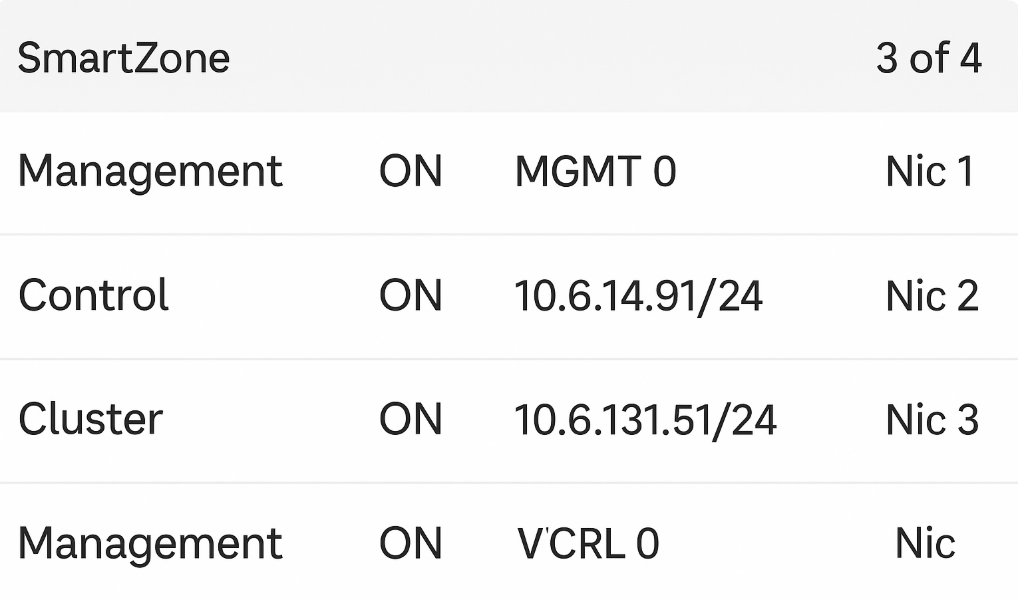
The exhibit shows a virtual SmartZone (vSZ) configuration running in a VMware environment with three separate virtual NICs (vNICs), each mapped to a different port group: Management, Control, and Cluster.
According to RUCKUS One Online Help -- SmartZone Interface Configuration and RUCKUS AI Documentation -- SmartZone High-Scale Architecture, this design is specific to vSZ-H (High-Scale) deployments, which require three distinct network interfaces for distributed control, management, and cluster synchronization.
The three NIC mappings confirm physical or virtual separation of traffic for scalability and redundancy (A and E). vSZ-E (Essentials) requires only two interfaces (Management and Control) and does not use a dedicated cluster interface, distinguishing it from vSZ-H (D).
There is no indication of a four-node cluster in the exhibit, and SmartZone appliances typically show node counts under the Cluster Dashboard, not at the NIC configuration stage.
Thus, based on the configuration, this is a vSZ-H system with three NICs and three port groups, each serving a dedicated function.
RUCKUS One Online Help -- SmartZone vSZ-H Network Interface Roles
RUCKUS Analytics 3.5 User Guide -- Controller Connectivity and Cluster Interfaces
RUCKUS AI Documentation -- vSZ-H Deployment Topologies and Port Group Mapping
Currently there are no comments in this discussion, be the first to comment!