
Free Preparation Discussions
 MENU
MENU
Proofpoint TPAD01 Exam Questions
- Topic 1: Product Overview: Covers key product functionalities and how Proofpoint's components integrate within the overall email security suite.
- Topic 2: Mail Flow: Covers how the Email Protection Server handles inbound and outbound mail, including routing, SMTP, TLS, and certificate management.
- Topic 3: Message Processing: Covers building policies and rules for filtering and message disposition, along with configuring SMTP profiles.
- Topic 4: Email Firewall: Covers creating and managing mail rules, controlling SMTP rate, configuring outbound throttling, and strengthening overall email security.
- Topic 5: Quarantine: Covers managing quarantine folders, configuring settings, releasing messages, and understanding rule precedence.
- Topic 6: Smart Search & Logging: Covers using Smart Search, analyzing logs, configuring syslogs, and leveraging the PoD API for operational insights.
- Topic 7: Alerts & Reporting: Covers configuring alert profiles, managing notifications, and monitoring system performance through reports.
- Topic 8: Email Authentication: Covers configuring SPF, DKIM, and DMARC policies, and setting up email authentication keys.
- Topic 9: User Management: Covers syncing Active Directory, importing profiles, configuring LDAP/SSO, and managing user roles and access permissions.
- Topic 10: Spam Detection: Covers tuning spam management policies, creating custom spam rules, and configuring safe and block lists.
- Topic 11: Virus Protection: Covers configuring virus protection policies, restricting message processing, and editing related rules.
- Topic 12: User Notifications: Covers setting up email warning tags, configuring tag routes, and managing email digests for end users.
- Topic 13: Targeted Attack Protection (TAP): Covers managing URL rewriting, configuring Message Defense, and using the TAP Dashboard to monitor advanced threats.
- Topic 14: Threat Response: Covers differentiating cloud versus on-premises defense, configuring servers and workflows, and managing the threat response process.
Free Proofpoint TPAD01 Exam Actual Questions
Note: Premium Questions for TPAD01 were last updated On Oct. 09, 2026 (see below)
Refer to the exhibit below to see the interface used in this scenario.
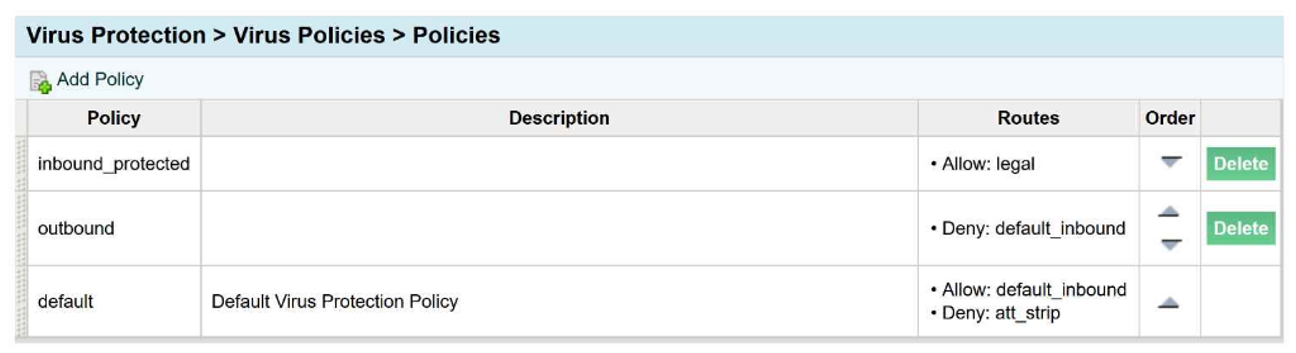
An email arrives inbound to the protection server, it is going to a single recipient and belongs
to the legal and default_inbound policy routes.
Which of the following is true regarding the virus policies?
The correct answer is C. The inbound_protected and default policy will be applied to the message in that order.
From the exhibit, the message is inbound and matches two policy routes:
legal
default_inbound
The inbound_protected virus policy is configured with Allow: legal, so that policy applies to this message first. The default virus policy is configured with Allow: default_inbound, so it also applies to the same message. Since the message matches both routes, both policies are applied in policy order, with the more specific matching inbound policy applying before the default policy.
Why the other choices are incorrect:
A is incorrect because the message is inbound, not outbound, so the outbound policy is not the first applicable policy here.
B is incorrect because the exhibit logic indicates the specific matched inbound policy applies before the default policy, not the reverse.
D is incorrect because the exhibit shows the message belongs to both legal and default_inbound, so the default policy is not ignored.
This is a Virus Protection policy-order question. The important concept is that Proofpoint can apply multiple matching virus policies based on route membership, and in this scenario the message is processed by inbound_protected first, followed by default.
So the complete interpretation of the exhibit is that the inbound_protected and default policies are both applied, in that order, which makes Answer C the verified course-aligned choice.
The Abuse Mailbox event source was working in Cloud Threat Protection, but is now showing red under status and is no longer processing emails. After editing the source and clicking ''Validate Source,'' you receive the error ''Unable to validate mailbox.'' What is the likely cause of this error?
The correct answer is A. The email server that hosts the abuse mailbox is disconnected. In Proofpoint's abuse-mailbox workflows, the mailbox must be reachable and functional for validation and ongoing message processing to succeed. Proofpoint's abuse-mailbox material emphasizes that abuse-mailbox handling depends on the mailbox receiving and processing reported messages as part of the investigation and remediation pipeline. If the mailbox or the mail system behind it becomes unavailable, validation failure is the most likely operational outcome.
The wording ''Unable to validate mailbox'' points to a connectivity or mailbox-access problem rather than a workflow-logic issue. Missing workflow match conditions would affect downstream automation behavior, but not the platform's ability to validate that the event source mailbox itself is reachable and usable. Likewise, disabling alert linking does not explain mailbox validation failure, and an incorrect email address format would more likely be caught as an obvious configuration input problem rather than as a mailbox validation failure after a source that was previously working suddenly turned red.
In the Threat Response course context, a source that was working and then becomes red strongly suggests an infrastructure or connectivity change. Since the event source depends on the hosted mailbox service continuing to accept and expose mail, the most likely cause is that the email server hosting the abuse mailbox is disconnected or unavailable. That makes A the course-aligned answer.
How does Proofpoint use TLS in email security?
The correct answer is B. To encrypt emails in transit between mail servers. Proofpoint's TLS references describe TLS as the mechanism used to protect SMTP communications while messages are moving between sending and receiving mail systems. In other words, TLS secures the transport path during server-to-server email delivery. That is exactly the use case the course is testing. Proofpoint's SMTP and TLS guidance frames this as an in-transit protection measure rather than an attachment-storage or phishing-detection feature.
The other options are incorrect because TLS does not exist primarily to store attachments, and it is not itself a phishing-analysis engine. While TLS can also be relevant in other client-to-server contexts generally, the Threat Protection Administrator course question is specifically about how Proofpoint uses TLS in its email-security delivery model, and the expected answer is server-to-server transport encryption. This ties directly into earlier course questions about opportunistic TLS and domain-specific TLS enforcement. Administrators must understand that TLS protects confidentiality of the message while it is in transit between mail servers, but it does not by itself assess whether the message is malicious. Therefore, the verified and course-aligned answer is B.
What is the primary purpose of SPF in Email Authentication?
The correct answer is B. It checks the sending IP address is authorized by the sender's domain. Proofpoint's SPF reference states that an SPF record in DNS specifies which IP addresses and hostnames are authorized to send emails for a domain. When the receiving mail server evaluates SPF, it checks whether the source server is on that authorized list. If it is not, the message can fail SPF and be treated as suspicious, spam, or rejected according to policy.
Proofpoint's broader email-authentication overview describes the SPF step in almost the same way: the receiving server verifies that the sending IP address is approved to send emails for the domain. That is the exact function being tested in this question. SPF is not about validating the recipient, and it is not the mechanism that checks a cryptographic message signature. Those are different controls. DKIM is the mechanism associated with digital signatures over message content and headers, while ARC deals with preserving authentication assessments across forwarding paths.
Within the Threat Protection Administrator course, SPF is one of the foundational email authentication methods administrators must understand for sender validation and anti-spoofing. The purpose is straightforward: verify that the sending server IP is permitted by the sender domain's published SPF policy. Therefore, the correct course answer is B.
When you are attempting to release a message from the quarantine folder, you have the three choices shown here. The option of Release Encrypted With Scan will do which of the following?
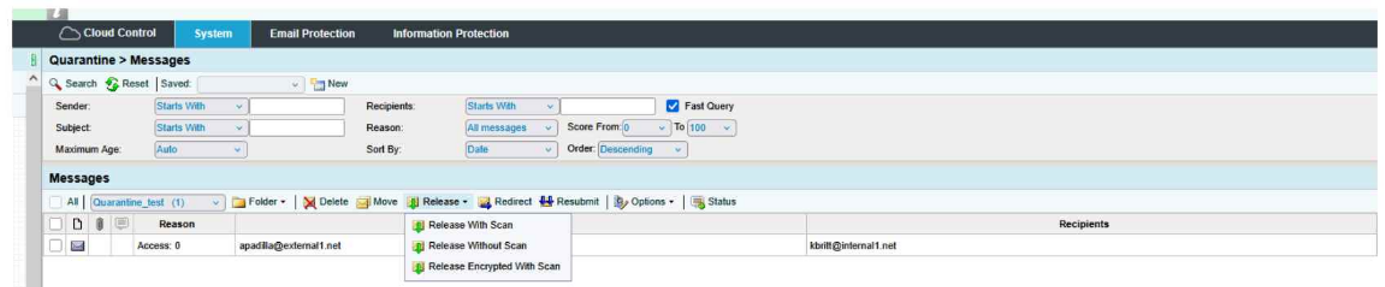
The correct answer is D. Resubmit the message to message defense and virus protection and release an encrypted message to the user.
From the exhibit, the release menu shows three distinct actions:
Release With Scan
Release Without Scan
Release Encrypted With Scan
The wording of Release Encrypted With Scan tells you two actions are happening together:
The message is being rescanned through the relevant protection layers, which in the course context means it is resubmitted through Message Defense and Virus Protection.
After that scan step, the message is released in encrypted form to the recipient.
That is why D is the only choice that includes both parts of the action: scan/resubmit and encrypted release.
Why the other options are incorrect:
A is incomplete because it mentions encrypted delivery, but it leaves out the with scan portion.
B is incomplete because it includes the rescan behavior, but it does not include encrypted delivery.
C is incorrect because the action is not releasing the message to the user's digest; it is releasing the actual message to the user.
This is a Quarantine administration question focused on understanding the difference between release options. The exhibit clearly shows that Release Encrypted With Scan combines rescanning plus encrypted delivery, making Answer D the verified course-aligned choice.
- Select Question Types you want
- Set your Desired Pass Percentage
- Allocate Time (Hours : Minutes)
- Create Multiple Practice tests with Limited Questions
- Customer Support
Patricia Hernandez
14 days agoFrank Martin
1 month agoEmma Torres
2 months agoBrenda Nguyen
2 months agoCharles Nguyen
3 months agoDonald Young
3 months agoJennifer Mitchell
4 months agoHeather Nguyen
4 months agoMichelle Hill
5 months agoBrenda Robinson
5 months agoSandra Sanchez
6 months agoEric Williams
5 months agoBarbara Nguyen
5 months agoDaniel Stewart
6 months agoCarol Walker
5 months agoSharon Cook
6 months agoBettyann
6 months agoSkye
7 months agoSon
7 months agoElden
7 months agoDominga
7 months ago