
Free Preparation Discussions
 MENU
MENU
Free Pegasystems PEGAPCDC87V1 Exam Dumps August 2026
Here you can find all the free questions related with Pegasystems Certified Pega Decisioning Consultant (PCDC) 87V1 (PEGAPCDC87V1) exam. You can also find on this page links to recently updated premium files with which you can practice for actual Pegasystems Certified Pega Decisioning Consultant (PCDC) 87V1 Exam. These premium versions are provided as PEGAPCDC87V1 exam practice tests, both as desktop software and browser based application, you can use whatever suits your style. Feel free to try the Certified Pega Decisioning Consultant (PCDC) 87V1 Exam premium files for free, Good luck with your Pegasystems Certified Pega Decisioning Consultant (PCDC) 87V1 Exam.MultipleChoice
Reference module: Creating and understanding decision strategies. In a Prioritize component, the top action can be determined based on the value of _______.
OptionsOrderList
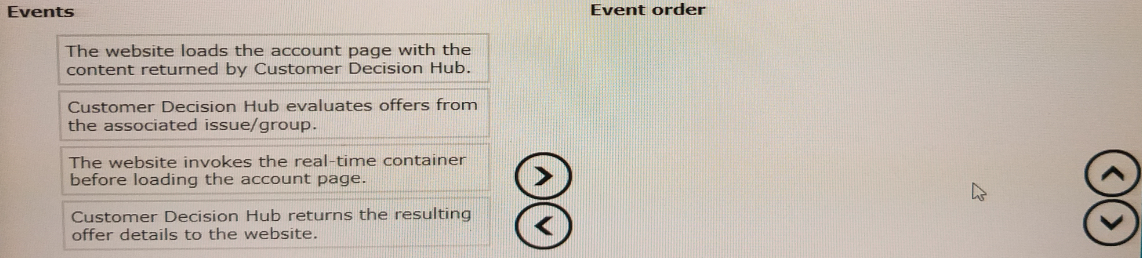
The U+ Bank marketing department wants to leverage the next-best-action capability of Pega Customer Decision Hub on its website to promote new offers to each customer.
Place the events in the sequential order.
MultipleChoice
Which two of these statements is true about Value Finder? (Select Two)
OptionsMultipleChoice
Reference module: Detecting unwanted bias
MyCo, a telco, has introduced mobile data packages for students. As a policy, MyCo does not want to discriminate based on gender when presenting the offers. As a Decisioning Consultant, how do you configure the ethical bias policy to allow no bias?
OptionsMultipleChoice
In a Decisioning Strategy, which decision component is required to enable access to the Customer properties like age, income, etc.?
OptionsMultipleChoice
As a Decisioning consultant, you are tasked with running an audience simulation to test the engagement policy conditions. Which statement is true when the simulation scope is: Audience simulation with engagement policy and arbitration?
Options
