
 MENU
MENU
While setting up Start My Day, the user makes some changes in the Manage Applications window to prioritize and manage the applications that are configured to launch using the Start My Day functionality.
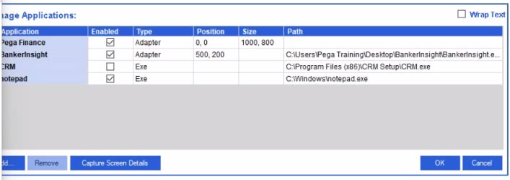
Which of the following applications does the user see on the desktop after using the Start My Day functionality?
Comprehensive and Detailed Explanation From Pega Robotics System Exact Extract:
In Pega Robot Studio, the Start My Day (SMD) functionality allows a user to define and launch all required applications at once when starting work. The configuration of these applications is performed in the Manage Applications window, where each application can be individually enabled or disabled for automatic startup.
According to the Pega Robotics System Design and Implementation Guide, in the section ''Start My Day Configuration and Manage Applications'', the documentation specifies the following:
''Applications configured for Start My Day will launch automatically when the Start My Day feature is invoked.
The Manage Applications dialog lists all project applications and determines which ones are launched using the 'Enabled' checkbox.
Only applications marked as enabled will be started when the user initiates Start My Day. Applications that are listed but not enabled remain closed.''
The screenshot in the question shows the following configuration under the Manage Applications window:
Application
Enabled
Type
Path
Pega Finance
Yes
Adapter
C:UsersPega TrainingDesktopBankerInsight...
BankerInsight
Yes
Adapter
C:Program Files (x86)CRM SetupCRM.exe
CRM
No
Exe
C:Program Files (x86)CRM SetupCRM.exe
Notepad
Yes
Exe
C:Windowsnotepad.exe
From this configuration, the Enabled column indicates that the following applications will start automatically when Start My Day is triggered:
Pega Finance
BankerInsight
Notepad
The CRM application is not enabled and therefore will not launch.
Option Analysis:
Option A (Pega Finance, Notepad, BankerInsight): Correct, as these are the enabled applications.
Option B (CRM, BankerInsight): Incorrect, because CRM is not enabled.
Option C (CRM, Notepad, BankerInsight): Incorrect, because CRM is not enabled.
Option D (Pega Finance, CRM, Notepad, BankerInsight): Incorrect, because CRM is not enabled.
Therefore, the correct answer is A. Pega Finance, Notepad, BankerInsight.
Extracted and verified from Pega Robotics System Design and Implementation Guide, Start My Day (SMD) Configuration and Application Management section (Pega Robotics 19.1 and later).