
Free Preparation Discussions
 MENU
MENU
Palo Alto Networks XSIAM-Engineer Exam Questions
- Topic 1: Planning and Installation: This section of the exam measures skills of XSIAM Engineers and covers the planning, evaluation, and installation of Palo Alto Networks Cortex XSIAM components. It focuses on assessing existing IT infrastructure, defining deployment requirements for hardware, software, and integrations, and establishing communication needs for XSIAM architecture. Candidates must also configure agents, Broker VMs, and engines, along with managing user roles, permissions, and access controls.
- Topic 2: Integration and Automation: This section of the exam measures skills of SIEM Engineers and focuses on data onboarding and automation setup in XSIAM. It covers integrating diverse data sources such as endpoint, network, cloud, and identity, configuring automation feeds like messaging, authentication, and threat intelligence, and implementing Marketplace content packs. It also evaluates the ability to plan, create, customize, and debug playbooks for efficient workflow automation.
- Topic 3: Content Optimization: This section of the exam measures skills of Detection Engineers and focuses on refining XSIAM content and detection logic. It includes deploying parsing and data modeling rules for normalization, managing detection rules based on correlation, IOCs, BIOCs, and attack surface management, and optimizing incident and alert layouts. Candidates must also demonstrate proficiency in creating custom dashboards and reporting templates to support operational visibility.
- Topic 4: Maintenance and Troubleshooting: This section of the exam measures skills of Security Operations Engineers and covers post-deployment maintenance and troubleshooting of XSIAM components. It includes managing exception configurations, updating software components such as XDR agents and Broker VMs, and diagnosing data ingestion, normalization, and parsing issues. Candidates must also troubleshoot integrations, automation playbooks, and system performance to ensure operational reliability.
Free Palo Alto Networks XSIAM-Engineer Exam Actual Questions
Note: Premium Questions for XSIAM-Engineer were last updated On Oct. 10, 2026 (see below)
Based on the _raw_log and XQL query information below, what will be the result(s) of the temp_value?
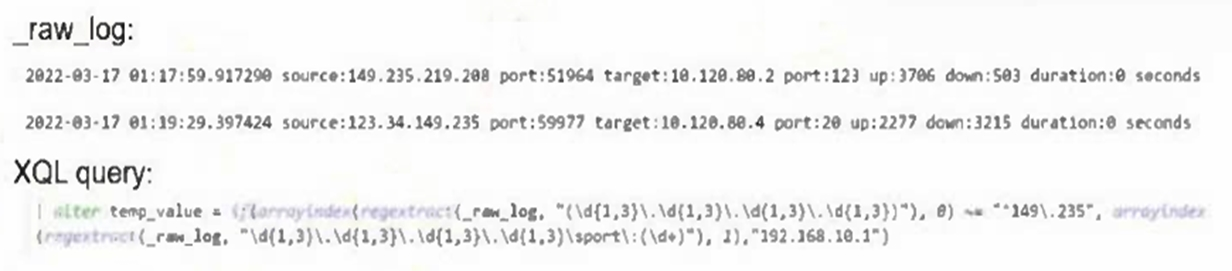
The XQL query uses regextract with conditions to check if the source IP begins with 149.235. When true, it assigns the replacement value 192.168.10.1, otherwise it extracts the source port. From the given logs, this produces 123 (from the port extraction in the second log) and 192.168.10.1 (replacement for the first log's matching source IP).
While using the playbook debugger, an engineer attaches the context of an alert as test data.
What happens with respect to the interactions with the list objects via tasks in this scenario?
When running the playbook debugger with attached test data, Cortex XSIAM operates entirely in debug mode, meaning neither the original list objects nor the original context are altered. All interactions happen in an isolated debug environment to avoid impacting production data.
A Cortex XSIAM engineer adds a disable injection and prevention rule for a specific running process. After an hour, the engineer disables the rule to reinstate the security capabilities, but the capabilities are not applied.
What is the explanation for this behavior?
When a disable injection and prevention rule is applied to a running process, the security capabilities are detached for the lifetime of that process. Even after disabling the rule, the capabilities are not reapplied automatically; the process must be restarted to restore security enforcement.
Which action is required to enable use of a custom script in an alert layout?
To use a custom script in an alert layout, the script must be tagged with 'general-purpose-dynamic-section', then a general purpose dynamic section is added to the layout, and finally the section settings are edited to attach the automation script. This ensures the script executes and displays results dynamically within the alert layout.
An application which ingests custom application logs is hosted in an on-premises virtual environment on an Ubuntu server, and it logs locally to a .csv file.
Which set of actions will allow the ingestion of the .csv logs into Cortex XSIAM directly from the server?
An application which ingests custom application logs is hosted in an on-premises virtual environment on an Ubuntu server, and it logs locally to a .csv file.
Which set of actions will allow the ingestion of the .csv logs into Cortex XSIAM directly from the server?
The correct approach is to install a Broker VM in the environment and configure its CSV Collector applet to ingest the .csv log files directly from the Ubuntu server. This enables secure ingestion of custom application logs into Cortex XSIAM without modifying the application or requiring an XDR agent on the server.
- Select Question Types you want
- Set your Desired Pass Percentage
- Allocate Time (Hours : Minutes)
- Create Multiple Practice tests with Limited Questions
- Customer Support
Adam King
20 days agoRachel Allen
1 month agoSharon Campbell
2 months agoJason Ramirez
2 months agoEric Lewis
3 months agoJoshua Garcia
4 months agoJeffrey Rogers
4 months agoOlivia Allen
5 months agoRobert Carter
5 months agoBrenda Harris
5 months agoMichelle Scott
6 months agoRichard Hernandez
6 months agoBarbara Morris
5 months agoGary Evans
5 months agoJoseph Rogers
5 months agoRoselle
6 months agoHarris
7 months agoSonia
7 months agoAdelaide
7 months agoLeonida
7 months agoDelila
8 months agoAmie
8 months agoDominga
8 months agoKenia
8 months agoFannie
9 months agoLuisa
9 months agoNiesha
9 months agoThad
9 months agoMargart
10 months agoFredric
10 months agoHolley
10 months agoWillard
10 months agoNicolette
11 months agoVallie
11 months agoOdette
11 months agoDorsey
11 months agoJustine
12 months agoVeronika
12 months ago