
Free Preparation Discussions
 MENU
MENU
NetApp NS0-593 Exam Questions
- Topic 1: ONTAP OS: This section of the exam measures the skills of NetApp Technical Support engineers and focuses on ONTAP operating system fundamentals. It covers various tools available for support and troubleshooting, including AutoSupport packages and core dump management. ONTAP cluster administration is addressed, encompassing tasks such as setting up and managing clusters. The exam also tests knowledge of data replication issues and the structure of ONTAP OS. Candidates should be prepared to troubleshoot ONTAP OS and handle panic events effectively.
- Topic 2: Hardware: Support Services Hardware engineers are evaluated on their hardware troubleshooting abilities in this domain in this exam section. It includes troubleshooting Service Processors (SP) or Baseboard Management Controllers (BMC). The exam covers hardware components in a Fibre Channel environment and cluster interconnect infrastructure. Candidates should understand MetroCluster configurations and their implications for hardware setup.
- Topic 3: Protocols: This domain tests the knowledge of ONTAP engineers regarding ONTAP protocol configurations. It encompasses ONTAP NAS configurations, including NFS and SMB protocols. ONTAP SAN configurations, covering iSCSI and Fibre Channel, are also included. The exam addresses S3 server configurations within ONTAP environments.
- Topic 4: Performance: NetApp Technical Support engineers are evaluated in this section based on their understanding of ONTAP performance concepts. It covers troubleshooting ONTAP performance issues, including identifying bottlenecks and analyzing performance data. The exam also addresses software-defined ONTAP solutions and their impact on system performance.
Free NetApp NS0-593 Exam Actual Questions
Note: Premium Questions for NS0-593 were last updated On Sep. 06, 2026 (see below)
Your customer complains that u host will constantly report losing a connection to the iSCSl target and then report that the session was reestablished.
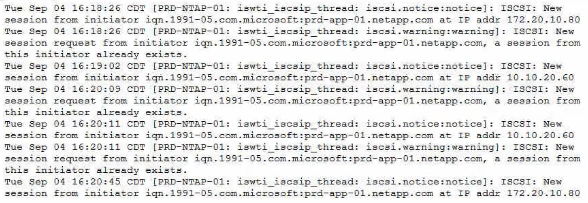
As shown in the exhibit, what is a cause of this flapping?
IQN stands for iSCSI Qualified Name, which is a unique identifier for an iSCSI initiator or target1.
ONTAP uses IQN to authenticate and authorize iSCSI sessions2.
If two hosts have the same IQN, they will cause a conflict and ONTAP will reject the new session request from the second host3.
This will result in the host losing the connection to the iSCSI target and then reporting that the session was reestablished, as shown in the exhibit.
To avoid this problem, each host should have a unique IQN.Reference:
iSCSI Qualified Name (IQN) - NetApp
iSCSI authentication and authorization - NetApp
Troubleshooting iSCSI issues - NetApp
[Configuring iSCSI initiators - NetApp]
A customer is calling you to troubleshoot why users are unable to connect to their CIFS SVM.
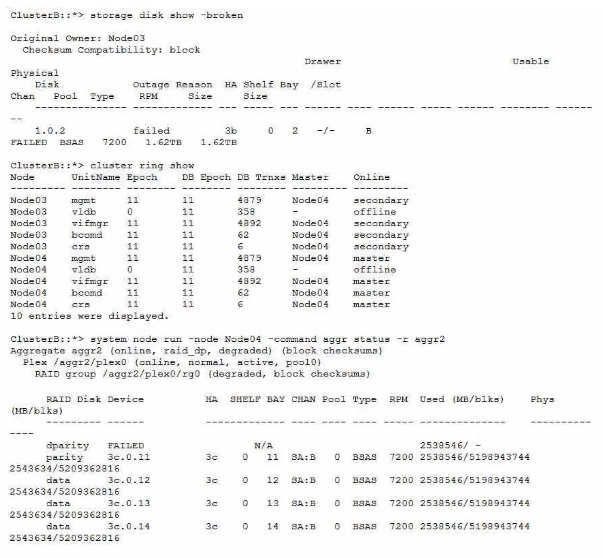
Referring to the Information shown in the exhibit, what Is the source of the problem?
The broken disk in Node03 is causing the cluster ring to be offline, which prevents the CIFS SVM from being accessible. The cluster ring is a distributed database that stores cluster configuration information and enables communication between cluster nodes. If the cluster ring is offline, the cluster cannot function properly and the CIFS SVM cannot serve data to clients. The other options are not relevant to the CIFS SVM connectivity issue.Reference=https://www.netapp.com/support-and-training/netapp-learning-services/certifications/support-engineer/
https://mysupport.netapp.com/site/docs-and-kb
You have a customer complaining of long build times from their NetApp ONTAP-based datastores. They provided you packet traces from the controller and client. Analysis of these traces shows an average service response time of 1 ms. QoS output confirms the same. The client traces are reporting an average of 15 ms in the same time period.
In this situation, what would be your next step?
The question describes a scenario where the controller and client have a significant difference in their reported latency for the same datastores.
The controller's latency is 1 ms, which is within the normal range for ONTAP-based datastores1.
The client's latency is 15 ms, which is much higher than the controller's latency and could indicate a performance issue on the client side2.
Therefore, the next step is to investigate the client that reports high latency and identify the possible causes, such as network congestion, misconfiguration, resource contention, or application issues23.
The other options are not relevant or appropriate for this scenario, because:
A) The cluster is not responding slowly, as the controller's latency is low and QoS output confirms the same.
C)The cluster interconnects are not likely to be the cause of the latency difference, as they are used for communication between nodes within the cluster, not between the controller and the client4.
D)A sync core is a diagnostic tool that captures the state of the system at a given point in time, and is not a troubleshooting step for performance issues5.Reference:
ONTAP 9 Performance - Resolution Guide - NetApp Knowledge Base
Performance troubleshooting - NetApp
How to troubleshoot performance issues in Data ONTAP 8 7-mode
Cluster interconnect network - NetApp
How to generate a sync core on a node - NetApp
Recently, a CIFS SVM was deployed and is working. The customer wants to use the Dynamic DNS (DDNS) capability available in NetApp ONTAP to easily advertise both data UFs to their clients. Currently. DNS is only responding with one data LIF. DDNS is enabled on the domain controllers.
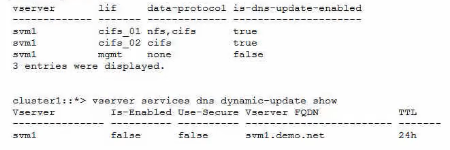
Referring to the exhibit, which two actions should be performed to enable DDNS updates to work? (Choose two.)
To enable DDNS updates to work, two actions should be performed:
Remove the NFS protocol from the cifs_01 data LIF.This is because DDNS updates are only supported for LIFs that have only one data protocol enabled1. The cifs_01 LIF has both NFS and CIFS protocols enabled, which prevents it from registering its DNS record dynamically. By removing the NFS protocol from the cifs_01 LIF, it will become eligible for DDNS updates.
Enable the -is-enabled parameter for the SVM DDNS services.This is because the -is-enabled parameter controls whether the SVM sends DDNS updates to the DNS servers2. The exhibit shows that the -is-enabled parameter is set to false for the svm1 SVM, which means that it does not send any DDNS updates. By enabling the -is-enabled parameter, the SVM will start sending DDNS updates for its eligible LIFs.Reference:
1: Configure dynamic DNS services3
2: Manage DNS/DDNS services with System Manager4
Your customer complains about missing volume snapshot copies on a SnapMlrror destination. While investigating this case, you notice an executed SnapMirror resync operation in the event logs of the system.
In this scenario, what Is the cause of this problem?
= When a SnapMirror resync operation is performed, the destination volume is reverted to the most recent common snapshot copy with the source volume. Any newer snapshot copies that exist on the destination volume are deleted automatically, unless they are marked as busy or locked. This is done to ensure that the destination volume is consistent with the source volume and to avoid data loss or corruption. Therefore, if the customer complains about missing snapshot copies on the destination volume after a SnapMirror resync, the most likely cause is that those snapshot copies were newer than the common snapshot that was chosen for resync and were removed automatically by the system.Reference=SnapMirror resync operation,SnapMirror resync or update failed No Snapshot copies found on volume,Even though there is common snapshot, SnapMirror resync fails with error: No common snapshot copy found between source and destination volume
- Select Question Types you want
- Set your Desired Pass Percentage
- Allocate Time (Hours : Minutes)
- Create Multiple Practice tests with Limited Questions
- Customer Support
Steven King
17 days agoBrian Perez
23 days agoAngela Rivera
2 months agoAngela Collins
2 months agoKevin Phillips
3 months agoAshley Davis
3 months agoJustin Garcia
4 months agoBrenda Garcia
4 months agoBetty Rivera
4 months agoRonald Harris
5 months agoBarbara Thomas
5 months agoJoseph Howard
4 months agoNathan Torres
4 months agoBetty Cook
5 months agoBrenda Miller
4 months agoAdelle
5 months agoShantell
6 months agoMaddie
6 months agoShannan
6 months agoKerry
6 months agoIvette
7 months agoKaran
7 months agoNoel
7 months agoTeddy
7 months agoAlexis
8 months agoMelinda
8 months agoJustine
8 months agoWeldon
8 months agoHassie
9 months agoTomoko
9 months agoArminda
9 months agoNovella
9 months agoFranchesca
10 months agoLaurene
10 months agoLucy
10 months agoScot
10 months agoBeckie
11 months agoLindsay
11 months agoShannon
11 months agoGoldie
11 months agoMaybelle
12 months agoGeraldine
12 months agoCarlene
12 months agoJanine
1 year agoFelicidad
1 year agoYvonne
1 year agoJennifer
1 year agoKaycee
1 year agoDorothea
1 year agoEliseo
2 years agoLeota
2 years agoNorah
2 years agoDorthy
2 years agoOctavio
2 years agoAmber
2 years agoLuz
2 years agoWalker
2 years agoMicah
2 years agoWillard
2 years agoMammie
2 years agoLatricia
2 years agoHubert
2 years agoLouvenia
2 years agoSherita
2 years agoMarguerita
2 years agoWillow
2 years agoAlyce
2 years agoLeslie
2 years agoFletcher
2 years agoDean
2 years agoTamar
2 years agoFrederica
2 years agoAdelina
2 years agoReuben
2 years agoCatalina
2 years agoLevi
2 years agoLizbeth
2 years agoAngelica
2 years agoShaun
2 years ago