
Free Preparation Discussions
 MENU
MENU
NetApp NS0-516 Exam Questions
- Topic 1: Storage Configuration: This section of the exam measures the skills of NetApp SAN Specialists and covers the setup of alerting and notification systems for E-Series storage systems. Candidates will learn how to create and manage Volume Groups or Dynamic Disk Pools (DDP) along with associated volumes. Additionally, this domain addresses the physical and logical storage requirements, implementation of CHAP for iSCSI environments, and the management of DDP or Volume Groups.
- Topic 2: Documentation: This domain is targeted at SAN Specialists and focuses on the importance of documentation in the implementation process. Candidates will review how to prepare a site for the deployment of E-Series systems and the necessary information to provide to customers after a solution has been deployed. This knowledge ensures that specialists can effectively communicate and document critical implementation details.
- Topic 3: Hardware: This section measures the skills of NetApp SAN Engineers in understanding hardware components within E-Series storage systems. It covers various cabling options, including Fibre Channel, Ethernet, Infiniband, and SAS.
- Topic 4: Host Side: This domain focuses on host connection options for E-Series systems, measuring the skills of NetApp SAN Engineers in configuring hosts for multipathing.
- Topic 5: Management: This section measures the skills of professionals in managing E-Series systems using SANtricity System Manager. It covers administrative tasks necessary for effective system management, including security features available in both SANtricity System Manager and SANtricity Unified Manager.
- Topic 6: Toolbox: This domain is designed for NetAPP professionals to focus on the tools required to design and implement E-Series solutions. Candidates will learn about various tools that facilitate effective planning, deployment, and management of E-Series systems within a SAN environment.
- Topic 7: Protection: This section measures the skills of NetApp SAN Specialists in data protection strategies. It covers Data Assurance features with media scans that help protect data integrity.
- Topic 8: SAN: This domain focuses on end-to-end network configuration for Fibre Channel and Ethernet, measuring the skills of the target audience in creating efficient storage area networks (SAN). Candidates will learn about best practices for configuring network components to ensure optimal performance and reliability in data transmission.
- Topic 9: Troubleshooting: This section measures the troubleshooting skills of exam-takers regarding E-Series systems. Candidates will learn systematic steps for diagnosing issues within an E-Series environment.
Free NetApp NS0-516 Exam Actual Questions
Note: Premium Questions for NS0-516 were last updated On Oct. 13, 2026 (see below)
Click the Exhibit button.

An administrator is asked to create a 5532 GiB volume from the volume group.
Referring to the exhibit, how would the administrator complete this request?
Review the Available Capacity: According to the exhibit, the volume group has a total of 17820.00 GiB capacity, out of which 5532.00 GiB is the current free capacity. However, it is split into two free capacity areas of 15120.00 GiB and 2412.00 GiB.
Identify the Challenge: The requested volume of 5532 GiB cannot be created directly from the current free capacity because it is not contiguous; it's split into two separate areas.
Consolidate the Capacity: To create the volume, the administrator needs to consolidate the free capacity. This involves merging the non-contiguous free spaces to form a contiguous space large enough for the 5532 GiB volume.
Procedure for Consolidation:
Access the volume group management settings.
Select the option to consolidate free capacity areas.
Follow the prompts to merge the two free capacity areas into a single contiguous space.
Create the Volume: Once the free capacity is consolidated, proceed to create the 5532 GiB volume from the newly formed contiguous free space.
Which file contains the configuration for a multipath driver for FC on Linux systems?
The multipath configuration file for Fibre Channel (FC) on Linux systems is typically /etc/multipath.conf.
This file is used to define multipath settings and policies, such as path grouping, path selection, and failover behavior.
Reference: NetApp E-Series SANtricity Multipath Drivers Guide for Linux.
Click the Exhibit button.
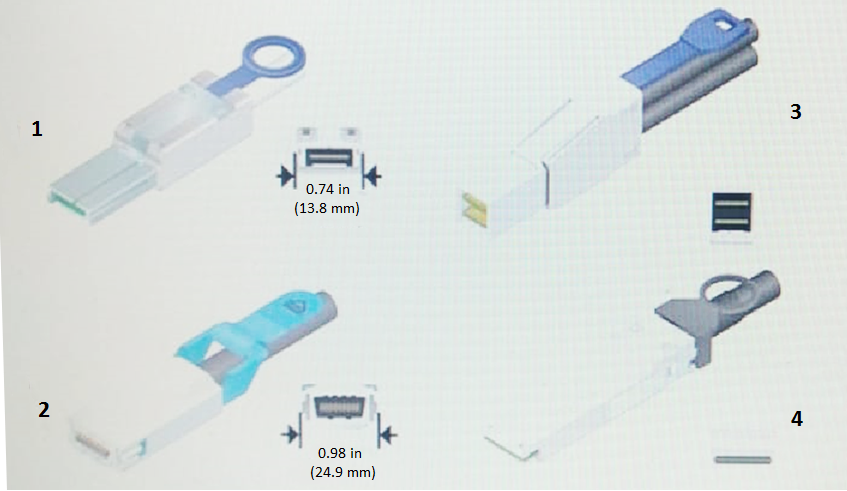
Referring to the exhibit, which cable is an InfiniBand 4X connector?
Identify Connector Types:
Step: Examine the connectors in the exhibit to identify the InfiniBand 4X connector.
Reason: InfiniBand 4X connectors have a distinct appearance and size.
Connector Characteristics:
Observation: Connector 1 in the exhibit is labeled as 0.74 in (13.8 mm), which matches the size and appearance of an InfiniBand 4X connector.
Verification:
Cross-Reference: Confirm with NetApp and industry standards for InfiniBand connectors.
Result: Connector 1 is the InfiniBand 4X connector based on size and design.
NetApp E-Series hardware documentation
Industry standards for InfiniBand connectors
You are cabling drive expansion shelves for an E2800 storage system.
In this scenario, which cabling method should you use?
Cabling method: It is important to distribute the connections for redundancy and balanced performance.
EXP1 and EXP2 ports: By dividing these ports between the A-side and B-side IOM-12 modules, the system ensures balanced load and failover capabilities.
Reference: NetApp E-Series hardware setup and configuration guide.
A customer wants to manage an E-Series system over a secure connection between the system and a server. During implementation, you are asked to fulfill this installation requirement.
In this scenario, which three actions are required to complete this task? (Choose three.)
Secure Connection Requirement: To manage the E-Series system over a secure connection, certain steps need to be taken to ensure encrypted communications.
Disabling Legacy Management Interface: This step ensures that only secure management interfaces are used, preventing the use of less secure legacy protocols.
Certificate Signing Request (CSR): Completing the CSR on the system is necessary to generate a public/private key pair. This CSR can then be submitted to a certificate authority (CA) to obtain a signed certificate.
Importing CA Signed Certificates: Once the CA has signed the certificate, it must be imported into the E-Series system. This signed certificate ensures that the communication between the server and the system is encrypted and trusted.
NetApp E-Series SANtricity System Manager documentation on secure management
NetApp Implementation Engineer - SAN Specialist - E-Series manuals
- Select Question Types you want
- Set your Desired Pass Percentage
- Allocate Time (Hours : Minutes)
- Create Multiple Practice tests with Limited Questions
- Customer Support
Jeffrey Smith
24 days agoBrenda Flores
2 months agoJustin Rivera
2 months agoEmily Martin
3 months agoKimberly Ramirez
3 months agoLisa Robinson
4 months agoSharon Reed
4 months agoMatthew Hall
5 months agoHeather Jackson
5 months agoEric Baker
5 months agoTiffany Bailey
6 months agoRebecca Phillips
6 months agoAngela Williams
5 months agoMonica Parker
5 months agoNathan Taylor
5 months agoLinda Nguyen
6 months agoFannie
6 months agoAnglea
7 months agoCecil
7 months agoTien
7 months agoTonja
7 months agoAlyce
8 months agoJean
8 months agoMerissa
8 months agoShannon
8 months agoBlossom
9 months agoAntonio
9 months agoArminda
9 months agoAnnmarie
9 months agoLina
10 months agoCasie
10 months agoNikita
10 months agoRosenda
10 months agoHeidy
11 months agoZana
11 months agoCharlette
11 months agoJaime
11 months agoDenise
12 months agoLucia
12 months agoGarry
1 year agoDenae
1 year agoSonia
1 year agoVernell
1 year agoMargart
1 year agoEliseo
1 year agoLorrine
1 year agoAlaine
1 year agoNieves
1 year agoAndrew
1 year agoArletta
1 year agoMarshall
1 year agoCarol
1 year agoKindra
1 year agoSue
1 year agoKaycee
1 year agoShad
1 year agoMalcom
2 years agoEulah
2 years agoVincent
2 years agoCathrine
2 years agoSherell
2 years agoIluminada
2 years agoJohnna
2 years agoDick
2 years agoPura
2 years agoReuben
2 years agoShawnna
2 years agoTwana
2 years agoGeraldine
2 years agoElinore
2 years agoStacey
2 years agoChrista
2 years agoLaquanda
2 years agoVi
2 years agoLisbeth
2 years agoLeota
2 years agoGlen
2 years agoHailey
2 years ago