
Free Preparation Discussions
 MENU
MENU
Salesforce Certified MuleSoft Platform Architect (Mule-Arch-201) Exam Questions
- Topic 1: Explaining Application Network Basics: This topic includes subtopics related to identifying and differentiating between technologies for API-led connectivity, describing the role and characteristics of web APIs, assigning APIs to tiers, and understanding Anypoint Platform components.
- Topic 2: Establishing Organizational and Platform Foundations: Advising on a Center for Enablement (C4E) and identifying KPIs, describing MuleSoft Catalyst's structure, comparing Identity and Client Management options, and identifying data residency types are essential subtopics.
- Topic 3: Designing and Sharing APIs: Identifying dependencies between API components, creating and publishing reusable API assets, mapping API data models between Bounded Contexts, and recognizing idempotent HTTP methods.
- Topic 4: Designing APIs Using System, Process, and Experience Layers: Identifying suitable APIs for business processes, assigning them according to functional focus, and recommending data model approaches are its subtopics.
- Topic 5: Governing Web APIs on Anypoint Platform: This topic includes subtopics related to managing API instances and environments, selecting API policies, enforcing API policies, securing APIs, and understanding OAuth 2.0 relationships.
- Topic 6: Architecting and Deploying API Implementations: It covers important aspects like using auto-discovery, identifying VPC requirements, comparing hosting options, and understanding testing methods. The topic also involves automated building, testing, and deploying in a DevOps setting.
- Topic 7: Deploying API Implementations to CloudHub: Understanding Object Store usage, selecting worker sizes, predicting app reliability and performance, and comparing load balancers. Avoiding single points of failure in deployments is also its sub-topic.
- Topic 8: Meeting API Quality Goals: This topic focuses on designing resilience strategies, selecting appropriate caching and OS usage scenarios, and describing horizontal scaling benefits.
- Topic 9: Monitoring and Analyzing Application Networks: It discusses Anypoint Platform components for data generation, collected metrics, and key alerts. This topic also includes specifying alerts to define Mule applications.
Free Salesforce Salesforce Certified MuleSoft Platform Architect (Mule-Arch-201) Exam Actual Questions
Note: Premium Questions for Salesforce Certified MuleSoft Platform Architect (Mule-Arch-201) were last updated On Aug. 11, 2026 (see below)
What is true about where an API policy is defined in Anypoint Platform and how it is then applied to API instances?
Correct Answe r: The API policy is defined in API Manager for a specific API instance, and then ONLY applied to the specific API instance.
*****************************************
>> Once our API specifications are ready and published to Exchange, we need to visit API Manager and register an API instance for each API.
>> API Manager is the place where management of API aspects takes place like addressing NFRs by enforcing policies on them.
>> We can create multiple instances for a same API and manage them differently for different purposes.
>> One instance can have a set of API policies applied and another instance of same API can have different set of policies applied for some other purpose.
>> These APIs and their instances are defined PER environment basis. So, one need to manage them seperately in each environment.
>> We can ensure that same configuration of API instances (SLAs, Policies etc..) gets promoted when promoting to higher environments using platform feature. But this is optional only. Still one can change them per environment basis if they have to.
>> Runtime Manager is the place to manage API Implementations and their Mule Runtimes but NOT APIs itself. Though API policies gets executed in Mule Runtimes, We CANNOT enforce API policies in Runtime Manager. We would need to do that via API Manager only for a cherry picked instance in an environment.
So, based on these facts, right statement in the given choices is - 'The API policy is defined in API Manager for a specific API instance, and then ONLY applied to the specific API instance'.
What best describes the Fully Qualified Domain Names (FQDNs), also known as DNS entries, created when a Mule application is deployed to the CloudHub Shared Worker Cloud?
Correct Answe r: The FQDNs are determined by the application name chosen, IRRESPECTIVE of the region
*****************************************
>> When deploying applications to Shared Worker Cloud, the FQDN are always determined by application name chosen.
>> It does NOT matter what region the app is being deployed to.
>> Although it is fact and true that the generated FQDN will have the region included in it (Ex: exp-salesorder-api.au-s1.cloudhub.io), it does NOT mean that the same name can be used when deploying to another CloudHub region.
>> Application name should be universally unique irrespective of Region and Organization and solely determines the FQDN for Shared Load Balancers.
A Mule application implements an API. The Mule application has an HTTP Listener whose connector configuration sets the HTTPS protocol and hard-codes the port
value. The Mule application is deployed to an Anypoint VPC and uses the CloudHub 1.0 Shared Load Balancer (SLB) for all incoming traffic.
Which port number must be assigned to the HTTP Listener's connector configuration so that the Mule application properly receives HTTPS API invocations routed through the
SLB?
When using CloudHub 1.0's Shared Load Balancer (SLB) for a Mule application configured with HTTPS in an Anypoint VPC, specific ports must be configured for the application to correctly route incoming traffic:
Port Requirement for SLB:
The CloudHub Shared Load Balancer for HTTPS traffic requires that applications listen on port 8092 for secure (HTTPS) communication. This port is reserved specifically for SSL traffic when using SLB with Anypoint VPCs.
Why Option B is Correct:
Setting the HTTP Listener's connector configuration to 8092 aligns with CloudHub requirements for HTTPS via the Shared Load Balancer.
of Incorrect Options:
Option A (8082) is used for non-HTTPS (HTTP) traffic.
Option C (80) and Option D (443) are standard web ports but are not applicable within CloudHub SLB's internal configuration for VPC routing.
Reference For more information on the Shared Load Balancer port configurations, refer to MuleSoft's documentation on CloudHub and VPC load balancer requirements.
An eCommerce company is adding a new Product Details feature to their website, A customer will launch the product catalog page, a new Product Details link will
appear by product where they can click to retrieve the product detail description. Product detail data is updated with product update releases, once or twice a year, Presently
the database response time has been very slow due to high volume.
What action retrieves the product details with the lowest response time, fault tolerant, and consistent data?
Scenario Analysis:
The eCommerce company's Product Details feature requires low response time and consistent data for a feature where data rarely changes (only once or twice a year).
The database response time is slow due to high volume, so querying the database directly on each request would lead to poor performance and higher response times.
Optimal Solution Requirements:
Low Response Time: Data retrieval should be fast and not depend on database performance.
Fault Tolerance and Data Consistency: Cached or stored data should be consistent and resilient in case of database unavailability, as the product details data changes infrequently.
Evaluating the Options:
Option A: Using a Cache scope would temporarily store the product details in memory, which could improve performance but might not be suitable for infrequent updates (only twice a year), as cache expiration policies typically require shorter durations.
Option B: Storing product details in Anypoint MQ and then retrieving it through a subscriber is not suitable for this use case. Anypoint MQ is better for messaging rather than as a data storage mechanism.
Option C (Correct Answer): Using an object store to store and retrieve product details is ideal. Object stores in MuleSoft are designed for persistent storage of key-value pairs, which allows storing data retrieved from the database initially. This provides quick, consistent access without querying the database on every request, aligning with requirements for low response time, fault tolerance, and data consistency.
Option D: Selecting data directly from the database for each request would not meet the performance requirement due to known slow response times from the database.
Conclusion:
Option C is the best answer, as using an object store allows caching the infrequently updated product details. This approach reduces the dependency on the database, significantly improving response time and ensuring consistent data.
Refer to MuleSoft documentation on Object Store v2 and best practices for data caching to implement this solution effectively.
An Order API triggers a sequence of other API calls to look up details of an order's items in a back-end inventory database. The Order API calls the OrderItems process API, which calls the Inventory system API. The Inventory system API performs database operations in the back-end inventory database.
The network connection between the Inventory system API and the database is known to be unreliable and hang at unpredictable times.
Where should a two-second timeout be configured in the API processing sequence so that the Order API never waits more than two seconds for a response from the Orderltems process API?
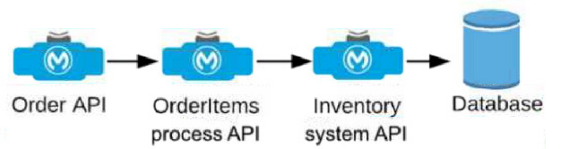
Understanding the API Flow and Timeout Requirement:
The Order API initiates a call to the OrderItems process API, which in turn calls the Inventory system API to fetch details from the inventory database.
The requirement specifies that the Order API should not wait more than two seconds for a response from the OrderItems process API, even if there are delays further down the chain (between Inventory system API and the database).
Choosing the Appropriate Timeout Location:
Setting the timeout at the OrderItems process API level ensures that if the Inventory system API takes longer than two seconds to respond, the OrderItems process API will terminate the request and send a timeout response back to the Order API. This prevents the Order API from waiting indefinitely due to the unreliable connection to the database.
If the timeout were set in the Inventory system API or database, it would not help the Order API directly, as the OrderItems process API would still be waiting for a response.
Detailed Analysis of Each Option:
Option A (Correct Answer): Setting the timeout in the OrderItems process API allows it to control how long it waits for a response from the Inventory system API. If the Inventory system API does not respond within two seconds, the OrderItems process API can terminate the call and return a timeout response to the Order API, meeting the requirement.
Option B: Setting the timeout in the Order API would not limit the wait time at the OrderItems process API level, meaning the OrderItems process API could still wait indefinitely for the Inventory system API, leading to a longer delay.
Option C: Setting the timeout in the Inventory system API only affects the connection to the database and does not influence how long the OrderItems process API waits for the Inventory system API's response.
Option D: Setting a timeout in the database is not feasible in this context since database timeouts are typically configured for database operations and would not directly control the API response times in the overall API chain.
Conclusion:
Option A is the best choice, as it ensures that the OrderItems process API does not hold the Order API longer than the required two seconds, even if the downstream connection to the database hangs. This configuration aligns with MuleSoft best practices for setting timeouts in API orchestration to manage dependencies and prevent delays across a chain of API calls.
For additional information on timeout settings, refer to MuleSoft documentation on handling timeouts and API orchestration best practices.
- Select Question Types you want
- Set your Desired Pass Percentage
- Allocate Time (Hours : Minutes)
- Create Multiple Practice tests with Limited Questions
- Customer Support
Carol Rogers
14 days agoThomas Wilson
22 days agoKaren Phillips
2 months agoHarold Mitchell
2 months agoGary Davis
3 months agoMelissa Lopez
3 months agoEmma Edwards
3 months agoMark Campbell
4 months agoNathan Miller
4 months agoKenneth Green
3 months agoMargaret Scott
3 months agoSarah Wright
3 months agoRonald Wilson
4 months agoAntione
5 months agoWade
5 months agoLeatha
5 months agoLashawnda
5 months agoAnabel
6 months agoRosio
6 months agoJanna
6 months agoYuriko
6 months agoSharita
7 months agoYun
7 months agoRosio
7 months agoCarlton
7 months agoKandis
8 months agoJunita
8 months agoBrandon
8 months agoCassi
8 months agoBambi
9 months agoBrock
9 months agoMing
9 months agoRosenda
9 months agoProvidencia
10 months agoLenna
10 months agoVictor
10 months agoJanet
10 months agoTrina
11 months agoErick
11 months agoJeniffer
12 months agoLeontine
12 months agoGoldie
1 year agoMose
1 year agoKirby
1 year agoLakeesha
1 year agoCandra
2 years agoBuck
2 years agoRomana
2 years agoTonette
2 years agoLouisa
2 years agoDenae
2 years agoHelga
2 years agoErick
2 years agoMollie
2 years agoAlaine
2 years agoFidelia
2 years agoMelinda
2 years agoFidelia
2 years agoTherese
2 years agoBoris
2 years agoRolland
2 years agoBeckie
2 years agoLai
2 years agoWenona
2 years agoIlene
2 years agoSophia
2 years agoCarry
2 years agoRoxanne
2 years agoSylvia
2 years agoMattie
2 years agoJacinta
2 years agoAntonio
2 years agoIlene
2 years ago