New Year Sale 2026! Hurry Up, Grab the Special Discount - Save 25% - Ends In 00:00:00 Coupon code: SAVE25

Welcome to Pass4Success

- Free Preparation Discussions

Microsoft MS-700 Exam - Topic 1 Question 90 Discussion

Actual exam question for Microsoft's MS-700 exam
Question #: 90
Topic #: 1
[All MS-700 Questions]

You have a Microsoft 365 E5 subscription that uses Teams.

When you attempt to create a new sensitivity label for Teams, you discover that the Groups & sites option is unavailable as shown in the following exhibit.
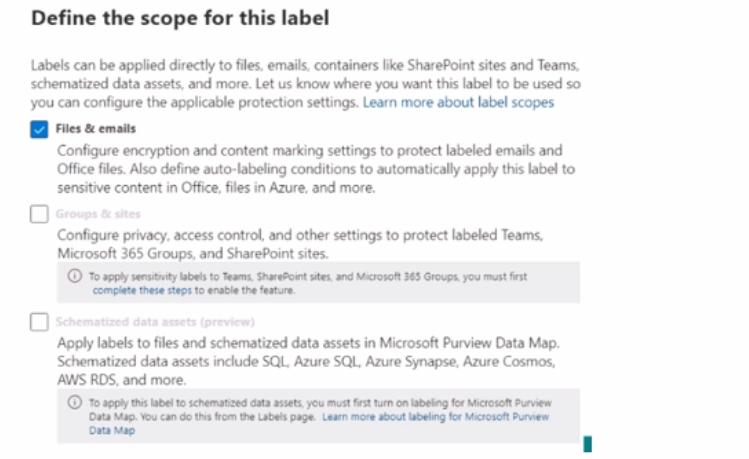
You need to be able to select Groups & sites when you create the sensitivity label.

Which cmdlet should you run?

Show Suggested Answer Hide Answer
Suggested Answer: B

Contribute your Thoughts:

0/2000 characters
Brock
3 months ago
Hmm, I’m not convinced. What if it doesn’t work?
upvoted 0 times
...
Lenny
4 months ago
I've had the same issue, definitely Set-AzureADDirectorySetting.
upvoted 0 times
...
Rosio
4 months ago
Wait, are you sure? I thought it was Set-Uni-fiedQroup.
upvoted 0 times
...
Gretchen
4 months ago
Totally agree, that's the right cmdlet!
upvoted 0 times
...
Chauncey
4 months ago
You need to run Set-AzureADDirectorySetting for that.
upvoted 0 times
...
Gladis
4 months ago
I’m leaning towards Set-Uni-fiedQroup, but I’m not completely confident. I wish I had reviewed the cmdlets more thoroughly!
upvoted 0 times
...
James
5 months ago
I feel like we had a similar question in our last mock exam, and I chose Set-CsTeansEnhancedEncryptionPolicy, but that doesn't seem right for this scenario.
upvoted 0 times
...
Lanie
5 months ago
I think it might be Set-AzureADDirectorySetting, but I could be mixing it up with another cmdlet we practiced.
upvoted 0 times
...
Josephine
5 months ago
I remember we discussed sensitivity labels in Teams, but I'm not sure which cmdlet to use for enabling Groups & sites.
upvoted 0 times
...
Sylvie
5 months ago
Alright, I've got a strategy here. Based on the information provided, I believe the Set-AzureADDirectorySetting cmdlet is the one I need to run to unlock the Groups & sites option. Let's see if that works!
upvoted 0 times
...
Glenn
5 months ago
Okay, I think I know what's going on here. Let me double-check the cmdlet options and see which one is the right fit for this scenario.
upvoted 0 times
...
Brandon
5 months ago
Hmm, this looks like a tricky one. I'll need to carefully review the options and think through the steps to enable the Groups & sites option for creating the sensitivity label.
upvoted 0 times
...
Iesha
5 months ago
Ugh, I'm a bit confused by this question. The options don't seem very straightforward. I'll need to take some time to really understand the problem and the potential solutions.
upvoted 0 times
...
Johnetta
5 months ago
Hmm, I'm a bit confused by the wording of the question. Does "after receipt of event M1 with x equal to zero" mean the machine is already in State 1 when M1 is received?
upvoted 0 times
...
Kaycee
5 months ago
This looks like a tricky spatial data alignment issue. I'll need to carefully consider the metadata and compare it to my own data to figure out the most likely cause.
upvoted 0 times
...
Danica
5 months ago
I think there was something about how running installations might mess up the dependencies that the base EOS relies on. That sounds familiar.
upvoted 0 times
...
Dottie
5 months ago
A seems right to me because Stealthwatch and TrustSec were frequently mentioned in our notes.
upvoted 0 times
...
Matthew
2 years ago
I'm not sure, but it's worth exploring all options before making a decision.
upvoted 0 times
...
Avery
2 years ago
What about Set - SPOSiteoffice365Group? Could that be the right cmdlet?
upvoted 0 times
...
Lucina
2 years ago
I agree, Set-AzureADDirectorySetting could be the one to enable Groups & sites option.
upvoted 0 times
...
Fletcher
2 years ago
I think it might be Set-AzureADDirectorySetting.
upvoted 0 times
...
Matthew
2 years ago
I wonder which cmdlet we should run to fix this issue.
upvoted 0 times
...
Diane
2 years ago
I agree with User3, Set-AzureADDirectorySetting should help us select Groups & sites.
upvoted 0 times
...
Kerry
2 years ago
I believe the correct cmdlet to run is Set-AzureADDirectorySetting.
upvoted 0 times
...
Broderick
2 years ago
I think we need to run a cmdlet to fix this issue.
upvoted 0 times
...
Gearldine
2 years ago
I can't select Groups & sites when creating a sensitivity label for Teams.
upvoted 0 times
...
Charlena
2 years ago
You got that right! But hey, at least they're keeping us on our toes. This is the kind of challenge I live for. Let's put our heads together and figure this out.
upvoted 0 times
...
Jesusa
2 years ago
Ooh, this is a tricky one. I'm guessing it has something to do with Azure AD settings or maybe SharePoint Online. Some of these cmdlets sound a bit unfamiliar to me.
upvoted 0 times
...
Kristofer
2 years ago
I agree, this seems like a bit of a head-scratcher. Let's take a look at the answer options and see if we can figure out the right cmdlet to run.
upvoted 0 times
...
Lashawn
2 years ago
Wait a minute, did you say 'Set-CsTeansEnhancedEncryptionPolicy'? I think you meant 'Set-CsTeamsEnhancedEncryptionPolicy'. Gotta watch out for those typos, am I right?
upvoted 0 times
...
Dortha
2 years ago
Haha, I bet the answer is going to be some obscure PowerShell cmdlet that none of us have heard of before. Microsoft loves to make things complicated, don't they?
upvoted 0 times
...
Serina
2 years ago
Hmm, this is an interesting question. It seems like we need to be able to select the Groups & sites option when creating a sensitivity label for Teams. I wonder what the underlying issue could be here.
upvoted 0 times
Danica
2 years ago
Good luck! Hopefully, that solves the issue.
upvoted 0 times
...
Ozell
2 years ago
I'll give it a try then. Thanks for your input!
upvoted 0 times
...
Leslie
2 years ago
I'm not sure, but I think A) Set-UnifiedGroup is the correct one.
upvoted 0 times
...
Kayleigh
2 years ago
What about option B or C?
upvoted 0 times
...
Maryann
2 years ago
Yes, I think so. It should allow you to select Groups & sites.
upvoted 0 times
...
Buck
2 years ago
Are you sure that's the right cmdlet to run?
upvoted 0 times
...
Kris
2 years ago
A) Set-UnifiedGroup
upvoted 0 times
...
...
Aja
2 years ago
Ooh, good point! I wonder if it has to do with the Office 365 Group settings or the Teams configuration. We might need to dig into the administrative controls for those services.
upvoted 0 times
...
Elenore
2 years ago
You know, I've played around with sensitivity labels before, and I remember there was some kind of setting or policy that controlled what options were available. Maybe we need to adjust something at the tenant level?
upvoted 0 times
...
Rossana
2 years ago
Well, my first thought is that we need to enable the Groups & sites option for the sensitivity label. The question says it's unavailable, so we'll need to find a way to make it available.
upvoted 0 times
...
Colene
2 years ago
Hmm, this is an interesting question. I'm not sure I've encountered this issue before, but I'm eager to learn the solution. What do you all think? Any ideas on which cmdlet we should use?
upvoted 0 times
Sharan
2 years ago
I'm leaning towards Set-SPOSiteoffice365Group.
upvoted 0 times
...
Lacresha
2 years ago
No, I believe it should be Set-UnifiedGroup.
upvoted 0 times
...
Jennifer
2 years ago
I think the correct cmdlet to run is Set-AzureADDirectorySetting.
upvoted 0 times
...
...

Save Cancel