
Free Preparation Discussions
 MENU
MENU
Microsoft MB-280 Exam - Topic 6 Question 33 Discussion
Topic #: 6
You are using a forecast template.
You must configure the forecast by territory.
You need to configure the forecast parameters.
Which parameter should you configure?
Define a forecast model
Define the entities that must be used to generate the forecast.
1. In the General step of the Forecast configuration page, define the fields that should be used for the forecast.
[Steps 2 to 6 omitted]
7. Select a Rollup to hierarchy relationship.
This step establishes a relationship between the rollup and hierarchy entities. Each forecast template starts with a default rollup to hierarchy relationship:
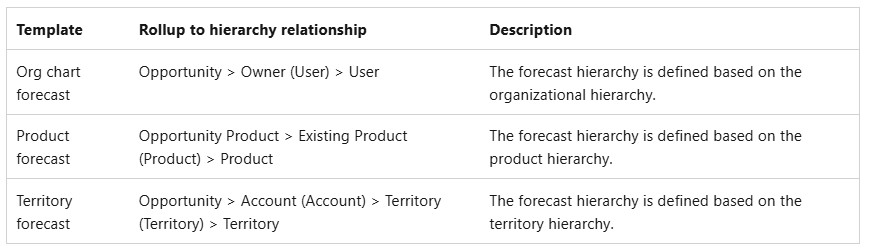
Choose different values to support your organization's specific requirements if needed.
Note: Select a template
The fastest way to create a forecast is to use a template. The template that you select defines how the forecast groups data.
On the Forecast configurations page, select one of the following templates:
Org chart forecast: Rollup columns and projections are based on your organization's reporting structure. This template uses the Manager field of the User entity for the hierarchy.
Product forecast: Rollup columns and projections are based on the product hierarchy.
*-> Territory forecast: Rollup columns and projections are based on the sales territory hierarchy.
https://learn.microsoft.com/en-us/dynamics365/sales/define-general-properties-scheduling-forecast
Currently there are no comments in this discussion, be the first to comment!